
Choosing the best smart locks for apartment doors requires more than comparing app features. The key split is whether you can replace the exterior hardware or need an inside-only retrofit, especially if you rent or must preserve the building’s original key. This selection suits apartment residents, landlords, and hosts weighing that constraint.

Pros
- Installs inside without replacing existing deadbolt
- Remote control through Yale Access app
- Unlimited virtual keys for shared entry
- Included Yale Connect for door control
Cons
- Requires an existing compatible deadbolt
- Uses four AA batteries

Pros
- Multiple entry methods, including fingerprint and passcode
- Matter over Thread supports multiple ecosystems
- Rechargeable battery lasts up to six months
- BHMA-certified with IP65 outdoor protection
Cons
- UWB requires specific Apple devices and a Thread hub
- NFC cards sold separately

Pros
- Apple Home Key with iPhone and Apple Watch
- Fingerprint reader stores up to 50 prints
- Four AA batteries last up to 8 months
- IP65 zinc-alloy body, emergency USB-C charging
Cons
- Aqara Zigbee hub required for remote passwords
- NFC card sold separately

Pros
- Five entry methods, including fingerprint access
- Stores 50 passwords, fingerprints, and key fobs
- Auto-lock and app-based locking
- Screwdriver installation for standard American doors
Cons
- Remote control requires a separately sold Wi-Fi gateway
- Bluetooth connection limits control without the gateway

Pros
- Eight-minute DIY installation
- Keeps original keys as backup
- Built-in Wi-Fi, no hub required
- Up to 10-month battery life
Cons
- Fits only compatible existing deadbolts
- Keypad sold separately
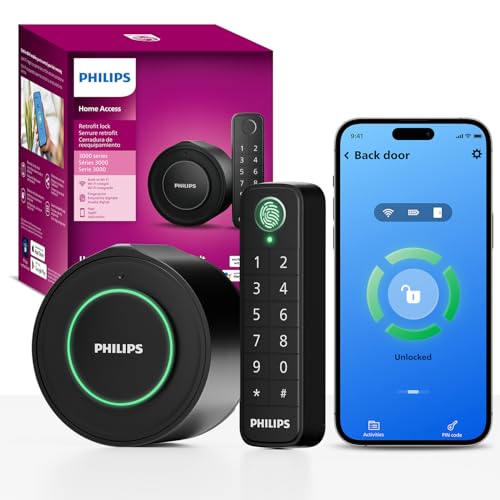
Pros
- Keeps original exterior hardware and keys
- Wireless fingerprint and passcode keypad
- Built-in WiFi, no extra hub required
- Remote app control and access history
Cons
- Requires a 2.4GHz WiFi network
- Keypad must sit within 39 inches
Start With the Door Hardware
A retrofit lock turns the interior thumbturn while leaving the outside portion and existing key in place. That approach is especially useful for apartments because the lease, building manager, or original deadbolt may not allow exterior changes. The Yale Approach Smart Wi-Fi Deadbolt Retrofit and FEOCEY Retrofit Smart Lock for Existing Deadbolt both follow this pattern.
Before ordering, confirm that your door uses a compatible single-cylinder deadbolt and that the interior clearance allows the new mechanism to sit flat. FEOCEY lists compatibility with Schlage and Kwikset deadbolts, standard door thickness ranges, and common backsets, while Yale keeps the original keys as a backup.
Pro Tip: Check the deadbolt brand, backset, door thickness, and interior clearance before removing anything.
If the lock must also serve a shared hallway or exposed entry, exterior durability matters more. Aqara U400 and U100 specify IP65-rated exteriors, while the Yale and FEOCEY retrofit designs keep much of the original exterior hardware unchanged. For background on the hardware itself, see why the strike plate matters.
Match Entry Methods to Apartment Life
Fingerprint access is convenient for residents who do not want to carry keys, while passcodes work better for cleaners, guests, and service providers. Aqara U400 combines fingerprint, touchscreen code, Apple Home Key, app access, NFC card support, voice control, and a physical key. The U100 offers fingerprint access for up to 50 fingerprints, local visitor passwords, Apple Home Key, and a mechanical key.
Yamiry’s Keypad Smart Door Knob Lock stores passwords and fingerprints and adds key-fob entry, but remote control requires its separate Wi-Fi gateway. Philips WiFi Smart Retrofit Lock supplies a wireless keypad with fingerprint and passcode entry, including permanent, one-time, scheduled, and recurring codes.
| Lock style | Main entry feature | Apartment fit |
|---|---|---|
| Retrofit deadbolt | Existing key retained | Renter-friendly |
| Biometric deadbolt | Fingerprint and code | Shared households |
| Smart knob | Keypad and key fob | Simple door upgrade |
Do not assume every advertised smart-home feature works without extra equipment. Aqara U400 needs a Thread-enabled Matter controller for its ecosystems and UWB hands-free entry, while U100 needs an Aqara Zigbee hub for remotely configured passwords and several third-party integrations.
Before You Mount It: Never rely on a digital method alone. Keep the physical key available, and verify that the door can open freely from inside without an app, code, or phone.
Plan Power, Alerts, and Access
Battery format affects maintenance in a small apartment where a lockout can be especially disruptive. Yale uses four AA batteries, U100 uses four AA batteries and offers emergency USB-C charging, Philips uses two CR123 batteries, and U400 has a removable rechargeable battery with USB-C charging.
FEOCEY combines built-in Wi-Fi with battery alerts, door-ajar notifications, activity history, and gyroscope-based auto-lock. Philips also provides remote status, activity records, low-battery alerts, and an adjustable auto-lock timer. Yamiry remains Bluetooth-based unless you add its gateway, so remote access depends on that separate purchase.
For a broader look at access risks, read how smart locks can be hacked. The US Consumer Product Safety Commission is also a useful general authority for household safety information, though it does not select a lock for your door.
Expert Examined
From Dana Whitfield

I keep spare power and the physical key in separate, accessible places rather than inside the apartment. The mistake I see is treating a low-battery alert as optional, so set a reminder to act when the app reports a low charge.
Read more about Dana WhitfieldWhich Lock Fits Your Apartment
I would point renters with a compatible deadbolt toward the smart lock category and the Yale Approach Smart Wi-Fi Deadbolt Retrofit first. Its inside-only installation preserves the existing deadbolt and keys, while Yale Access supports remote control, activity tracking, and unlimited virtual keys through the included Yale Connect.
I would choose the Aqara Smart Lock U100, Apple Home Key for a household that wants fingerprint entry, Apple Home integration, local encrypted fingerprint storage, and a mechanical backup. Its IP65 rating, emergency USB-C charging, and battery life of up to eight months suit a frequently used apartment entrance, provided the required hub fits your setup.
For a renter who wants direct Wi-Fi without a hub, I would consider the FEOCEY Retrofit Smart Lock for Existing Deadbolt. It keeps original keys, installs from inside, supports Alexa, provides door-ajar alerts, and lists up to ten months of battery life under stated usage conditions. I would verify compatibility before purchase and keep the original lock parts for move-out.
The Bottom Line
The mistake most apartment buyers make is choosing features before checking the deadbolt and lease rules. A fingerprint reader or voice assistant cannot compensate for an incompatible lock body, a blocked interior thumbturn, or permission problems with exterior hardware.
First, photograph and measure the existing deadbolt, then confirm whether an inside-only retrofit is required. After that, choose the entry methods your household will actually use and preserve a physical backup key.
FAQs
Retrofit models can be a strong fit when you need to keep the existing exterior hardware and physical keys. Confirm deadbolt compatibility, interior clearance, and lease requirements before buying. Fingerprint entry is convenient for residents, while keypad codes are easier to share with guests and service providers. Some models provide both, along with a physical key for emergencies. Battery life varies by model, battery type, usage, and connectivity. Use low-battery alerts, keep the specified replacement or charging method ready, and do not wait until the battery is empty. IP65 indicates protection against dust and water jets for the rated exterior. It does not mean the entire lock can be submerged, and installation still needs to follow the door and product requirements. A physical key or local code may still work, depending on the model and battery state. Remote app features generally require the lock, network, and any required hub or controller to be operating.Are retrofit smart locks better for apartment doors?
Is fingerprint or keypad entry better for an apartment?
How often do apartment smart lock batteries need attention?
What does an IP65 rating mean on a smart lock?
Do smart locks work during a power or Wi-Fi outage?
Sources
- US Consumer Product Safety Commission www.cpsc.gov
- UL Solutions www.ul.com