
Shopping for the best smart door locks with key backup means deciding whether you want simple keypad access, remote control, or a biometric entry method. The right choice depends on your door type and how much you want a traditional key to cover app, battery, or network failures.

Pros
- Keypad, app, and Apple Watch entry
- Optional Bluetooth Auto-Unlock
- Auto-Lock helps secure the door
- Custom codes for guests and service people
Cons
- Wi-Fi or Z-Wave modules sold separately
- Bluetooth configuration requires the Yale Access app

Pros
- DoorSense detects a fully closed door
- BHMA Grade 2 certified durability
- Keypad, phone, Apple Watch, backup key
- Scheduled, revocable access codes
- Wi-Fi Bridge extends battery life and range
Cons
- Remote app control limited to US and Canada
- Wi-Fi network needed for remote app features
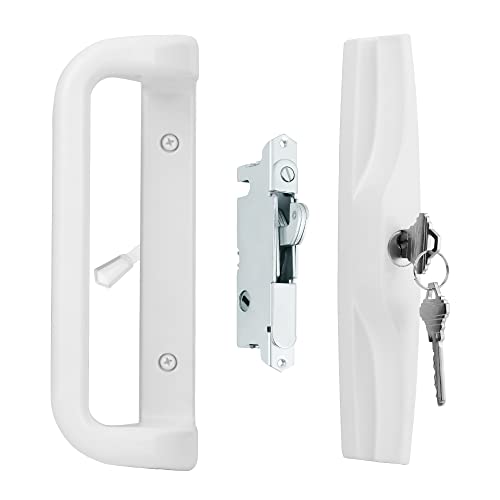
Pros
- Fits 3-15/16-inch screw-hole spacing
- Works with 1-3/16 to 2-inch doors
- Reversible left- or right-handed design
- Mortise lock, keys, and screws included
Cons
- Strike plate or keeper not included
- Requires compatible door measurements before ordering

Pros
- Up to 20 unique entry codes
- Auto-lock secures the deadbolt
- Backlit keypad for day or night
- BHMA Grade 3 residential durability
Cons
- No app, phone, or Wi-Fi control
- Codes are created directly at the lock

Pros
- Keypad, smartphone, Apple Watch, and backup-key entry
- Direct 2.4 or 5 GHz Wi-Fi, no hub needed
- Scheduled codes for guests and service providers
- BHMA Grade 2 durability certification
Cons
- Remote app control limited to US and Canada
- Smart features depend on Wi-Fi connectivity
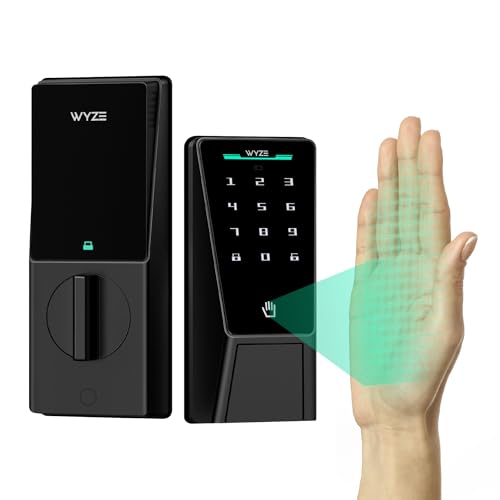
Pros
- Contactless palm-vein recognition
- Dual batteries with USB-C emergency charging
- Up to 50 guest access codes
- IP53 weather resistance, BHMA3 certified
Cons
- Wi-Fi needed for remote control
- Large 12.71-inch lock assembly
Choose the Entry Method You Will Actually Use
A keypad is the most broadly practical option for families, guests, and service workers. The Yale Bluetooth Smart Lock Deadbolt with Keypad adds keypad access, Yale Access app control, Apple Watch control, optional Bluetooth Auto-Unlock, custom entry codes, and Auto-Lock, while retaining a backup key.
Wi-Fi models suit households that need remote status checks, alerts, or access changes away from home. The Yale WiFi Smart Lock Deadbolt with Keypad connects directly to 2.4 or 5 GHz Wi-Fi without a bridge, while the Yale Extended Range WiFi Smart Lock Deadbolt includes a Wi-Fi Bridge that manages the network connection and is designed to extend range and battery life.
Biometric entry is a different trade-off. The WYZE Palm Lock, Smart Door Lock with Palm Vein reads a palm vein pattern without touch, also supports keypad codes, Wi-Fi control, voice commands through Alexa or Google Assistant, and a mechanical key. For a patio slider, the House Guard White Sliding Glass Door Handle Set is hardware rather than a smart deadbolt, with a keyed mortise lock and reversible handle.
Pro Tip: Measure the door, existing lock position, screw-hole spacing, and thickness before ordering. Sliding-door hardware is especially fit-dependent.
Key Backup Still Matters During Failure
A backup key is useful when batteries run low, a phone is unavailable, or an app connection is not convenient. It should not replace basic battery maintenance, however. Yale models provide low-power alerts, while the WYZE Palm Lock adds a six-month main battery, a two-week secondary battery, and emergency USB-C charging from a power bank.
Auto-Lock reduces the chance of leaving the door unsecured, but it cannot compensate for a door that does not close or align correctly. DoorSense on the Yale Wi-Fi models identifies whether the door is fully closed before Auto-Lock secures it.
Before You Mount It: Never leave the mechanical key in an obvious hiding place near the door. A visible spare can undermine the access control you installed, so use a safer backup plan that household members can reach when needed.
Match Features to the Door and Household
Smart deadbolts are intended for compatible entry doors, while the House Guard set is specifically for selected sliding patio doors. The House Guard handle fits 3-15/16-inch center-to-center screw holes and doors from 1-3/16 to 2 inches thick, and its strike plate or latch keeper is not included.
| Entry type | Main access | Best fit |
|---|---|---|
| Smart deadbolt | Keypad and app | Front entry doors |
| Wi-Fi deadbolt | Remote control | Connected households |
| Sliding handle | Key and latch | Compatible patio doors |
Code sharing also varies by model. The Yale Digital Keypad Deadbolt supports up to 20 unique codes without an app, phone setup, or Wi-Fi. The WYZE Palm Lock supports up to 50 unique or one-time codes, while Yale Wi-Fi models allow codes to be shared, scheduled, or revoked through the Yale Access app.
For broader context on physical door hardware, read about why the strike plate matters. If you are weighing a key box against electronic access, the differences in key lock boxes and smart locks are also worth considering.
Expert Examined
From Jenna Castellano

I keep seeing access problems start with door alignment rather than the keypad itself. I would check that the deadbolt moves freely and the door closes fully before relying on Auto-Lock or remote control.
Read more about Jenna CastellanoWhat the Durability Ratings Tell You
BHMA grading gives you a durability reference, but the grades are not identical across these products. The Yale Wi-Fi deadbolts are Grade 2 certified by BHMA, while the Yale Digital Keypad Deadbolt is Grade 3 certified for residential use. Both are specified for operation from -22°F to 140°F.
Certification does not eliminate the need to verify fit, battery condition, or correct installation. For information about lock and door hardware standards, consult UL Solutions, and consider how your own door construction affects the installation.
Which Lock Fits Your Entry
I would point you to the <a href="Yale Digital Keypad Deadbolt for a household that wants key-free entry without Wi-Fi, phone setup, or an app. Its backlit keypad, Auto-Lock, backup key, and allowance for up to 20 codes cover everyday family access while keeping the controls simple.
For remote access, scheduled codes, and alerts, I would choose the Yale WiFi Smart Lock Deadbolt with Keypad. It connects directly to Wi-Fi, supports Apple Watch and smartphone control, and adds DoorSense. I would choose the WYZE Palm Lock, Smart Door Lock with Palm Vein when contactless palm entry, many guest codes, dual batteries, and emergency USB-C charging matter most.
If your opening is a compatible sliding patio door rather than a standard deadbolt, I would point you to the House Guard White Sliding Glass Door Handle Set. Its keyed mortise lock and reversible handle address a different installation need, so measure first and plan for a compatible keeper.
The Bottom Line
The most common mistake is treating every key-backup lock as interchangeable. A smart deadbolt cannot substitute for a sliding-door handle set, and a connected model may be unnecessary if you only need codes and Auto-Lock.
Start by measuring your door and confirming the existing lock type. Then decide whether keypad-only access, remote Wi-Fi control, or palm recognition solves the problem, and keep the backup key as a secondary access route rather than your daily system.
FAQs
A keypad works well when several people need codes or when you prefer a familiar entry method. Palm recognition adds contactless access, but a keypad and mechanical key remain useful backup options. Some models are designed specifically without Wi-Fi, including the Yale Digital Keypad Deadbolt. Other models use Wi-Fi for remote control, alerts, code management, or app access, so check the connection requirements before ordering. Keep it somewhere accessible to the household but not obvious near the door. A backup key should support an outage or depleted battery without creating an easy access point for someone outside the home. Pay attention to low-power alerts and replace batteries before they are depleted. Models with secondary batteries or emergency USB-C charging provide additional ways to restore access when power is low. The rating identifies a durability classification for the lock. The Yale Wi-Fi models listed here are Grade 2 certified, while the Yale Digital Keypad Deadbolt is Grade 3 certified for residential-grade durability.Should I choose a keypad or palm-recognition lock?
Can a smart lock work without Wi-Fi?
Where should I keep the backup key?
How should I maintain a smart lock’s batteries?
What does a BHMA Grade 2 or Grade 3 rating mean?
Sources
- BHMA and ANSI lock standards information. www.buildershardware.com
- UL Solutions product safety and standards information. www.ul.com