
Choosing the best smart door locks with handle starts with matching the lock to your door hardware and daily entry habits. Fingerprint access, direct Wi-Fi, and smart-home requirements separate these models, so this selection suits homeowners, landlords, and families replacing a lever-style lock.

Pros
- Fingerprint handle opens in 0.3 seconds
- Five entry methods, including app and key
- Built-in 2.4GHz Wi-Fi, no hub required
- Up to 100 PIN codes with access logs
Cons
- Requires eight AA alkaline batteries
- Requires specific door hole and clearance

Pros
- Built-in WiFi for anywhere access
- Touchscreen keypad enables keyless entry
- Customizable alarm for forced entry attempts
- BHMA-certified security, durability, and finish
Cons
- Remote features require a home WiFi connection
- App control adds setup and management

Pros
- Apple Home Key with iPhone or Apple Watch
- Fingerprint recognition in under 0.3 seconds
- Matter over Thread supports multiple ecosystems
- Up to 10 months on four AA batteries
Cons
- Alkaline batteries required for stable operation
- Thread-enabled Matter controller required for platforms

Pros
- Built-in WiFi, no hub required
- Fingerprint entry in 0.3 seconds
- One-time and recurring PIN codes
- Matching handle set included
Cons
- Requires 2.4GHz WiFi within 33 feet
- Batteries not included, alkaline only
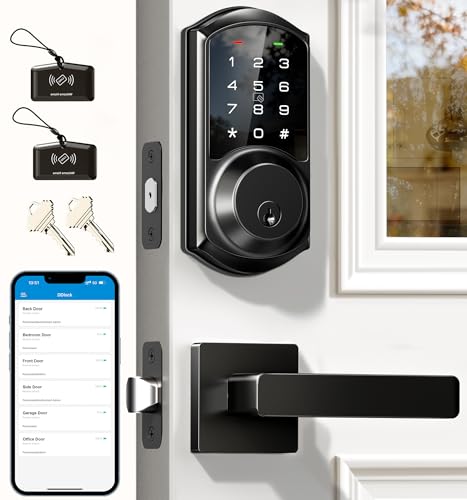
Pros
- App and web control with no subscription fee
- Stores 250+ flexible access codes
- IP54 weatherproof, BHMA/ANSI Grade 3
- IC card capacity exceeds 1,000 cards
Cons
- Remote features require separate G2 gateway
- Two-year warranty requires product registration

Pros
- Fingerprint, PIN, app, and keyfob entry
- Supports Apple Home Key and Matter
- Remote access and smart activity alerts
- Six AA batteries included
Cons
- Wi-Fi supports 2.4 GHz networks only
- Requires compatible Matter controller and Thread router
Match the Lock to Your Door
A handle lock replaces more than a keypad. Door thickness, bore-hole size, backset, and clearance around the existing hardware determine whether installation is possible. Philips Upgraded Wi-Fi Smart Lock with Handle fits doors from 1-3/8 to 2 inches thick, uses a 2-3/8 or 2-3/4 inch backset, and requires a 2-1/8 inch hole plus 4.53 inches between the deadbolt and handle set.
ULTRALOQ Latch 5 Pro WiFi Smart Lever Lock is made for compatible lever doors from 1-3/8 to 1-3/4 inches thick, with a 2-1/8 inch bore hole and either listed backset. Veise VE06-L Smart Deadbolt Lock with 2 Lever supports 1-3/8 to 2-inch doors and either a 1-1/2 or 2-1/8 inch hole, making its stated fit broader in that respect.
Before You Mount It: Measure the door and existing opening before removing the old hardware. A lock that needs a different clearance or bore size may not sit correctly, even if the exterior handle appears compatible.
| Lock type | Main entry method | Key fit concern |
|---|---|---|
| Smart lever | Fingerprint or PIN | Lever-door dimensions |
| Deadbolt handle | PIN, app, or key | Bore and clearance |
| Matter lever | Phone, fingerprint, or PIN | Hub and Thread needs |
Choose the Entry Method You Will Actually Use
Fingerprint handles are useful when your hands are full or you do not want to enter a code. The Philips Upgraded Wi-Fi Smart Lock with Handle stores up to 50 fingerprints and opens as the handle turns, while Aqara Smart Lock with Handle U300, Apple Home Key stores up to 25 and recognizes a fingerprint in under 0.3 seconds according to its listed specifications.
Codes remain more practical for guests, cleaners, tenants, and scheduled access. The Philips Upgraded model supports up to 100 passwords, while Veise VE06-L Smart Deadbolt Lock with 2 Lever supports more than 250 codes, including recurring, scheduled, and one-time options. Its app and web portal do not require a subscription fee, but remote smart-home control requires the separately sold G2 gateway.
Mechanical keys still matter as a backup. The Philips models, Veise, ULTRALOQ, and Aqara list physical-key support or emergency power options, but battery requirements differ. See how to reset a smart lock before you need that procedure during a lockout.
Pro Tip: Save a separate access method for each regular user instead of sharing one permanent code. Removing one guest’s permission is simpler when access is assigned individually.
Wi-Fi, Thread, and Battery Decisions
Direct Wi-Fi is convenient for remote control without a bridge, but the network details still matter. Both Philips models use 2.4GHz Wi-Fi without a hub, and the Philips WiFi Keypad Deadbolt with Handle specifies keeping the lock within 33 feet of the router while minimizing obstacles. Schlage Encode Smart WiFi Lock, Lever Handle also connects directly to home Wi-Fi for app control and monitoring.
Matter over Thread is a different setup. Aqara Smart Lock with Handle U300, Apple Home Key requires a Thread-enabled Matter controller for the relevant platform, and Apple Home Key requires a compatible Thread-enabled Apple hub. ULTRALOQ Latch 5 Pro WiFi Smart Lever Lock also needs compatible Matter and Thread equipment for those features, although its built-in Wi-Fi supports remote app access on 2.4GHz networks.
Battery planning should be part of the purchase decision. Aqara lists up to 10 months from four AA alkaline batteries and has dual USB-C emergency power, while ULTRALOQ lists up to one year with alkaline or up to 1.5 years with lithium and includes six AA batteries. The Philips Upgraded model requires eight AA alkaline batteries, which are not included.
Expert Examined
From Jenna Castellano

I keep spare compatible batteries where household members can reach them, rather than leaving them inside a locked utility room. The mistake I see is treating app access as the only backup, so I prefer a lock with a listed key or emergency-power method and a written access plan.
Read more about Jenna CastellanoSecurity Features Need the Right Context
A keypad, fingerprint reader, or app adds convenience, but each model handles access in its own way. Schlage Encode Smart WiFi Lock, Lever Handle lists encrypted connectivity, a customizable alarm for door movement and forced-entry attempts, a fingerprint-resistant touchscreen, and the highest residential security, durability, and finish rating from BHMA industry experts.
Veise VE06-L Smart Deadbolt Lock with 2 Lever lists local AES encryption, a two-minute lockout after five incorrect attempts, IP54 weather resistance, and BHMA/ANSI Grade 3 certification. Certification describes a defined performance classification, not a promise that every installation or door will resist every attack. For background on door hardware, read what a strike plate does.
For broader lock-security terminology, UL Solutions provides information about safety standards and certification work. You should also inspect the frame, screws, and strike area because the electronic lock is only one part of the complete door assembly.
Which Lock Fits Your Household
I would point families wanting the fewest steps at Philips Upgraded Wi-Fi Smart Lock with Handle. Its fingerprint-on-the-handle design avoids a separate scan-and-turn sequence, while five listed entry methods include fingerprint, app, password, voice, and key. The capacity for 100 passwords also suits households that regularly share access.
I would put Schlage Encode Smart WiFi Lock, Lever Handle on a front door where direct Wi-Fi, app monitoring, Alexa, Google, Ring, and Airbnb compatibility matter. Its BHMA security, durability, and finish rating plus customizable alarm make it the more security-focused choice in this group.
For an Apple-centered home, I would choose Aqara Smart Lock with Handle U300, Apple Home Key, provided you already have the required Thread-enabled Apple hub. Its Apple Home Key support, local AES-encrypted fingerprint data, and dual USB-C emergency power fit a household that wants phone or watch access without giving up a backup route.
The Bottom Line
The mistake most buyers make is treating every handle lock as a universal replacement. Door thickness, bore size, backset, clearance, Wi-Fi range, and hub requirements can matter more than the keypad design.
Measure the door before choosing a feature set. Then decide whether your household values fingerprint entry, guest-code management, direct Wi-Fi, or Matter support most, and keep the listed battery or emergency-access requirements visible after installation.
FAQs
Fingerprint access can be faster for daily entry, especially when your hands are full. Keypads are usually more flexible for guests, tenants, scheduled access, and one-time codes, so the better choice depends on who needs entry and how often access changes. Measure door thickness, bore-hole diameter, backset, and the clearance between the deadbolt and handle area. Compare those measurements with the model’s stated requirements before removing existing hardware. Some models connect directly to 2.4GHz Wi-Fi without a hub, while Matter over Thread features require compatible controllers and, for Apple Home Key, a compatible Thread-enabled Apple hub. Bluetooth app controls may work locally even when remote features need additional connectivity. Use the battery type specified by the manufacturer and pay attention to low-battery alerts. Keep a compatible replacement set accessible, and understand whether the lock offers a physical-key backup or emergency USB power. It identifies a performance classification or rating under the referenced standard. It does not replace correct installation, a sound door frame, or regular battery maintenance, and it should not be treated as a guarantee against every forced-entry method.Are fingerprint smart handles better than keypad locks?
What should I measure before installing a smart lock with handle?
Do smart handle locks need Wi-Fi or a hub?
How should I maintain the batteries?
What does BHMA or ANSI certification mean on a smart lock?
Sources
- BHMA, Builders Hardware Manufacturers Association. www.buildershardware.com
- UL Solutions, safety science and certification information. www.ul.com