
Shopping for the best smart door locks with face recognition means deciding whether hands-free entry, built-in video, or dependable backup access matters most. This selection is for homeowners comparing biometric locks for a real front door, not just a phone-controlled deadbolt.

Pros
- Facial recognition with dual infrared sensors
- Fingerprint sensor stores up to 99 prints
- Six entry methods, including physical key
- Built-in Wi-Fi, no bridge required
Cons
- Only fits doors 1 3/8 to 3 1/8 inches
- Remote features depend on Wi-Fi and app access

Pros
- Perovskite solar panel with integrated 37Wh battery
- 3D facial recognition for up to 50 users
- Built-in Wi-Fi with Matter smart-home support
- Five entry methods, including PIN and mechanical key
Cons
- Solar charging depends on sufficient daily light
- Facial recognition works from up to 23 inches

Pros
- 3D face, palm-vein, and fingerprint access
- Seven entry methods for family members
- 12-month 10,000mAh battery
- Matter, Apple Home, Alexa, and Google support
Cons
- Included cylinder required; existing cylinders unsupported
- Fit limited to specified door dimensions

Pros
- Facial recognition entry with local data storage
- 2K camera with 135° head-to-toe view
- 32GB local storage, no monthly fee
- 15,000mAh battery, up to six months
Cons
- Matter does not support camera streams
- Not compatible with mortise locks
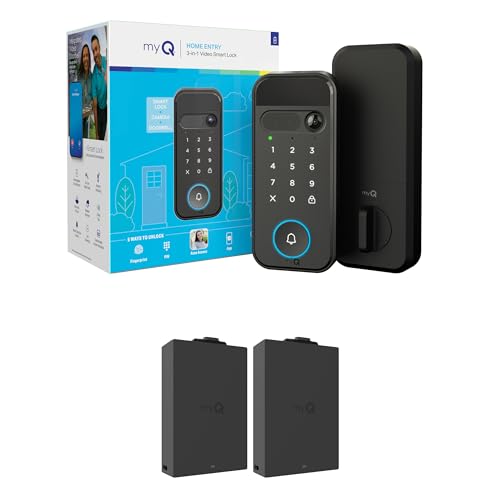
Pros
- 2K HDR camera with color night vision
- Five entry methods, including face and fingerprint
- Remote control and alerts through myQ app
- Extra battery included
Cons
- Face and fingerprint access unavailable in Illinois and Texas
- Recognition features unavailable outside the U.S. and Canada

Pros
- 3D face, palm vein, and fingerprint entry
- Eight access options for family and guests
- 4-inch indoor screen with night vision
- IP67 dust and water protection
Cons
- Larger mortise, drilling may be needed
- Remote features depend on Tuya or Smart Life app
Start With the Door, Not the App
Face recognition is only useful if the lock fits the door and gives the sensor a clear approach. Check door thickness, backset, faceplate style, and whether the product replaces a standard single-cylinder deadbolt or requires a larger mortise opening.
The eufy Security Video Smart Lock E40 fits most standard US and Canadian single-cylinder deadbolts, while the YINTIN 3D Face Recognition Smart Lock with Camera uses a larger mortise design that may need drilling or mortising. SwitchBot Lock Vision Pro Smart Lock lists specific crossbore, backset, and door-thickness ranges, so measure before ordering.
For more context, review why the strike plate matters. A strong biometric reader cannot compensate for a misaligned latch or a door that does not close consistently.
Before You Mount It: Do not assume a replacement smart lock fits every existing cylinder. Compare the included hardware with your door, and keep a mechanical key or emergency power method available before removing the old lock.
Match the Biometric Sensor to Daily Life
Three-dimensional facial recognition is convenient when your hands are full, but lighting, approach angle, and privacy preferences still matter. Lockly Visage Zeno Smart Lock uses dual infrared sensors, while SwitchBot Lock Vision Pro Smart Lock uses structured light designed to operate in darkness.
Palm-vein sensing can help family members who struggle with small fingerprint readers. SwitchBot stores up to 90 fingerprints and adds palm-vein, NFC, PIN, app, and physical-key entry. Lockin Veno Solar Face Smart Lock recognizes up to 50 users and also provides PIN, app, voice-assistant, and mechanical-key access.
| Device type | Key distinction | Best placement |
|---|---|---|
| Face-only focus | Hands-free approach | Covered front entry |
| Face plus camera | Visitor video | Delivery-facing door |
| Multi-biometric | Family flexibility | Busy household entrance |
Biometric data deserves the same attention as any other access credential. Local storage appears across several models, including eufy, SwitchBot, and YINTIN. Read more about smart-lock security risks before adding remote access.
Expert Examined
From Ray Okafor

I keep a physical backup method available for every electronic door lock. The mistake I see is treating facial access as the only entry route, even though a depleted battery, damaged exterior, or phone problem can happen at the worst time.
Read more about Ray OkaforPower and Video Features Change the Maintenance
Battery design separates these locks as much as recognition technology does. Lockin Veno Solar Face Smart Lock combines a solar panel with an integrated battery and USB-C backup, while SwitchBot Lock Vision Pro Smart Lock lists a dual-battery setup with a USB-C emergency option.
Camera-equipped models add useful visitor awareness but also create another power demand. The eufy Security Video Smart Lock E40 combines a rechargeable battery with an automatic backup battery and local storage, while myQ Secure View™ 3-in-1 Smart Lock Deadbolt adds 2K HDR video, color night vision, and two-way audio.
For a mortise installation, YINTIN adds an indoor screen, night vision, and remote visitor communication through the Tuya or Smart Life app. If you need only entry control, a simpler deadbolt may mean fewer components to maintain. If deliveries are frequent, a camera integrated into the lock may justify the added complexity.
Pro Tip: Before installation, charge the main battery, record the emergency-power procedure, and create a backup PIN or physical-key plan for each regular household member.
Choose the Access Ecosystem Carefully
Built-in Wi-Fi avoids a separate bridge on several models, including Lockly Visage Zeno Smart Lock, Lockin Veno Solar Face Smart Lock, and SwitchBot Lock Vision Pro Smart Lock. Matter support can connect compatible locks with Apple Home, Google Home, Alexa, or SmartThings, but camera streams may still require the manufacturer app.
Privacy and convenience may pull in different directions. Local video storage on the eufy model avoids a monthly fee, while app alerts and remote access require careful account management. The role of a smart-lock bridge also matters if you are comparing a direct Wi-Fi model with another system.
Certification language should not be confused with biometric accuracy. Matter describes smart-home interoperability, while a security or durability evaluation addresses different concerns. UL Solutions explains how its safety work relates to products and systems, but you should still verify the exact listing and installation limits for the lock you select.
Which Lock Fits Your Front Door
I would point homeowners who want the broadest hands-free entry options to SwitchBot Lock Vision Pro Smart Lock. Its face, palm-vein, fingerprint, NFC, PIN, app, and physical-key methods suit a household with children, older relatives, and occasional guests. The automatic locking sensor is also useful when the door tends to be pulled shut during a busy exit.
I would put Lockin Veno Solar Face Smart Lock on a door where battery attention is inconvenient. Its integrated solar design, built-in Wi-Fi, Matter support, and multiple entry methods make it a practical fit for a family entrance with regular traffic.
For a delivery-heavy home, I would choose eufy Security Video Smart Lock E40. The integrated doorbell, 2K camera, local storage, radar-based motion detection, and dual-power design combine visitor awareness with entry control, provided your door matches its compatibility limits.
The Bottom Line
The mistake most buyers make is treating face recognition as the whole decision. Door compatibility, backup access, battery format, local data handling, and the need for video can matter more after installation.
If you do one thing first, measure the door and identify its existing lock type. Then choose the biometric and camera features that fit that hardware, and confirm a second entry method before relying on the new lock.
FAQs
Face recognition is convenient when your hands are occupied, while fingerprint access can be more private and predictable for close-range entry. Models with both options give households more flexibility, especially when lighting, appearance changes, or user comfort varies. No. Compatibility depends on door thickness, backset, crossbore, faceplate, deadbolt style, and whether the lock requires a mortise opening. Measure the door and compare those details with the product specifications before purchase. The listed models provide different backup options, including a mechanical key, USB-C emergency power, a backup battery, or solar-assisted charging. Set up and understand the emergency method before the main battery reaches a low level. Matter is a smart-home interoperability standard that helps compatible devices work across supported platforms. It does not automatically mean every feature, especially camera streaming, is available through every home platform.Is face recognition better than fingerprint access on a smart lock?
Can a face-recognition smart lock fit any front door?
What happens if the smart lock battery runs out?
What does Matter mean on a smart lock?
Sources
- UL Solutions and product safety information. www.ul.com
- National Fire Protection Association and home safety guidance. www.nfpa.org