
Choosing the best smart door locks with camera requires more than comparing video resolution, because door fit and outdoor protection decide whether the device works properly. The main split is between standard-deadbolt designs and larger mortise locks, so this selection suits homeowners deciding which front-door setup matches their existing hardware.

Pros
- 2K camera with f/1.6 lens
- Fast fingerprint recognition
- Built-in Wi-Fi and 8GB storage
- BHMA Grade 3, IP65 weather resistance
Cons
- Rechargeable battery requires periodic charging
- Compatible accessories sold separately

Pros
- Fast palm vein recognition in 0.6 seconds
- BHMA Grade 1 deadbolt certification
- 2K HD camera with 150-degree view
- 16GB built-in local storage
Cons
- Camera streams unavailable through Matter
- Not compatible with HomeBase 2

Pros
- Nine access methods for family and guests
- 3D face recognition for touchless entry
- HD camera with night vision and alerts
- Tuya app control and video intercom
Cons
- Difficult mortise installation, possible screw cutting
- Not waterproof, indoor installation only

Pros
- Palm-vein and fingerprint recognition
- 0.17-second access, 99% stated accuracy
- 2K camera with 180° panoramic view
- 8GB local storage, no monthly fee
Cons
- 3.66-pound hardware may feel heavy
- Large 11 x 4.4 x 3.5-inch footprint
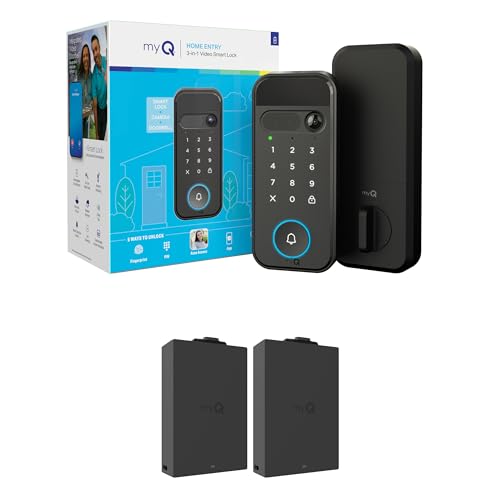
Pros
- 2K HDR camera with color night vision
- Five entry methods, including face and fingerprint
- Remote control and alerts through myQ app
- Extra battery included
Cons
- Face and fingerprint access unavailable in Illinois and Texas
- Recognition features unavailable outside the U.S. and Canada

Pros
- 3D face, palm vein, and fingerprint entry
- Eight access options for family and guests
- 4-inch indoor screen with night vision
- IP67 dust and water protection
Cons
- Larger mortise, drilling may be needed
- Remote features depend on Tuya or Smart Life app
Start With the Door, Not the Camera
Several of these products replace a familiar deadbolt, while others use a larger mortise body that may require drilling or cutting. The Smart Door Lock with 3D Face Recognition & Camera specifically warns that installation is difficult and that its mortise does not suit standard doors. YINTIN also says to compare door thickness, lock-body opening, and hole positions before ordering.
Weather exposure creates another dividing line. The eufy Security Video Smart Lock E331 carries IP65 weather resistance and BHMA Grade 3 certification, while YINTIN lists IP67 protection. The Smart Door Lock with 3D Face Recognition & Camera is not waterproof and should not be installed outdoors, making placement and shelter especially important.
Before You Mount It: Confirm the existing deadbolt or mortise dimensions before removing hardware. A camera lock that does not match the door preparation can require permanent changes and may leave the entry unsecured during installation.
For background on the hardware behind that fit, read what a strike plate does. The latch and strike alignment still matter even when the lock adds fingerprints, facial recognition, or remote control.
| Device type | Key differentiator | Best placement |
|---|---|---|
| Standard deadbolt | E331, myQ designs | Prepared front doors |
| Palm vein lock | S3 Max, Veno Plus | Biometric-focused homes |
| Mortise lock | YINTIN, Tuya model | Doors allowing modification |
Match Entry Methods to Your Household
Fingerprint access is practical for everyday family entry, while palm vein recognition offers contactless access on the eufy Security Video Smart Lock FamiLock S3 Max and Lockin Veno Plus Smart Lock with Camera. The S3 Max adds a rear lock video screen, which can help children or older adults check the front door without reaching for a phone.
Face recognition adds convenience when hands are full, but it should not be the only plan. The myQ Secure View™ 3-in-1 Smart Lock Deadbolt offers face access, fingerprint, PIN, app control, and a key. YINTIN combines 3D face, palm vein, fingerprint, passcode, key card, app, mechanical key, and remote entry.
I keep a physical-key or emergency-power option in the decision because batteries and phones are not guaranteed to be available at the right moment. For broader access planning, compare a key lock box with a smart lock before assigning temporary entry to guests or service workers.
Pro Tip: Choose one primary method for daily use, then confirm that every household member can use a separate backup method without relying on the same phone.
Camera Coverage and Local Storage
Camera specifications are not interchangeable. The E331 and FamiLock S3 Max use 2K HD cameras, while the FamiLock S3 Max adds a 150-degree head-to-toe view and an indoor rear screen. Lockin Veno Plus lists a 2K ultra-wide camera, panoramic coverage, infrared night vision, built-in Wi-Fi, and 8GB local storage without a monthly fee.
The myQ Secure View™ 3-in-1 Smart Lock Deadbolt lists 2K HDR video, color night vision, motion alerts, and two-way audio. The generic Tuya model and YINTIN model also combine visitor video, doorbell functions, and two-way communication, but their larger mortise requirements deserve as much attention as their camera features.
Expert Examined
From Ray Okafor

Privacy also varies by storage approach. Eufy states that palm-vein data on the FamiLock S3 Max stays locally on the lock, while YINTIN says its biometric data is stored locally. The Lockin model specifically lists local AI video storage, so buyers who want fewer recurring services should examine storage details before choosing a camera lock.
For broader privacy concerns, review how smart locks can be hacked. The U.S. Consumer Product Safety Commission is also a useful authority for general home-safety information, although it does not certify these specific products.
Battery Planning for the Front Door
The E331 uses a rechargeable 10,000mAh battery, while the FamiLock S3 Max lists up to four months of full functionality plus four AAA batteries for an additional month of essential functionality. The generic Tuya model and YINTIN model provide rechargeable power with USB-C emergency input, and YINTIN also includes a mechanical key.
Before choosing, decide how often you can recharge the lock and whether someone can reach the exterior emergency port. The myQ product includes an extra battery, while the E331 lists a large rechargeable battery for its lock and video features. These details matter more for a busy entrance than a small difference in camera resolution.
Which Lock Fits Your Front Door
I would point homeowners with a standard US deadbolt setup toward the eufy Security Video Smart Lock E331. Its stated installation time is about 15 minutes with no drilling on most standard setups, and it combines fingerprint entry, keypad access, app control, voice assistant support, physical keys, 2K video, built-in Wi-Fi, and 8GB storage. IP65 protection and BHMA Grade 3 certification make its specification set suited to a typical covered front door.
I would choose the eufy Security Video Smart Lock FamiLock S3 Max for a household that values contactless palm-vein entry and an indoor screen. Its 150-degree camera view, local biometric storage, backup AAA battery setup, and Matter support add useful flexibility, though camera streams still require the eufy app rather than Matter.
For a door where a larger mortise installation is acceptable, I would point you to the YINTIN 3D Face Recognition Smart Lock with Camera. Its indoor screen, night vision, two-way talk, IP67 protection, eight entry methods, local biometric storage, and USB-C emergency input suit a family wanting many ways to manage the entrance. Confirm the dimensions first because drilling or mortising may be needed.
The Bottom Line
The mistake most buyers make is treating every camera lock as a direct deadbolt replacement. Mortise dimensions, door thickness, weather exposure, and interior clearance can matter more than face recognition or a wider field of view.
If you do only one thing first, measure the existing lock opening and door thickness, then compare those measurements with the product installation requirements. After the fit is confirmed, choose the entry method, storage approach, and backup power arrangement that your household can maintain.
FAQs
Fingerprint access is a familiar daily option, while palm vein and face recognition reduce the need to touch the lock. Choose a model that also provides a PIN, mechanical key, app control, or emergency power input so one failed method does not block entry. No. Some models suit standard deadbolt preparations, while the Smart Door Lock with 3D Face Recognition & Camera and YINTIN use larger mortise designs. Check door thickness, hole positions, lock-body opening, trim, and interior clearance before ordering. Follow the product’s rechargeable-battery schedule and respond to low-battery alerts promptly. Keep the mechanical key or emergency power method available, and confirm that the backup battery or USB-C port can be reached when the main battery is depleted. BHMA grades describe performance requirements for certain door hardware categories, but the product data here specifically identifies Grade 1 for the FamiLock S3 Max and Grade 3 for the E331. The grade does not replace checking fit, weather protection, or installation instructions.Which entry sensor is best for a smart door lock with camera?
Can these camera locks fit any front door?
How should I maintain the lock battery?
What does BHMA Grade 1 or Grade 3 mean?
Sources
- Builders Hardware Manufacturers Association. www.buildershardware.com
- U.S. Consumer Product Safety Commission. www.cpsc.gov
- UL Solutions. www.ul.com