
Shopping for the best security cameras with local storage means deciding where footage should live, then matching coverage and power to that spot. This selection suits homeowners who want recordings kept at home instead of relying on monthly cloud storage.
Pros
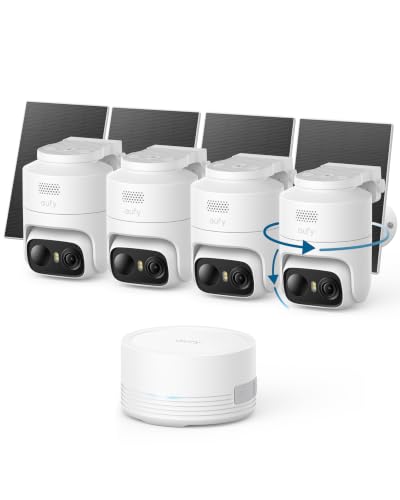
- 360 degree pan and tilt with automatic subject tracking
- Detachable 3W solar panels for independent positioning
- 2K color night vision with integrated spotlight
- Onboard 64GB local storage expandable to 1TB
- AI detection for humans, vehicles, pets, and faces
Cons
- Incompatible with Apple HomeKit and HomeBase 2
- Requires HomeBase Mini or updated HomeBase 3 hub

Pros
- Three lenses, simultaneous 3MP views
- 355° pan and 90° tilt coverage
- Human, vehicle, and pet AI detection
- 32GB SD card included, no subscription
Cons
- 2.4GHz Wi-Fi only
- Wired installation required

Pros
- 128GB encrypted local hub storage, no subscriptions
- Continuous 5W solar charging with 8000mAh battery
- 4MP resolution with 65-foot color night vision
- Supports both 2.4GHz and 5GHz Wi-Fi networks
Cons
- Motion auto-tracking is disabled by default
- Vehicle and animal detection requires app reconfiguration
- 5GHz Wi-Fi signal weakens over longer distances

Pros
- Up to 1,000-foot line-of-sight range
- Detailed 4K video with 110° viewing angle
- AI alerts for people and vehicles
- 32GB local storage, expandable to 512GB
Cons
- Rechargeable cameras require periodic charging
- Base station required for local recording

Pros
- Three AA batteries last up to two years
- Fast 0.4-second PIR motion detection trigger
- Wide 159-degree lens with color night vision
- Local 30-day loop storage with no subscription
- Drill-free adhesive mount for quick installation
Cons
- Non-removable internal memory card
- No audio recording capability
- Adhesive mount unsuitable for powdery walls
Local Storage Is Not One Feature
Local recording can mean a removable microSD card, a built-in card, or a hub that stores footage away from the camera. That distinction matters if a camera is damaged or taken. The Vivideye system stores recordings in its expandable four-channel Home Hub, while the eufy Security eufyCam C37 4-Cam Kit uses a HomeBase Mini with built-in storage.
Capacity also varies substantially. The eufy system starts with 64GB and supports expansion up to 1TB, Vivideye includes 128GB, and Swann includes 32GB expandable to 512GB. The XMSLSPKJ camera stores footage locally for over 30 days, but its SD card is non-removable.
For broader context on hub-based recording, the explanation of NVR and DVR differences can help you understand why storage location affects access and system design.
Pro Tip: Choose the storage format before mounting. A hub is useful when you want recordings separated from an outdoor camera, while built-in or card storage keeps a single camera simpler.
Match Coverage to the Installation
Pan-and-tilt cameras suit spaces where one viewpoint must scan several directions. The Anssipo model combines two fixed lenses with a 355-degree pan and 90-degree tilt lens, while eufy adds 360-degree tracking and subject recognition through its compatible base options.
For a yard or driveway, solar power can reduce routine charging. Vivideye uses a 5W panel and an 8000mAh battery, while eufy includes detachable 3W panels. Swann instead uses rechargeable batteries with USB-C and optional solar charging.
| Camera style | Storage design | Best placement |
|---|---|---|
| Multi-lens PTZ | 32GB card | Wide indoor or yard view |
| Solar camera pair | Hub storage | Outdoor coverage |
| Battery stick-on | Built-in SD | Door or window |
Wireless does not mean every model works the same way. Vivideye supports 2.4GHz and 5GHz Wi-Fi, Anssipo is 2.4GHz only and Ethernet capable, and Swann uses Wi-Fi HaLow for long-range communication. Check the network band and route before choosing a mounting position.
Night Vision, Alerts, and Privacy
Night performance is more than resolution. Eufy provides 2K color night vision with a spotlight, Swann offers 4K video with color and infrared night vision, and Anssipo combines spotlights with color or infrared modes. Vivideye lists 4MP color night vision up to 65 feet.
Detection choices also shape daily use. Eufy identifies humans, vehicles, pets, and faces; Vivideye focuses on human detection by default; and XMSLSPKJ uses PIR motion detection with local-only encrypted video and no audio. Those differences affect which alerts you receive and how much footage gets saved.
Before You Mount It: A camera aimed at a public area or a neighbor’s private space can create privacy problems. Set the viewing angle and alert zones carefully, and remember that local storage does not remove the need to follow applicable privacy rules.
For questions about whether recordings may be used as evidence, review the discussion of security camera footage in court. The camera’s storage method alone does not determine admissibility.
Expert Examined
From Dana Whitfield

I keep seeing people choose a camera for resolution first, then discover the power or Wi-Fi arrangement does not fit the mounting spot. I would map the coverage area, outlet or sunlight access, and storage location before deciding between a hub system and a single camera.
Read more about Dana WhitfieldWhich Camera Fits Your Home
I would point you to the eufy Security eufyCam C37 4-Cam Kit when you want four outdoor cameras, solar assistance, 360-degree tracking, and expandable local storage in one system. Its human, vehicle, pet, and face detection also gives it a wider alert vocabulary than models centered mainly on human motion.
For a larger property with difficult Wi-Fi paths, I would consider the Swann MaxRanger4K Mini 4K Wireless Security Camera. Its Wi-Fi HaLow connection is designed for long range, and the base station keeps recordings local while the cameras add 4K video, two-way audio, and deterrent features.
I would choose the No Subscription Wireless Security Camera for a small entry point where drilling is undesirable. Its adhesive mounting, three-AA battery design, local-only storage, and wide-angle color night vision make it a focused door, window, or porch option rather than a whole-property system.
The Bottom Line
The biggest mistake is treating local storage as a complete specification. You still need to check whether footage sits on a camera, card, or hub, how much capacity is included, and whether the network and power arrangement suit the installation.
If you only do one thing first, draw the camera locations and mark each site’s Wi-Fi, sunlight, and viewing needs. Then choose the storage design that protects the recordings without creating a maintenance problem.
FAQs
Which camera type suits a wide outdoor area?
Pan-and-tilt or multi-lens models can cover more directions than a fixed viewpoint. Solar systems such as Vivideye and eufy are especially suited to outdoor locations where regular charging would be inconvenient, while Swann emphasizes long-range wireless coverage.
Where should I place a local-storage camera?
Place it where the lens covers the intended entry, yard, or room without pointing into private neighboring areas. Confirm Wi-Fi reach, sunlight for solar panels, and access to the camera or hub before fixing the mount.
How do local-storage cameras stay powered?
The products use different approaches, including detachable solar panels, rechargeable batteries, USB-C charging, and AA batteries. Maintenance depends on the design, so check whether the installation has dependable sunlight or whether battery access will be easy.
What does a camera certification mean?
A certification or protection rating should be verified for the exact model and installation condition. The supplied product details identify Vivideye as IP66 weatherproof, but they do not establish certifications for every camera in the comparison.
For broader electrical and product-safety information, consult UL Solutions and the US Consumer Product Safety Commission.
Sources
- UL Solutions www.ul.com
- US Consumer Product Safety Commission www.cpsc.gov