
Choosing the best security cameras that work with home assistant means checking protocol support before image resolution. The key split is local integration versus a camera built around its own app, so renters, homeowners, and privacy-focused buyers can choose with fewer surprises.
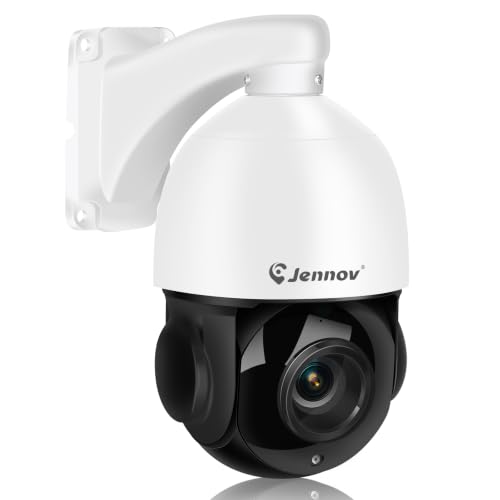
Pros
- 4K 8MP video with 20X optical zoom
- Auto tracking with adjustable human detection
- 320-foot IR night vision
- PoE connection uses one Ethernet cable
Cons
- Works only with Onvif PoE NVRs
- Tracks only one target at a time
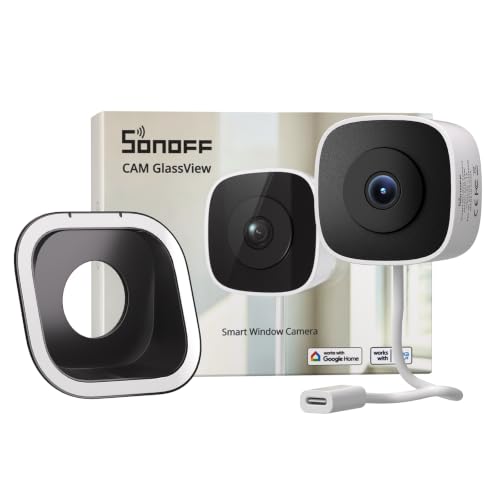
Pros
- No-drill, stick-on installation
- 2K video with color night vision
- Local web console, RTSP, and ONVIF
- Up to 128GB microSD storage
Cons
- Requires indoor window-glass placement
- Needs a power connection

Pros
- 20X optical zoom captures distant details clearly
- True 4K 8MP sensor for crisp target identification
- Motorized 360-degree pan and 90-degree tilt coverage
- AI auto-tracking follows detected human movement
Cons
- Wired installation requires PoE or 12V DC cabling
- Large 12.2-inch housing requires substantial mounting clearance

Pros
- No-drill glass installation with three brackets
- 2K resolution with Starlight color night vision
- Dual-band 2.4GHz and 5GHz Wi-Fi
- Standard ONVIF and RTSP compatibility
Cons
- MicroSD card not included
- Cloud storage requires paid subscription
- Offline AP hotspot range limited to 15 meters

Pros
- Sturdy IP66 waterproof metal casing
- Night vision reaches up to 82 feet
- Supports ONVIF and RTSP video streams
- Combines humanoid detection with a siren alarm
Cons
- Maximum MicroSD card capacity capped at 128GB
- Video resolution tops out at 1080P
Start With the Connection Home Assistant Needs
RTSP provides a video stream, while ONVIF helps compatible systems discover and communicate with a camera. SONOFF CAM GlassView 3MP 2K Window Camera, Ediloca 2K Window Camera for Home Security, and Topodome J10A ONVIF Bullet Outdoor WiFi Security all list RTSP and ONVIF support, making them the clearest choices for a local Home Assistant setup.
PoE models suit buyers who already have Ethernet runs or an ONVIF-compatible NVR. Jennov 4K 8MP Outdoor PTZ Camera with Pan requires a PoE NVR that supports ONVIF, while SUNBA 4K PTZ Security Camera Outdoor supports PoE or 12V DC power. An NVR and DVR explanation can help clarify where recording belongs.
Pro Tip: Prioritize RTSP and ONVIF in the product specifications, then confirm your Home Assistant installation can use the stream before choosing resolution or pan controls.
Match the Camera to the Mounting Problem
Window cameras install indoors against glass, which avoids outdoor wiring and drilling. SONOFF includes three brackets and a light-blocking option for reflections, while Ediloca includes tilt, horizontal, and stand mounting. Those details matter more than a wide field of view if the camera must point through a double-pane window.
Outdoor coverage favors a different design. Topodome provides an IP66 metal bullet body and infrared night vision, while the Jennov and SUNBA PTZ models add remote pan and tilt for larger areas. Read more about security camera status lights before positioning a unit where glare or indicators could affect the view.
Before You Mount It: Do not assume a window camera sees clearly through every pane. Reflections, indoor lighting, and the angle of the glass can reduce useful footage, so adjust the bracket and block stray light before fixing the cable in place.
| Camera type | Key protocol | Best placement |
|---|---|---|
| Window Wi-Fi | RTSP and ONVIF | Behind exterior glass |
| Outdoor bullet | RTSP and ONVIF | Fixed exterior view |
| Outdoor PTZ | ONVIF or PoE | Large open areas |
Separate Video Quality From Coverage
Resolution and coverage solve different problems. The Jennov and SUNBA cameras use 8MP sensors for 4K video and include 20X optical zoom, which is useful for distant vehicles, entrances, or broad property lines. Their tracking features can follow human movement, but PTZ control also adds setup decisions.
Topodome records at 1080P and reaches up to 82 feet with infrared night vision, making it a simpler fixed-view option. SONOFF and Ediloca provide 2K window footage, with full-color night viewing features intended for scenes seen through glass. For broader context on identification features, see how security cameras handle facial recognition.
Expert Examined
From Ray Okafor

I keep the camera stream separate from the recording plan because a local dashboard does not automatically mean local storage. The mistake I see is choosing a camera for sharp video, then discovering that the preferred recorder or network cannot use its stream.
Read more about Ray OkaforStorage also varies across these models. SONOFF supports up to 128GB microSD storage, Topodome supports up to 128GB, and Ediloca supports up to 256GB while also offering continuous recording. Jennov and SUNBA are better matched with an ONVIF recorder when you want centralized footage.
Which Camera Fits Your Home
I would point renters or apartment residents toward SONOFF CAM GlassView 3MP 2K Window Camera when no-drill mounting and local viewing are priorities. Its dual-band Wi-Fi, adjustable brackets, RTSP and ONVIF support, and no-subscription local console make it a practical fit for a window-facing driveway or entry.
I would choose Ediloca 2K Window Camera for Home Security for someone who wants continuous recording, offline AP mode, and flexible placement inside the home. For a large outdoor area, I would instead point you to SUNBA 4K PTZ Security Camera Outdoor, especially when PoE or 12V DC power and remote pan, tilt, and optical zoom fit the property.
The Bottom Line
The most common mistake is treating Home Assistant compatibility as a brand promise rather than a protocol question. A camera may have a smart app yet still be unsuitable for your local setup if RTSP, ONVIF, recorder support, or network requirements do not match.
First, decide whether the camera will sit behind glass, on an exterior wall, or over a large open area. Then confirm the available power and network connection, followed by RTSP or ONVIF support, before choosing resolution or tracking features.
FAQs
A camera that supports RTSP and ONVIF is usually the easiest fit for local integration. The listed SONOFF, Ediloca, and Topodome models support both protocols, while the Jennov and SUNBA models are oriented toward ONVIF-based setups. Yes, a window camera can view a driveway from indoors when its bracket and glass angle limit reflections. SONOFF includes a light-blocking bracket, and Ediloca offers several mounting positions for different window views. Wi-Fi is convenient for indoor window placement, especially where drilling is not practical. PoE provides power and data through one Ethernet cable, which can be preferable for outdoor cameras and centralized recording. ONVIF is a compatibility standard that helps cameras communicate with compatible recorders and security software. It does not guarantee that every feature, such as PTZ control or audio, will work in every system.What type of security camera works best with Home Assistant?
Can a window camera work for driveway security?
Should I choose Wi-Fi or PoE?
What does ONVIF mean on a security camera?
Sources
- ONVIF and network video interoperability information. www.onvif.org
- UL Solutions and safety standards information. www.ul.com