
Choosing the best security cameras that can’t be hacked means reducing exposure rather than believing any internet-connected device is invulnerable. The key split is local storage versus cloud dependence, and that matters most to households wanting private footage without giving up useful alerts.

Pros
- Local storage up to 256GB microSD card
- Motorized pan and tilt motion tracking
- Night vision detection up to 30 feet
- Real-time motion and sound detection alerts
Cons
- Requires 2.4 GHz Wi-Fi network
- MicroSD card sold separately
- Wired power cord limits placement options

Pros
- Subscription free AI detection for people, pets, vehicles
- 2K QHD resolution with Starlight color night vision
- Weatherproof IP66 rating for outdoor durability
- Supports local MicroSD storage up to 512GB
Cons
- Wired power setup requires nearby outlet access
- MicroSD card not included for local storage
- Operates exclusively on 2.4GHz Wi-Fi bands

Pros
- Sharp 2K 3MP resolution with 114-degree view
- Subscription-free local storage up to 512GB
- Weatherproof IP65 housing for indoor or outdoor use
- Built-in detection for people, motion, and crying
Cons
- Requires a continuous wired power connection
- MicroSD card sold separately for local recording
- Operates strictly on 2.4 GHz Wi-Fi networks
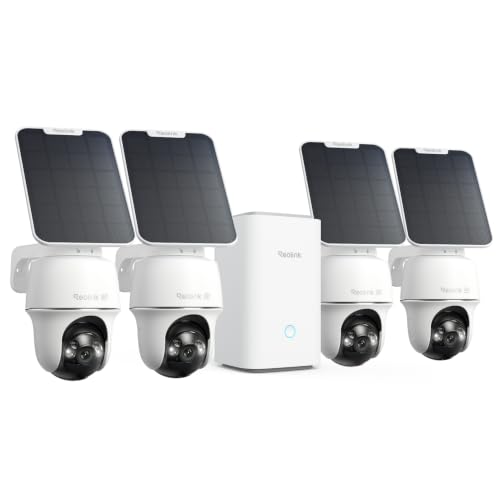
Pros
- Sharp 4K 8MP video with spotlight color night vision
- Wide 355-degree pan and 140-degree tilt coverage
- Dual-band 2.4GHz and 5GHz Wi-Fi flexibility
- Smart detection identifies people, vehicles, and animals
Cons
- MicroSD card not included for local storage
- Dependent on outdoor Wi-Fi signal reach

Pros
- Dual-lens 3K video with 8x zoom up to 40 feet
- Removable solar panel provides continuous wire-free power
- HomeBase S380 hub with expandable local storage to 16TB
- Full 360-degree pan and tilt with AI motion tracking
Cons
- Must be mounted vertically to achieve complete coverage
- Dual-lens visual clarity capped at 40 feet of range

Pros
- True 4K resolution reads plates up to 33 feet
- Motorized pan and tilt provides 360-degree coverage
- HomeBase 3 included with expansion up to 16TB
- AI tracking follows people and vehicles automatically
Cons
- MicroSD card not included for on-device storage
- Requires two hours of direct daily sunlight
Local storage is the first privacy decision
A camera that records to a microSD card can keep everyday clips on your property instead of relying entirely on a subscription service. The Kasa 1080p Indoor Pan/Tilt Wired Security Camera supports local recording up to 256GB, while the Tapo 2K+ Indoor/Outdoor Wired Security Camera and Tapo 2K Indoor/Outdoor Wired Security Camera support cards up to 512GB.
Multi-camera systems shift storage to a hub or expandable local system. REOLINK Argus PT Ultra 4K Solar Security Camera supports local storage expansion up to 1TB by two cards, while eufy Security SoloCam E340, 4-Cam Kit includes HomeBase 3 with expandable storage up to 16TB. That arrangement can suit larger properties where keeping several camera feeds together matters.
Pro Tip: Choose a card or storage setup only after checking the model’s stated capacity and compatibility guidance. Keep firmware updated through the manufacturer’s app when updates are available.
Match coverage to the location
Indoor monitoring favors compact wired cameras with pan and tilt. The Kasa model is suited to rooms where you want 1080p video, motion and sound alerts, night vision, two-way audio, and the ability to watch a baby or pet from the app.
For exposed positions, the Tapo 2K+ Indoor/Outdoor Wired Security Camera has an IP66 rating, while the Tapo 2K Indoor/Outdoor Wired Security Camera has an IP65 rating. The REOLINK and eufy kits are wire-free and solar powered, making them more appropriate when running a cable to several outdoor positions would be inconvenient.
Pan and tilt can reduce blind spots, but coverage still depends on where you mount the camera. REOLINK offers 355-degree pan and 140-degree tilt, while both eufy kits provide 360-degree pan and tilt coverage. For more placement context, see this explanation of what security camera lights mean.
Protect the account: Do not treat local storage as a substitute for account security. Use the official app, keep firmware current, and avoid exposing a camera or storage hub through an unnecessary network configuration.
Detection features affect privacy as well
Useful detection can reduce the amount of footage you need to review, but it is worth choosing alerts that match the space. Tapo C121 identifies people, pets, or vehicles, while C113 identifies people, motion, and baby cries and lets you define activity and privacy zones.
The outdoor kits add tracking and broader coverage. REOLINK identifies people, vehicles, and animals, while the eufy SoloCam E42, 4-Cam Kit adds AI facial recognition, motion tracking, and a strobe light. Facial recognition deserves extra consideration because it changes what information the system processes; this article on facial recognition in security cameras explains the distinction.
Expert Examined
From Dana Whitfield

I keep seeing homeowners place a camera where it captures too much of a shared room or neighboring area. I prefer setting privacy or activity zones first, then aiming the camera only at the doorway, crib, driveway, or other area that needs attention.
Read more about Dana WhitfieldFor broader security planning, the U.S. Consumer Product Safety Commission provides consumer safety information, but camera privacy settings remain a product and network responsibility.
Which camera fits your privacy priorities
I would point you to the Kasa 1080p Indoor Pan/Tilt Wired Security Camera for an indoor room, especially when a compact wired camera, app viewing, motion and sound alerts, and subscription-free microSD recording are the priority. Its 1080p resolution keeps the setup straightforward without requiring a multi-camera hub.
For an outdoor position with stronger detail, I would choose the Tapo 2K+ Indoor/Outdoor Wired Security Camera. Its IP66 design, 2K video, person, pet, and vehicle detection, privacy-friendly local storage option, and color night vision make it a practical fit for a railing, frame, or other location with nearby power.
I would reserve the REOLINK Argus PT Ultra 4K Solar Security Camera for a larger property needing four wire-free cameras, solar power, 360-degree coverage, and centralized local storage without a monthly fee. If sharper 4K detail, facial recognition, and HomeBase expansion matter more, the eufy Security SoloCam E42, 4-Cam Kit is the more feature-heavy alternative.
The Bottom Line
The mistake most buyers make is assuming that a camera is private simply because it offers local storage. Privacy also depends on updated firmware, sensible app access, careful placement, and alerts that do not capture more of your home than necessary.
If you only do one thing first, decide where footage should live. Then select the camera whose storage format, power source, detection controls, and coverage pattern fit that location before considering extra features.
FAQs
Local storage can reduce reliance on cloud video storage, but it does not make an internet-connected camera impossible to compromise. Choose a model with local recording, keep its firmware updated, use the official app, and limit access to the people who need it. A compact wired pan-and-tilt camera is a practical fit for an indoor room because it can provide app viewing, motion alerts, night vision, and two-way audio. The Kasa model also supports sound detection and local microSD recording. Place it where the camera can cover the intended doorway, yard, railing, or driveway without recording unnecessary private areas. Weatherproof models are better suited to exposed positions, and privacy or activity zones can narrow what triggers alerts. The REOLINK and eufy outdoor kits are solar powered and designed for wire-free operation. Their solar features reduce cable and charging demands, but placement still matters because the camera and removable or included solar components need a suitable outdoor position. It refers to keeping recordings on local equipment rather than depending entirely on remote cloud storage, with protection applied to stored data. Check the individual product specifications because storage location, hub behavior, card support, and encryption features differ between models.Are local-storage security cameras safer than cloud cameras?
Which camera type is best for an indoor room?
Where should I place an outdoor security camera?
Do solar cameras need regular charging?
What does encrypted local storage mean?
Sources
- National Institute of Standards and Technology www.nist.gov
- U.S. Consumer Product Safety Commission www.cpsc.gov
- Federal Trade Commission www.ftc.gov