
Choosing the best security cameras for starlink means matching the camera system to your property layout, not simply chasing the highest resolution. The key split is whether you want wired PoE recording, long-range wireless coverage, or solar-assisted cameras, especially if your Starlink router sits far from the outdoor mounting points.

Pros
- 4K PTZ lens with 360° tracking
- 2K fixed lens, 115° viewing angle
- Local AI, no cloud or monthly fees
- 2TB HDD with 24/7 recording
Cons
- PoE wired installation required
- 5× zoom is digital, not optical

Pros
- 4K PTZ lens with 360° tracking
- 2-in-1 fixed and auto-tracking view
- Local AI processing, no cloud fees
- Pre-installed 4TB HDD for 24/7 recording
Cons
- PoE wiring required for installation
- 16-channel expansion needs a PoE switch

Pros
- 4K video for detailed coverage
- AI detection for people, vehicles, and faces
- Color night vision with reduced noise
- IP67 weatherproof design
Cons
- Requires Lorex Connect V-Series NVR
- Camera cable sold separately
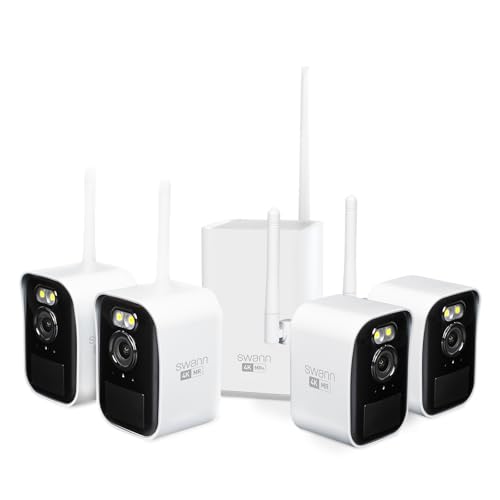
Pros
- Wi-Fi HaLow covers up to 1,000 feet line of sight
- 4K video capture with 50-foot color night vision
- Solar panels provide continuous outdoor power
- Free local storage on included 32GB microSD card
- True Detect plus senses heat, motion, and people
Cons
- Wireless reach drops to 330 feet through obstacles
- System expansion limited to 8 total cameras

Pros
- Sharp 4K video with 126-degree coverage
- AI detection tracks people and vehicles
- Color night vision via spotlight or ambient light
- IP67 weatherproofing rated down to -40 degrees
- Active deterrence with LED lights and siren
Cons
- Requires a Lorex V-Series NVR setup
- Ethernet camera cable sold separately
- Only compatible with Lorex Connect app

Pros
- 4K TrueColor night vision without floodlights
- Radar, PIR, and AI triple detection
- 360-degree pan-tilt with real-time tracking
- Solar panel with 9200mAh rechargeable battery
Cons
- Base station requires direct router Ethernet connection
- Optional 1TB expansion storage not included
Start With the Connection Path
Starlink can provide the internet connection, but the cameras still need a practical route to their recorder or base station. PoE systems use one cable for power and video, which can be a strong fit when you can run cable from the NVR to each mounting location. The eufy Security kits are built around this approach.
Wireless systems reduce cable runs, but distance and obstacles still matter. Swann uses Wi-Fi HaLow and lists coverage up to 1000 feet in line of sight or 330 feet through obstacles, while aosu cameras connect wirelessly to an aosuBase that connects to your router through Ethernet.
Before buying, identify where the Starlink router or network connection will sit, then mark the camera locations. An NVR near the network equipment may simplify management, while a wireless base station may be more practical for a detached garage, driveway, or large yard.
Pro Tip: Map the router, recorder, base station, and camera locations before mounting anything. This exposes cable lengths and wireless obstacles while changes are still easy.
PoE, Long-Range Wireless, or Solar
PoE is the most structured option in this group. The eufy Security NVR System E50, 4-Cam Kit,4K includes a 2TB hard drive and supports 24/7 recording, while the 8-camera kit includes a 4TB drive. Both support local AI processing, smart video search, and expansion up to 16 channels through a PoE switch.
Swann is aimed at properties where traditional Wi-Fi range could be a concern. Its cameras are wireless, use Wi-Fi HaLow, and include solar panels described as forever charged. The system includes local storage and can support up to eight cameras, making it a practical direction for broad outdoor coverage without running video cables to every camera.
aosu takes a different route for homes that want wireless cameras with solar assistance. Its two-camera kit includes 32GB local storage, supports expansion up to 1TB, and uses radar, PIR, and AI detection. The system supports up to six cameras and provides 360-degree coverage with auto tracking.
| Connection type | Defining feature | Suitable placement |
|---|---|---|
| PoE NVR | Wired recording | Fixed cable routes |
| Wi-Fi HaLow | Long wireless range | Large outdoor properties |
| Solar wireless | Low-maintenance power | Yards and driveways |
Recording and Night Coverage Matter More Than Resolution
A 4K label does not tell you how footage will be stored or searched. Eufy provides a pre-installed hard drive and on-device AI, while Swann records locally to a 32GB MicroSD card with free recording. aosu also keeps footage locally, with encrypted storage that can be expanded.
Night coverage varies by design. The eufy cameras combine a fixed 2K lens with a 4K PTZ lens, color night vision, 360-degree tracking, and 5x digital zoom. Swann uses color video with spotlights and black-and-white viewing in complete darkness. The Lorex add-on cameras use color night vision, deterrence lighting, and AI detection for people and vehicles.
Storage also affects how quickly you can find an event. Eufy’s smart video search can look for people, vehicles, pets, or specific faces without scrolling through hours of footage. For background on recorder terminology, see the explanation of NVR and DVR systems.
Before You Mount It: Confirm that a Lorex add-on camera matches the new Lorex Connect app and the compatible V-Series NVR. The listed Lorex models are not interchangeable with the Lorex Classic app, and one version requires its camera cable to be purchased separately.
Expert Examined
From Jenna Castellano

I keep seeing the same installation mistake: the camera location is chosen first and the network route is considered later. Marking the recorder, router, cable path, and viewing angles together usually prevents an expensive repositioning job.
Read more about Jenna CastellanoWeather, Deterrence, and Two-Way Talk
Outdoor placement calls for more than a clear view. Both listed Lorex Connect cameras have IP67 weatherproofing, while their features include color night vision, AI detection, two-way talk, and lighting or siren deterrence. The newer V5 model also identifies faces and supports alerts for line crossing, intrusion, and tampering.
Swann adds microphones, speakers, spotlights, sirens, and True Detect for heat, motion, people, and vehicles. Eufy uses red and blue strobe deterrence, while aosu offers customizable activity zones and light and sound warnings. These features can help you react to activity, but they should not replace careful camera positioning.
For privacy-sensitive households, local processing and local storage deserve close attention. Eufy states that facial recognition, smart search, and cross-camera tracking happen on-device without cloud dependency or monthly fees. You can also read about facial recognition in security cameras before enabling related features.
Check the UL Solutions resources for general product safety information, but rely on each product’s own documentation for compatibility, installation, and weather-use limits.
Which System Fits Your Property
I would put the security camera category options into three practical groups. For a large property where you can run cable, I would point you to the eufy Security NVR System E50, 8-Cam Kit. Its eight cameras, 4TB drive, 24/7 recording, cross-camera tracking, and expansion to 16 channels suit a home with several fixed coverage zones and a planned PoE route.
For a smaller wired deployment, I would choose the eufy Security NVR System E50,4-Cam Kit,4K. It keeps the same dual-lens concept, local AI, smart video search, and 24/7 recording while starting with four cameras and a 2TB drive.
If cable installation is the main obstacle, I would point you to the Swann MaxRanger Mini Kit 4K Wireless NVR Security for a broad yard, detached garage, or long driveway. Its Wi-Fi HaLow range, solar panels, local recording, and support for up to eight cameras address the practical problems of distance and outdoor power. For a smaller solar-assisted setup, the aosu T2 Ultra 4K Camera for Home Security adds 360-degree auto tracking, local storage, and vehicle detection.
The Bottom Line
The mistake most Starlink camera buyers make is treating internet service and camera connectivity as the same thing. Starlink may provide the household connection, but each camera still needs a dependable wired route, wireless link, or base station path.
Start by drawing the camera locations and measuring the route back to the router, NVR, or base station. Once that path is clear, choose PoE for structured recording, Wi-Fi HaLow for long outdoor distances, or solar wireless cameras where cable and power access are difficult.
FAQs
They can use a Starlink connection when the camera system can connect through the available router or base station arrangement. The important step is confirming the camera’s network architecture, since some systems use PoE to an NVR while others connect wirelessly to a dedicated base. PoE cameras can suit a Starlink home when you can run cable between the NVR or PoE switch and the mounting locations. They provide power and video through one cable and can support continuous local recording, but installation planning matters more than the satellite service itself. Mount cameras where the intended view is clear and the connection route is practical. Check the distance to the NVR or base station, account for walls and other obstacles, and avoid placing the lens where lighting, overhangs, or nearby surfaces block useful footage. Solar-assisted cameras reduce the need for routine charging, but the panel and lens still need to remain clear of dirt, leaves, and other obstructions. You should also review storage capacity, alerts, and camera positioning periodically. IP67 is an enclosure rating associated with dust protection and water resistance under defined conditions. It does not explain every installation limit, so check the manufacturer’s instructions for mounting, cable protection, temperature, and exposure requirements.Do security cameras work with Starlink internet?
Are PoE cameras a good choice for a Starlink home?
Where should outdoor Starlink cameras be mounted?
Do solar security cameras still need maintenance?
What does IP67 mean for an outdoor camera?
Sources
- UL Solutions product safety information. www.ul.com
- Federal Communications Commission consumer information. www.fcc.gov