
Finding the best security cameras for privacy requires deciding between cloud feeds that broadcast outside your home and local storage hardware that keeps video on your property. Cloud-based video accounts expose footage to remote server breaches, while offline storage protects personal spaces from outside eyes. Homeowners prioritizing digital boundaries must evaluate physical lens covers and local memory options.
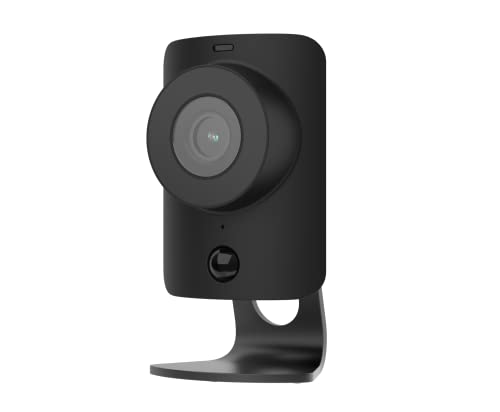
Pros
- 1080p HD resolution with 120-degree view
- Built-in stainless steel privacy shutter
- Two-way audio to speak with visitors
- Night vision for low-light monitoring
Cons
- Requires continuous AC power and Wi-Fi
- Indoor use only, not weather-rated
- Video verification requires Fast Protect plan

Pros
- 1500-lumen dimmable floodlight with 2K video
- 360-degree pan and tilt with AI motion tracking
- Subscription-free local storage up to 512 GB
- IP65 weather-resistant housing for rain and snow
Cons
- Requires hardwired power rather than battery setup
- Limited to 2.4 GHz Wi-Fi networks

Pros
- SolarPlus charging requires only two hours of daily sun
- Full 360-degree pan and tilt with AI subject tracking
- Clear 2K resolution paired with an f/1.6 aperture
- Local storage expandable up to 16TB without monthly fees
Cons
- MicroSD card not included for local storage
- Restricted to 2.4GHz Wi-Fi networks only

Pros
- 900MHz Wi-Fi HaLow, up to 1000ft line of sight
- Local 32GB base station, no monthly subscription fees
- True Detect+ AI senses heat, motion, people, and vehicles
- Night2Day color night vision plus infrared coverage
- Active deterrence with siren, sensor lights, and two-way talk
Cons
- Manual USB-C recharging required without optional solar panels
- Included MicroSD card limited to 32GB capacity
- Wireless range drops to 330 feet through obstacles
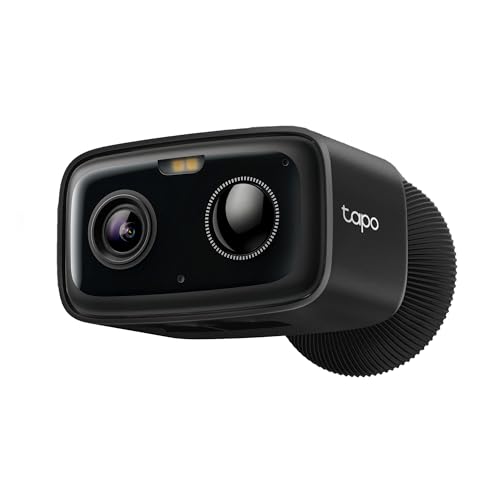
Pros
- Up to 180-day battery from 5200mAh cell
- Subscription-free on-device person detection alerts
- Local storage option up to 512GB microSD
- IP65 weather resistance against rain and dust
- Full-color night vision with 1080p resolution
Cons
- MicroSD card sold separately for local storage
- Cloud video history requires paid Tapo Care

Pros
- Removable solar panel with two hours daily charging
- Full 360-degree pan and tilt with smart AI tracking
- Clear 2K video with bright f/1.6 aperture
- Subscription-free local storage up to 128 GB
Cons
- MicroSD card not included in the box
- Supports only 2.4GHz Wi-Fi networks
Physical Shutters Versus Digital Disabling
Software switches inside mobile applications do not guarantee that an indoor lens stops recording. A physical barrier provides an unmistakable visual indicator that video capture is completely blocked. When you host guests or relax in private quarters, relying on a mechanical cover eliminates doubt about accidental transmissions.
Cameras without physical covers remain powered and connected to network infrastructure. Even if an application displays an inactive status, background processes or unexpected firmware bugs might still stream metadata. You can learn more about hardware activity by reading what do the lights on a security camera mean during active recording cycles.
Heads Up: A camera turned off only through software remains vulnerable to remote viewing if an account suffers unauthorized access.
Local Storage Architecture and Network Exposure
Local storage retains footage on microSD cards or in-house base stations rather than transmitting continuous clips to external hosting platforms. Storing recordings on your own hardware drastically reduces vulnerability to internet-wide credential leaks. The Federal Trade Commission advises that IoT hardware should limit unnecessary cloud broadcasts to minimize data interception.
Standalone systems operating on proprietary low-frequency protocols offer another layer of isolation. By keeping video transmissions off the standard home network, these devices avoid congestion and stay hidden from network snooping tools. For enterprise-level storage concepts that keep files off the public web, exploring what is an NVR and how is it different from a DVR provides valuable perspective.
| Storage Type | Network Path | Privacy Level |
|---|---|---|
| Built-in MicroSD | Direct to card | High isolation |
| Base Station | In-house hub | High isolation |
| Cloud Subscription | Remote servers | Exposed to leaks |
Expert Examined
From Dana Whitfield

The mistake I see most often is placing cloud-reliant indoor cameras in primary living spaces without checking whether motion detection runs on the chip or on a remote server. If the processing happens off-site, your daily routines are constantly uploading to external computers.
Read more about Dana WhitfieldSmart Detection and Boundary Masking
Modern cameras frequently process motion using smart algorithms to identify humans, vehicles, or pets. Understanding whether this artificial intelligence evaluates frames directly on the camera hardware or uploads snapshots to the cloud is vital. You should verify whether devices support do security cameras have facial recognition before placing them in sensitive family areas.
Outdoor cameras equipped with pan and tilt features can unintentionally monitor adjacent properties. Setting up privacy masking zones within the management software blinds specific coordinates, such as a neighbor’s window or swimming pool. This practice prevents community disputes while keeping surveillance strictly focused on your own entry points.
Pro Tip: Configure customized activity zones to stop motion sensors from scanning beyond your property line.
Choosing the Right Hardware for Your Home
For living rooms and high-traffic interior spaces, I would point you to the SimpliSafe SimpliCam 1080p Wired Indoor Home. Its mechanical stainless steel privacy shutter physically closes over the lens, making it obvious to everyone in the room when monitoring is disabled. If you need complete whole-property outdoor surveillance without third-party subscriptions, I recommend the eufy Security SoloCam E30, 4-Cam Kit. It combines solar charging with local storage expandability, storing your driveway and yard footage right on your property without requiring cloud uploads.
If your priority is covering distant perimeter gates without exposing video traffic to your standard home network, the Swann MaxRanger4K™ Mini Long-Range is my preferred selection. Its dedicated Wi-Fi HaLow base station uses a private long-range signal and stores video directly on a local card, keeping remote access completely off crowded wireless channels. Each of these models keeps surveillance assets under your physical control.
The Bottom Line
The biggest mistake buyers make is assuming that password protection alone ensures privacy while sending continuous video streams to cloud servers. Cloud-dependent cameras remain susceptible to third-party outages, policy changes, and credential stuffing attacks that can compromise sensitive recordings.
If you take only one action, switch your setup to local storage recording and activate physical shutters on any cameras stationed indoors. Establishing physical control over video files and lenses eliminates digital exposure and protects private household routines.
FAQs
Can hacked security cameras watch you without showing an active light?
Yes, sophisticated firmware exploits can disable the status indicator while leaving the sensor active. A physical shutter or unplugged power cable remains the only absolute safeguard against unauthorized video capture.
Is local storage truly safer than cloud storage?
Local storage keeps your video files inside your house on a microSD card or hub, preventing unauthorized remote access through cloud server data breaches. However, you must secure the physical storage unit so an intruder cannot steal the memory card.
What is a privacy masking zone on outdoor cameras?
A privacy masking zone is a blacked-out digital boundary that prevents the camera from viewing or recording specific areas. This feature helps prevent capturing neighboring properties, public sidewalks, or bedroom windows.
Do security cameras need continuous internet access to record locally?
Many local storage cameras can record motion events directly to internal cards without an active internet connection. You only require internet access if you wish to receive remote alerts or view live feeds away from home.
Sources
Sources
- Federal Trade Commission www.ftc.gov
- Cybersecurity and Infrastructure Security Agency www.cisa.gov