
Finding the best security cameras for home protection hinges on where power outlets sit and how much footage you plan to store locally without monthly cloud fees. Renters often need unobtrusive glass-mount units, while homeowners monitoring wide acreage require motorized tracking and weather-sealed housings.

Pros
- Full 360-degree pan and 90-degree tilt coverage
- Pre-installed 64GB SD card with no subscription
- Dual-band 2.4GHz and 5GHz Wi-Fi connectivity
- Built-in AI detection for humans and pets
Cons
- App restricted to United States and Canada
- Not suitable for pointing through window glass
- AI video summaries require optional Pro membership

Pros
- 2K indoor video for detailed room checks
- 2.4GHz or 5GHz Wi-Fi support
- AI person and pet detection without subscription
- 49-foot infrared night vision
Cons
- Plug-in indoor use only, no battery
- Fixed lens lacks PTZ or 360-degree rotation
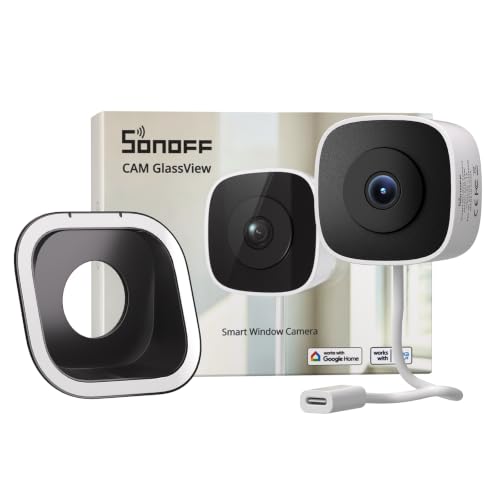
Pros
- No-drill, stick-on installation
- 2K video with color night vision
- Local web console, RTSP, and ONVIF
- Up to 128GB microSD storage
Cons
- Requires indoor window-glass placement
- Needs a power connection

Pros
- 2K resolution with automatic spotlight color night vision
- Local microSD recording up to 128GB without a subscription
- IP65 weatherproof housing rated down to minus 20 degrees
- PIR motion sensing range of 25 to 30 feet
Cons
- AI recognition and activity zones require a subscription
- Incompatible with Alexa, Google Assistant, and 5GHz WiFi
- Internal battery is non-replaceable by the user
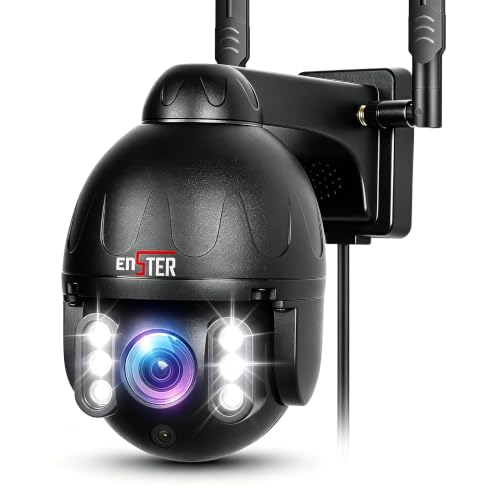
Pros
- 150-foot full-color night vision via 6 LEDs
- Dual-band 2.4G and 5G Wi-Fi transmission
- All-metal IP66 weatherproof exterior casing
- 355-degree pan and 90-degree tilt with 4X zoom
Cons
- App controls restricted to the CamHiPro platform
- Local storage requires buying a separate micro SD card

Pros
- No-drill glass installation with three brackets
- 2K resolution with Starlight color night vision
- Dual-band 2.4GHz and 5GHz Wi-Fi
- Standard ONVIF and RTSP compatibility
Cons
- MicroSD card not included
- Cloud storage requires paid subscription
- Offline AP hotspot range limited to 15 meters
Power Delivery and Recording Schedules
Battery-powered units preserve perimeter siding because they require zero cabling, but they only record short clips triggered by passive infrared sensors. Frequent sidewalk motion rapidly depletes lithium cells and risks missing context before an incident begins. Permanent plug-in hardware enables 24/7 continuous timelines that capture every second around an entryway.
Continuous indoor recording relies on high-endurance microSD cards or network storage to avoid gaps. If you plan to link multiple streams into a centralized hub, learning what is an NVR and how is it different from a DVR helps determine whether standard ONVIF streaming fits your home infrastructure.
Battery Drain Warning: Placing a battery camera toward a high-traffic street causes dozens of false wakes each hour, flattening a three-month charge in less than two weeks.
Indoor Placement and Glass Reflections
Pointing a standard indoor lens through a window pane creates severe nighttime glare once infrared emitters turn on. The bouncing light blinds the sensor, leaving exterior walkways pitch black on video. Window-specific designs resolve this by pressing flush against interior glass and relying on ambient illumination or starlight sensors for full-color night viewing.
Understanding what do the lights on a security camera mean is essential when placing indoor cameras on sills or desks. Status indicators can reflect against windowpanes or alert visitors, so disabling software LEDs ensures discreet surveillance without compromising frame visibility.
| Camera Type | Power Type | Ideal Location |
|---|---|---|
| Window Mount | Plug-in USB | Interior sills |
| Battery Outdoor | Rechargeable | Remote fences |
| PTZ Outdoor | AC Hardwired | Driveway corners |
Expert Examined
From Ray Okafor

I see homeowners position indoor cameras on high shelves tilted down toward windows, only to get solid white glare after sunset. A dedicated glass-mount bracket with the status lights switched off in the app prevents nighttime reflection completely.
Read more about Ray OkaforNetwork Reliability and Local Protocol Support
Congested 2.4GHz spectrums struggle in dense neighborhoods where neighboring routers compete for bandwidth. Upgrading to hardware with dual-band 5GHz connectivity keeps high-bitrate 2K and 5MP video smooth during live checks. The Federal Communications Commission (FCC) regulates these consumer frequencies to prevent interference across household electronics.
Proprietary cloud platforms often lock video behind recurring paywalls. Selecting hardware that features RTSP or ONVIF streaming lets you archive footage directly to a personal server or home automation system without third-party subscriptions. Knowing whether is security camera footage admissible in court reinforces the importance of storing clear, timestamped video on local storage drives.
Pro Tip: Assign static IP addresses to ONVIF and RTSP cameras inside your router settings to prevent streaming feeds from dropping off your local network dashboard.
Matching Cameras to Your Property Layout
For apartment renters who cannot drill through exterior brickwork, I would point you to the SONOFF CAM GlassView 3MP 2K Window Camera. Its stick-on interior mount avoids outdoor wiring while the anti-reflection bracket peers through double-pane glass without blinding night glare, pairing directly with Home Assistant via RTSP.
For broad yard coverage, I suggest the ENSTER 2.4/5G Security Camera Outdoor over plastic options. Its metal housing weathers freezing rain, while 355-degree motorized panning and dual-band networking eliminate blind spots across deep driveways.
If you prefer an indoor nursery or living room monitor, the SensForge 2.5K Indoor Pan-Tilt Security Camera provides 360-degree room panning, pet detection, and an included 64GB memory card so you avoid monthly fees right out of the box.
The Bottom Line
The biggest mistake buyers make is purchasing battery-operated hardware for high-traffic zones expecting continuous recording. Battery units conserve energy by sleeping between motion spikes, which frequently truncates crucial moments and requires inconvenient recharging cycles.
Start by auditing your exterior power outlets and Wi-Fi signal strength at each mounting location before buying hardware. Running a continuous-power line or choosing a dedicated window-mount alternative ensures dependable, uninterrupted coverage without dead-battery blind spots.
FAQs
Can indoor cameras record through double-pane window glass?
Standard indoor cameras reflect their infrared LEDs off glass at night, blinding the lens. Window-specific cameras eliminate this issue by using specialized anti-glare brackets, flush suction mounting, and ambient starlight sensors that operate without infrared bounce-back.
How much local storage is needed for 24/7 security recording?
A 2K resolution stream recording continuously requires approximately 20 to 30 gigabytes of storage space per day. A 128GB or 256GB endurance microSD card provides roughly five to ten days of continuous footage before rewriting older video loops.
Why do dual-band 5GHz cameras matter for home security?
The common 2.4GHz wireless band easily becomes saturated by smart plugs, neighboring routers, and appliances. Dual-band models can connect to 5GHz Wi-Fi, providing faster data throughput and reduced latency when streaming high-resolution 2K or 5MP feeds.
What is the difference between PIR motion and AI detection?
Passive infrared sensors react broadly to heat changes from moving objects like cars, branches, and animals. AI detection analyzes the pixel shapes in real time to categorize movement specifically as humans, pets, or packages, drastically lowering false alerts.
Sources
- Federal Communications Commission www.fcc.gov
- UL Solutions Standards www.ul.com