
Finding the best security cameras for Google Home means deciding between native Nest intelligence and third-party models with local storage. Buyers looking to view live feeds on a Nest Hub or automate events need to know which hardware streams smoothly and which models introduce delays.

Pros
- Sharp 3K 5MP video with color night vision
- Complete 360-degree pan and tilt motion tracking
- Subscription-free detection for people, pets, and vehicles
- Weatherproof IP65 housing fits indoor or outdoor use
- Local microSD storage supports cards up to 512GB
Cons
- Operates exclusively on 2.4 GHz Wi-Fi bands
- MicroSD card must be purchased separately
- Mandatory setup through the proprietary Tapo app
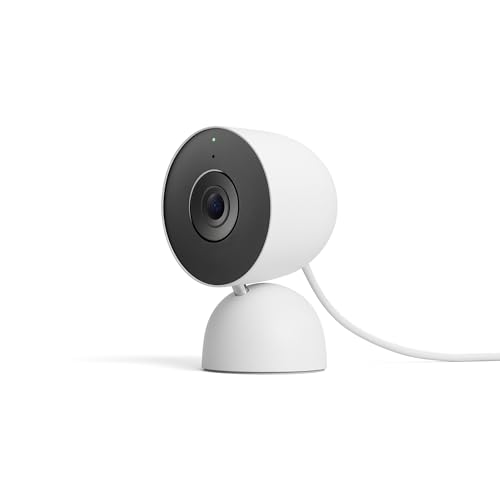
Pros
- Sharp 2K HDR video with color night vision
- Taller and wider field of view
- Encrypted video with two-step verification
- Green LED status light indicates active streaming
Cons
- Advanced Gemini AI features require paid subscription
- Wired power cord restricts placement near outlets
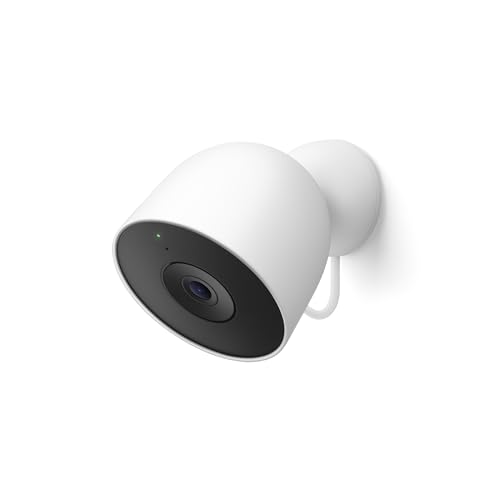
Pros
- Crisp 2K HDR video with wide field of view
- Continuous wired power eliminates battery maintenance
- Color night vision for dark outdoor areas
- Encrypted video with physical green status LED
Cons
- Gemini AI features require paid subscription
- Wired power cord requires nearby outdoor outlet

Pros
- Crisp 4K resolution with 18x zoom
- Full 360-degree pan and tilt coverage with auto-tracking
- On-device AI detection without subscription fees
- Supports local microSD storage up to 512GB
Cons
- Requires wired power source for outdoor operation
- Facial recognition not available in Illinois or Texas
- MicroSD card must be purchased separately

Pros
- Plugs into power for constant operation
- Weatherproof design for outdoor elements
- Motion and loud sound alerts
- Two way audio with speaker and mic
Cons
- Requires proximity to an electrical outlet
- Short three hour free cloud storage

Pros
- Two cameras with 360-degree pan and 180-degree tilt
- Clear 2K resolution with WDR and color night vision
- Dual integrated spotlights with loud 98dB siren
- IP65 weather resistance for indoor and outdoor mounting
Cons
- Incompatible with 5GHz Wi-Fi connections
- MicroSD card sold separately for local storage
- Descriptive AI alerts require Cam Unlimited Pro
Native Nest Integration Versus Third-Party Casting
Native Google Nest hardware integrates directly into the Google Home ecosystem without linking secondary cloud accounts. When a native camera spots movement, alerts route immediately to your mobile device and can trigger smart home routines without third-party skill bridges.
Third-party alternatives from brands like Tapo and WYZE link through Google Assistant partner services. While they support casting live footage to smart displays, event detection usually stays inside their proprietary apps unless specifically mapped to Google routines. If you want on-device intelligence without subscription fees, reviewing how security cameras use facial recognition locally can save you money.
Streaming Latency Trap: Third-party cameras routed through partner clouds can take five to ten seconds longer to load on a Nest Hub display than native Nest hardware. If instant gate or doorway monitoring is your priority, factor in this display buffer.
Power Architecture and Wi-Fi Stability
Continuous recording demands reliable power delivery, which is why wired indoor and outdoor units remain the backbone of Google Home setups. Running continuous feeds over Wi-Fi requires solid bandwidth, especially if you deploy 2K or 4K streams across multiple rooms. Verifying proper wireless channels prevents dropped connections during high-traffic hours.
Dual-band Wi-Fi support helps offload video streams from congested 2.4 GHz bands to cleaner 5 GHz channels. For whole-home coverage, you can check general security cameras to see how hardware choices influence data transmission across residential walls. Camera status indicators also reveal connectivity drops, so it helps to know what the lights on a security camera mean before mounting hardware up high.
| Feed Type | Power Source | Best Location |
|---|---|---|
| Native 2K | Fixed AC Cord | High-Traffic Entries |
| Third-Party 4K | Fixed AC Cord | Driveways and Yards |
| Dual-Lens Pan | Fixed AC Cord | Wide Open Patios |
Expert Examined
From Ray Okafor

The mistake I see most often is placing a pan-tilt camera too high on an exterior wall. If you mount it above ten feet, the downward tilt angle distorts facial angles and causes vehicle detection to miss low-profile cars.
Read more about Ray OkaforStorage Formats and Ongoing Subscription Costs
Google Nest hardware stores video history in the cloud, relying on Google Home Premium tiers to unlock Gemini summaries and long-term event archives. This architecture protects your recorded clips even if someone physically damages the outdoor hardware during an intrusion. Devices certified through standard electrical protections, such as those evaluated by UL Solutions, maintain safe outdoor power operation in extreme temperatures.
Budget-friendly alternatives prioritize local storage via microSD cards holding up to 512 GB of video. Local storage eliminates ongoing monthly service costs while retaining full-resolution footage on the device itself. Homeowners weighing standalone cards against centralized network recorders should review what an NVR is and how it differs from a DVR before finalizing a whole-property layout.
Pro Tip: Format large microSD cards directly inside the manufacturer companion app before mounting the camera outdoors, as default card formatting can trigger read errors on smart home hubs.
Matching the Hardware to Your Google Household
For primary entryways and interior spaces where Google Home is your primary dashboard, I would point you to the Google Nest Cam Indoor (Wired, 3rd Gen). Its 2K HDR stream, wide field of view, and native Gemini event summaries make it the cleanest option for monitoring high-traffic living areas without third-party app hopping.
When you need wide-area exterior coverage without ongoing service fees, I would put the Tapo 4K Wired Pan/Tilt Outdoor Security Camera over a driveway or detached garage. The 4K resolution provides significant digital zoom clarity, while the dual-band Wi-Fi connection and local person detection deliver rapid tracking without requiring cloud subscriptions.
If you want to eliminate blind spots on an open patio on a strict budget, the WYZE Duo Cam Pan Indoor/Outdoor IP65 2K 360° is my suggestion. Its dual-camera setup keeps a stationary view on the entryway while the motorized lens tracks motion across the yard, giving you dual-angle awareness inside the Google ecosystem.
The Bottom Line
The single thing most buyers get wrong is assuming any camera labeled as working with Google Assistant will behave identically to a first-party Nest unit. Third-party devices provide exceptional resolution and local storage value, but they cannot match the frictionless smart display pop-ups and instant routine triggers found on native Nest hardware.
If you only do one thing, audit your home Wi-Fi signal at the exact physical spot where you intend to mount the camera. Even the highest-resolution camera will stutter or refuse to cast to your Google Nest Hub if the local wireless signal drops below usable bandwidth thresholds.
FAQs
Do third-party cameras announce person alerts on Nest Mini speakers?
No, third-party cameras generally do not chime on Google smart speakers when they detect motion. While native Google Nest cameras broadcast spoken visitor announcements across Nest Hub and Mini units, third-party models restrict their automated push notifications to their own companion mobile apps.
Can you stream Google Home security cameras on a Chromecast?
Yes, you can issue voice commands to stream live camera feeds directly to any Chromecast-enabled television. Both native Nest cameras and linked third-party models from Tapo or WYZE support this function, though third-party streams may take slightly longer to handshake and load on screen.
Are wired security cameras better than battery models for Google Home?
Wired cameras are significantly more reliable for Google Home users because they eliminate battery conservation sleep cycles. Plugged-in hardware stays connected to your wireless network continuously, ensuring instantaneous live stream start times and eliminating missed seconds at the beginning of detected movement events.
What happens to Google Home cameras during an internet outage?
Native Nest cameras will lose their live view capability during an internet cut, though some models cache short clips locally until connectivity returns. Third-party cameras equipped with physical microSD cards continue recording video locally to the card even while your home network connection is completely down.
Sources
- UL Solutions Standards Directory www.ul.com
- Federal Communications Commission Equipment Authorization www.fcc.gov