
Installing the best residential security systems with cameras protects entry points while giving you visual confirmation of why an alarm triggered. Homeowners often get stuck choosing between high-channel continuous video recording and modular wireless sensors built for perimeter defense. Matching the hardware layout to your home footprint ensures critical zones remain covered without signal dropouts.

Pros
- No monthly fees or subscriptions required
- Dual WiFi and 4G cellular alert channels
- Includes 22 pieces with camera and sensors
- Loud base siren rated over 110dB
Cons
- Incompatible with 5GHz wireless networks
- MicroSD storage card sold separately

Pros
- 1TB local hard drive with no subscription fees
- PIR heat and motion sensors reduce false alerts
- Integrated spotlights provide color night vision up to 32ft
- Expandable eight-channel DVR supports four extra cameras
Cons
- Physical wiring required for every camera connection
- Color night vision range limited to 32 feet
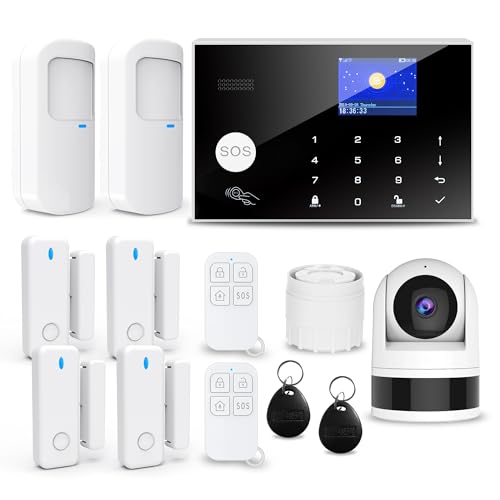
Pros
- Extensive 13-piece security kit
- Supports up to 100 sensors
- Dual WiFi and 2G connectivity
- Includes remote control and camera
Cons
- Requires legacy 2G network support
- Extensive initial installation time

Pros
- Pre-paired sensors require no initial manual syncing
- No mandatory monthly fees or subscription contracts
- Loud 120dB siren built into the touchscreen hub
- Dual 2.4GHz Wi-Fi and GSM cellular connectivity
Cons
- MicroSD card for video storage sold separately
- Cellular backup requires an independent SIM card

Pros
- Zero monthly monitoring subscription fees
- Loud 120dB alarm siren included
- Includes 1080P auto-tracking night vision camera
- Expandable up to 100 wireless sensors
Cons
- Incompatible with 5GHz Wi-Fi bands
- Cellular backup limited to 2G networks

Pros
- End-to-end encryption via HomeKit Secure Video
- Local in-home video analysis without cloud processing
- Smart motion detection distinguishes people from pets
- Dual-band 2.4 GHz and 5 GHz Wi-Fi compatibility
Cons
- Requires an Apple HomePod or Apple TV hub
- Requires an additional iCloud+ subscription plan
Wired DVR Architecture Versus Wireless Hub Systems
Wired video installations use coaxial cabling to pipe uninterrupted feeds directly into an on-site recorder. This setup bypasses household Wi-Fi congestion entirely and stores continuous 24/7 footage locally on a hard drive. If you are wondering what is an NVR and how is it different from a DVR, the primary difference lies in whether video processing happens inside the camera or at the central recorder box.
Wireless kits rely on battery-backed central hubs communicating with contact sensors, motion detectors, and standalone Wi-Fi cameras. These systems excel at quick perimeter notification, sounding a loud local siren and sending mobile pushes or automated phone calls if a contact opens. However, Wi-Fi cameras paired with wireless hubs usually record short event clips to an onboard memory card rather than maintaining continuous archives.
| System Architecture | Video Handling | Best Household Role |
|---|---|---|
| Wired Multi-Camera | Continuous 24/7 recording | Perimeter and driveway coverage |
| Wireless Hub Kit | Motion-triggered event clips | Entryway contact monitoring |
| Standalone Smart Cam | Secure encrypted clips | Single-room interior monitoring |
Dual-Path Connectivity and Power Reliability
A security platform is only as dependable as its link to the outside world during an incident. Wireless alarm hubs frequently feature dual-network pathways combining 2.4GHz Wi-Fi with cellular GSM or 4G SIM backup. If an intruder cuts exterior internet cables or local broadband drops, the hub falls back to mobile networks to dispatch phone calls and text alerts.
Network Frequency Trap: Most wireless security hubs and budget smart cameras only connect to 2.4GHz Wi-Fi bands. If your home router combines 2.4GHz and 5GHz under a single automated network name, pair the sensors manually on a dedicated 2.4GHz guest network to prevent dropped signals.
Wired DVR units operate continuously through local electrical circuits and keep writing to storage even if external internet goes dark completely. To prevent blind spots during utility failures, wire the recorder and power splitters into an uninterruptible power supply. You can also review what do the lights on a security camera mean to verify that infrared emitters and status indicators remain active after a power cycle.
Expert Examined
From Jenna Castellano

I frequently see homeowners point indoor motion sensors directly across from large sunlit windows. Rapid thermal changes from passing clouds heat the floor and trigger false alarms, so aim PIR sensors parallel to window walls rather than directly at the glass.
Read more about Jenna CastellanoSensor Zoning and Video Placement Strategies
Effective property defense requires separating entry detection from visual verification. Door and window contacts belong on ground-floor openings, basement egress points, and vulnerable side doors. Passive infrared sensors should monitor central hallways where an intruder must walk, rather than crowded utility rooms where heating appliances kick on unexpectedly.
Surveillance cameras require careful positioning to deliver actionable evidence rather than blurry shadows. Mount outdoor cameras high enough to prevent physical tampering while maintaining an angle that captures facial profiles instead of the tops of hats. The FCC sets strict guidelines on wireless interference, making physical placement and signal clearance crucial for reliable alert delivery.
Pro Tip: Position outdoor motion-sensing spotlights along entry paths so nighttime visitors illuminate their faces before reaching door locks, which transforms standard infrared views into detailed color recordings.
When selecting indoor placement, balance situational awareness against household privacy. Positioning a camera in a common entryway lets you confirm who disarmed the alarm panel without recording private living spaces. Homeowners interested in automated identification should read about whether do security cameras have facial recognition before deploying lenses inside private residential zones.
Matching the Hardware to Your Property Layout
For detached single-family homes with large yards and multiple exterior structures, I would point you toward the Swann Home/Business Wired DVR. Its 1TB local drive records four cameras around the clock without subscription overhead, while sensor spotlights deliver color night vision and heat-based motion filtering across wide driveways. If you plan to relocate in a few years, note whether are security cameras included when you sell a house so you know which wired components convey with the property.
For mid-sized houses requiring comprehensive perimeter warning, I would select the Wireless Home Security Systems,22Piece WiFi+4G App. The package includes a 2K camera alongside an extensive collection of contact switches and an emergency SOS button, while the 4G SIM backup ensures alerts go out even if home broadband fails. Dedicated Apple households wanting strict end-to-end encryption for indoor spaces should look at the Eve Cam Smart Indoor Camera, which offloads video analysis directly to an Apple home hub.
The Bottom Line
The single biggest mistake buyers make is purchasing an alarm kit without checking how the surveillance camera stores and surfaces event footage. A loud siren deters an active intruder, but without high-resolution recordings and sensible sensor zones, you are left without usable evidence after the alarm sounds.
Start by counting every exterior door and ground-level window that needs a physical magnetic contact. Once your perimeter threshold is mapped, select a camera configuration that covers your primary driveway and main entrance with reliable local storage.
FAQs
Do residential camera systems work during a power outage?
Wired DVR systems shut off during an outage unless connected to an uninterruptible power supply battery backup. Wireless alarm hubs typically feature internal rechargeable backup batteries that run the central siren and cellular alert dialer for several hours, though individual Wi-Fi cameras will drop offline if your home router loses power.
Can security camera footage be used as legal evidence?
Yes, clear residential video footage can be submitted to law enforcement and introduced during legal proceedings. Read more on how is security camera footage admissible in court to understand proper chain of custody, timestamp verification, and resolution requirements.
What is the difference between PIR motion detection and pixel motion detection?
Pixel motion detection analyzes changes between digital video frames, which causes frequent false alerts from headlights, shadows, and blowing leaves. Passive infrared sensors detect moving heat signatures from people and vehicles, dramatically cutting down phantom notifications.
Do these security systems require monthly subscription fees?
None of the featured hardware kits mandate recurring monthly fees for basic operation. Wired DVRs store video directly onto internal hard drives, while the wireless alarm kits support onboard microSD storage and send automated push notifications, phone calls, or texts without paid subscriptions.
Sources
- Federal Communications Commission Equipment Authorization www.fcc.gov
- National Electrical Manufacturers Association Security Standards www.nema.org