
Shopping for the best programmable smart thermostats gets easier once you identify the wiring and heating system first. The main split is between connected HVAC controls, battery-powered replacements, and specialty units for water-based floor heat, making this selection useful for homeowners comparing those specific needs.
Pros
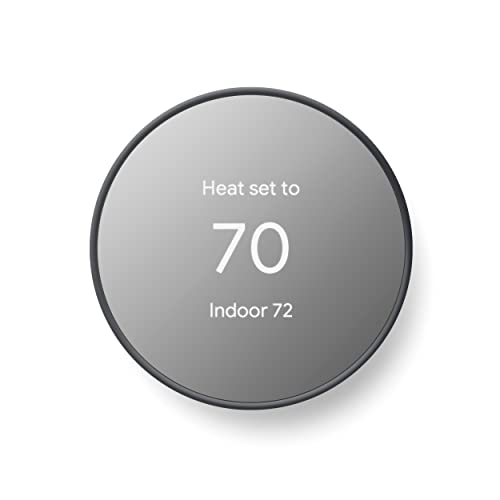
- ENERGY STAR certified for energy savings
- Remote control from phone, laptop, or tablet
- Programmable schedules in Google Home app
- HVAC monitoring with maintenance alerts
Cons
- C wire may be needed for some systems
- No lock feature for thermostat controls

Pros
- 7-day flexible scheduling
- Geofencing with automatic home and away
- ENERGY STAR certified
- Alexa ready
Cons
- C-wire power adapter required
- Limited with heating-only oil furnaces

Pros
- 7-day programmable scheduling
- Manual, automatic, and storage modes
- 0.5C temperature accuracy
- 95-240V, 16A support
Cons
- Wall-mounted installation required
- No app or remote control listed

Pros
- 5-2 day scheduling
- Large backlit display with clear font
- Battery powered, no C-wire required
- UWP wall plate simplifies installation
Cons
- Not compatible with electric baseboard heat
- Two AA batteries not included

Pros
- Plus or minus 1 degree accuracy
- Smartphone temperature control
- Seven-day programmable scheduling
- Touchscreen temperature display
Cons
- Requires compatible TUYA AC system
- Remote control depends on app access

Pros
- Color LCD shows room temperature and set point
- Programmable hourly schedule for warmer mornings
- Precise control for underfloor and boiler water heating
- Flame-retardant PC shell
Cons
- Focused on water-based heating systems
- No smart-home app or remote control listed
Start With System Compatibility
A smart thermostat is only a good fit if its electrical and HVAC requirements match your home. Google Nest Thermostat – Smart Thermostat for Home is designed to work without a C wire in most homes, while some systems require a C wire or compatible power accessory. Honeywell Home T5 Smart Wi-Fi Thermostat requires a C-wire power adapter, so wiring should be checked before purchase.
Not every model serves the same equipment. Honeywell Home X2P Programmable Thermostat supports one heat and one cool stage, hot water heat, and forced air, but it does not work with electric baseboard heat. Fafeicy Smart Thermostat is specifically built for underfloor and boiler water heating rather than general HVAC control.
Before You Wire: A missing or incompatible C-wire arrangement can prevent a thermostat from operating correctly. Confirm the existing system and power requirements before removing the current control.
| System type | Key requirement | Suitable direction |
|---|---|---|
| Connected HVAC | Wi-Fi or C wire | Google or Honeywell Home |
| Basic staged HVAC | 1 heat, 1 cool | Honeywell Home X2P |
| Water floor heat | Boiler water control | Fafeicy |
Choose Control Around Your Routine
Scheduling varies considerably across these models. Google Nest Thermostat – Smart Thermostat for Home lets you create an energy-efficient schedule in the Google Home app, adjust settings remotely, and receive schedule suggestions through Savings Finder. It also turns itself down when you leave and supports Google Assistant and Matter-certified voice assistants through compatible devices.
Honeywell Home T5 Smart Wi-Fi Thermostat offers either seven-day scheduling or location-based temperature control. Its geofencing feature uses your smartphone location for away and return changes, while monthly energy reports and personalized tips add another way to monitor household use.
For a simpler setup, Honeywell Home X2P Programmable Thermostat uses a 5-2 schedule and can also operate without programming. Walfront’s controller provides manual, automatic, programmable, and state-storage modes, while the Pyhodi unit combines app control with daily home, sleep, and away schedules.
Pro Tip: Write down the times and temperatures you actually use before choosing between seven-day, 5-2, and location-based control. A simpler schedule can be preferable if you rarely change routines.
For broader home energy information, the Smart Energy and Climate Control category provides related equipment context. Buyers comparing connected ecosystems may also want to consider whether Google Home control matters more than a standalone wall interface.
Match the Display and Installation Style
Display design matters if you adjust the thermostat at the wall. Honeywell Home X2P has a large screen, clear font, backlighting, custom display settings, and a filter reminder. Fafeicy Smart Thermostat uses a color LCD showing room temperature, set point, and working mode on one screen, which suits rooms where floor-heating status needs to be visible.
Walfront uses a sensitive LCD and includes screws with an ABS shell. Pyhodi focuses on a touchscreen LED display and app control, with stated temperature accuracy of plus or minus one degree Fahrenheit or Celsius. These are different priorities from the Nest and T5 models, which put more emphasis on phone-based scheduling and connected features.
Expert Examined
From Jenna Castellano

I keep seeing thermostat projects stall because the buyer chooses features before identifying the heating equipment. I would start at the existing wall control, record the system type and wire arrangement, then narrow the models by compatibility before considering app functions.
Read more about Jenna CastellanoEnergy labels also need careful interpretation. Google Nest Thermostat – Smart Thermostat for Home and Honeywell Home T5 are ENERGY STAR certified, while the other listed products have different feature descriptions and specialty applications. The ENERGY STAR program explains what its certification represents, but certification does not replace checking your system requirements.
Which Thermostat Fits Your Home
I would point you to Google Nest Thermostat – Smart Thermostat for Home if remote control, Google Home scheduling, occupancy-based setbacks, and HVAC monitoring are central to your decision. Its compatibility note is important, especially for heating-only, cooling-only, zone-controlled, and heat-pump systems where a C wire or compatible accessory may be needed.
I would choose Honeywell Home T5 Smart Wi-Fi Thermostat for a household that wants seven-day programming, geofencing, monthly energy reports, and possible utility demand-response participation. It is a stronger match when the home already has the required C-wire power arrangement and the equipment falls within its stated compatibility.
For a different room, I would put Fafeicy Smart Thermostat on the shortlist for underfloor or boiler water heating. Its programmable schedule, room-temperature readout, and stated focus on steady floor heat make it more appropriate for that application than a general connected HVAC thermostat. If you need a battery-powered, basic one-heat/one-cool replacement, Honeywell Home X2P is the more relevant direction.
The Bottom Line
The biggest mistake buyers make is treating every programmable thermostat as interchangeable. Wiring, heat source, staging, and whether the system uses forced air or water-based floor heat determine which models belong on your shortlist.
If you do only one thing first, identify the current system and C-wire situation before selecting a display or app. Then choose between connected scheduling, a simpler battery-powered control, or a specialty floor-heating thermostat.
FAQs
Fafeicy Smart Thermostat is built for underfloor and boiler water heating. Its schedule controls different target temperatures by hour and its display shows the current room temperature, set point, and working mode. Not always. Google Nest Thermostat – Smart Thermostat for Home is designed to work without one in most homes, while Honeywell Home T5 requires a C-wire power adapter and some Nest-compatible systems also need a C wire or another power accessory. Google Nest Thermostat – Smart Thermostat for Home and Honeywell Home T5 are ENERGY STAR certified. The certification identifies products that meet the program’s applicable energy-efficiency criteria, but it does not confirm compatibility with your HVAC equipment. A seven-day schedule suits changing weekday and weekend routines, while a 5-2 schedule is simpler for consistent workweeks. Location-based control can adjust settings through smartphone geofencing when supported by the thermostat.Which thermostat type suits underfloor heating?
Do smart thermostats need a C wire?
What does ENERGY STAR certification mean here?
What schedule should I choose?
Sources
- ENERGY STAR program www.energystar.gov
- US Department of Energy www.energy.gov