
Shopping for the best peephole cameras with motion detection means deciding how you want to verify activity: through an indoor display, a phone app, or both. Renters and apartment residents especially need a model that fits the existing peephole while balancing alerts, battery life, and privacy.

Pros
- 3MP 1080p video with 4.3-inch screen
- 160° wide-angle PIR motion detection
- Night vision for after-dark viewing
- 5000mAh rechargeable battery, 40 to 60 days
Cons
- MicroSD card not included
- Mobile alerts require app connectivity
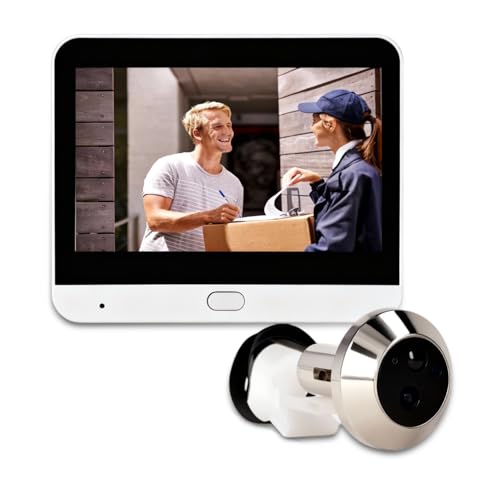
Pros
- 1080P camera with 120-degree wide-angle view
- PIR motion alerts and video recording
- 4.3-inch color monitor with AHD support
- 5000mAh battery with up to 30-day standby
Cons
- System functions require the mobile app
- Memory card for storage is not included

Pros
- 1080P video with 120° night vision
- PIR motion alerts within 2 meters
- 4.3-inch LCD monitor for quick viewing
- 5000mAh battery, 30-plus days standby
Cons
- Requires a compatible 16mm-plus peephole
- UBOX app required for smart management

Pros
- PIR motion detection with photo and video recording
- Night vision for after-dark viewing
- 2000mAh battery, up to 30 days standby
- Concealed anti-prying peephole design
Cons
- 640x480 recording resolution
- 90-degree viewing angle

Pros
- 3MP resolution with automatic day/night switching
- 90-degree wide-angle doorstep view
- PIR motion detection and body sensing
- USB-C charging with 30-day standby
- Supports memory cards up to 128GB
Cons
- Small 2.8-inch viewing screen
- Requires compatible door thickness and hole size

Pros
- 1080p HD video
- 4.3-inch color monitor
- 5000mAh rechargeable battery
- Two-way audio and night vision
Cons
- 2.4GHz Wi-Fi only
- PIR detection range limited to 1 to 2 meters
Match the Sensor to Your Entryway
Most of these devices use PIR motion detection, which looks for changes associated with a person rather than recording every passing shadow. Detection ranges vary by model: Yunseity Door Peephole Camera can notify the app when someone remains within 1 to 3 meters for five seconds, while Cawhum Peephole Camera for Apartment Front Door specifies alerts within 2 meters.
A wider lens is useful when visitors stand off-center or when the door opens onto a narrow landing. The Yunseity Door Peephole Camera provides a 160-degree diagonal view, while several alternatives use 120 degrees. The 90-degree models from FTVOGUE and YDuupxe are more limited, but their concealed designs may suit a straightforward entryway.
Pro Tip: Set PIR sensitivity after installation so normal hallway movement does not create unnecessary alerts.
Choose Between Local Screens and Phone Alerts
An indoor LCD screen lets you identify someone without opening an app. The Cawhum, HAPYTHDA, and Yunseity models include 4.3-inch color monitors, while the FTVOGUE and YDuupxe viewers use 2.8-inch displays. App-connected models add remote viewing, mobile notifications, and communication when you are away.
Storage is another important split. Several units support memory cards up to 128GB, while Cawhum also describes local and cloud storage. HAPYTHDA requires a Class 10 FAT32 card for recording and works only on a 2.4GHz network, so check your router settings before mounting it. For broader connectivity questions, see these steps for handling doorbell camera disconnections.
| Device type | Key distinction | Best placement |
|---|---|---|
| App plus LCD | Remote alerts and viewing | Apartments needing access away |
| LCD only | Local visitor check | Simple entryway monitoring |
| Concealed viewer | Less visible hardware | Privacy-focused door installations |
Measure the Door Before You Order
Peephole cameras are not universal. Cawhum fits doors 3 to 12 centimeters thick with peepholes of at least 16 millimeters, HAPYTHDA fits 35 to 115 millimeters, and YDuupxe fits 40 to 110 millimeters with a 16 to 45 millimeter hole. Confirm both measurements, along with clearance for the interior screen and battery.
Battery capacity also changes maintenance. The 5000mAh models advertise standby periods from 30 days to 60 days depending on the product, while the 2000mAh FTVOGUE and YDuupxe units advertise up to 30 days. These figures depend on activity, calls, alerts, and recording, so a busy hallway will require more frequent charging.
Before You Mount It: Do not cover the existing peephole or obstruct the door’s closing hardware. A tight fit can damage the door, reduce the camera view, or make emergency exit harder.
I keep the interior display close enough to reach without opening the door, but not where visitors can see private notifications through the glass or gap. The mistake I see is choosing the camera first and measuring the door afterward, so record the thickness and hole diameter before ordering.
Expert Examined
From Jenna Castellano

I have found that hallway lighting and door position often matter more than a headline resolution number. A camera aimed at a bright window or angled too high can produce an unhelpful view, so position the lens toward the visitor’s face and check night vision clearance.
Read more about Jenna CastellanoWhich Model Fits Your Door
I would point apartment residents toward the peephole camera category first, then consider Cawhum Peephole Camera for Apartment Front Door when the door matches its 3 to 12 centimeter fit range. Its 120-degree view, 4.3-inch screen, UBOX app, cloud and local storage options, and 5000mAh battery create a balanced setup for a shared apartment entrance.
I would choose Yunseity Door Peephole Camera for someone who wants the widest stated view and longer advertised standby time. Its 160-degree diagonal angle, three PIR sensitivity levels, 4.3-inch display, and recording during a network outage with a storage card suit a busy landing. For a simpler local screen and concealed design, I would point you to Digital Door Viewer, Night Vision PIR Motion, especially when a 90-degree view is sufficient.
The package security guidance is also useful if deliveries are the main reason you want alerts. HAPYTHDA adds two-way talk and a 120-degree view, but its 2.4GHz-only network requirement deserves attention before purchase.
The Bottom Line
The mistake most buyers make is treating every peephole camera as a universal replacement. Door thickness, peephole diameter, viewing angle, network band, and charging access determine whether the device will suit your entryway.
If you do only one thing first, measure the door and existing peephole carefully. Then choose the sensor range and viewing angle that match where visitors actually stand, followed by the storage and app features you will use.
FAQs
Most models in this category use PIR motion detection, which is designed to sense people through infrared changes. Sensitivity and detection distance vary, so adjust the setting to limit alerts from normal hallway activity. Mount it in the existing peephole when the door measurements match the product range. Keep the lens aimed toward approaching visitors, preserve the door’s closing clearance, and make sure the interior screen and charging port remain accessible. Advertised standby periods range from about 30 to 60 days among these models, but frequent alerts, calls, and recording can shorten that period. Use low-battery notifications and keep the charging connection accessible. PIR means passive infrared. It detects changes in infrared energy associated with movement, helping the camera distinguish likely human activity from some nonhuman motion. Not always. Some models can send alerts or support cloud storage, while local recording generally requires a compatible card. Check the stated capacity, format, and network requirements before inserting one.What type of motion sensor do peephole cameras use?
Where should a peephole camera be mounted?
How often do peephole camera batteries need charging?
What does PIR mean on a peephole camera?
Does a peephole camera need a memory card?
Sources
- UL Solutions and Consumer Technology www.ul.com
- US Consumer Product Safety Commission and Home Safety www.cpsc.gov