
Shopping for the best palm vein smart locks means deciding whether contactless entry or an all-in-one video system matters more, especially if your home has children, older adults, renters, or frequent visitors.

Pros
- Fast palm vein recognition in 0.6 seconds
- BHMA Grade 1 deadbolt certification
- 2K HD camera with 150-degree view
- 16GB built-in local storage
Cons
- Camera streams unavailable through Matter
- Not compatible with HomeBase 2

Pros
- Palm-vein access in 0.3 seconds
- 10,000mAh rechargeable battery, up to 8 months
- Six entry methods, including physical key
- IP55 weatherproof alloy construction
- Alexa and Google Home control
Cons
- Rechargeable battery requires periodic charging
- Remote features depend on app and Wi-Fi

Pros
- 3D face, palm-vein, and fingerprint access
- Seven entry methods for family members
- 12-month 10,000mAh battery
- Matter, Apple Home, Alexa, and Google support
Cons
- Included cylinder required; existing cylinders unsupported
- Fit limited to specified door dimensions

Pros
- Palm-vein and fingerprint recognition
- 0.17-second access, 99% stated accuracy
- 2K camera with 180° panoramic view
- 8GB local storage, no monthly fee
Cons
- 3.66-pound hardware may feel heavy
- Large 11 x 4.4 x 3.5-inch footprint
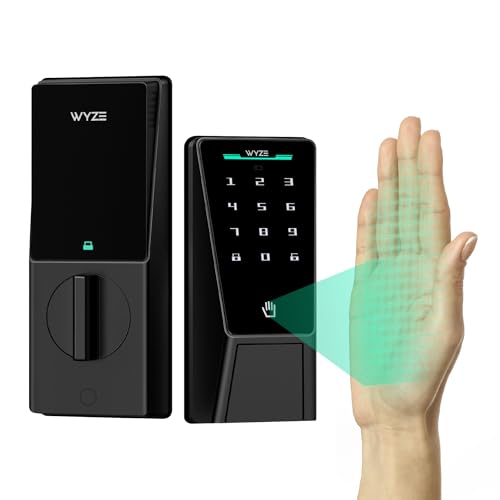
Pros
- Contactless palm-vein recognition
- Dual batteries with USB-C emergency charging
- Up to 50 guest access codes
- IP53 weather resistance, BHMA3 certified
Cons
- Wi-Fi needed for remote control
- Large 12.71-inch lock assembly

Pros
- 3D face, palm vein, and fingerprint entry
- Eight access options for family and guests
- 4-inch indoor screen with night vision
- IP67 dust and water protection
Cons
- Larger mortise, drilling may be needed
- Remote features depend on Tuya or Smart Life app
Start With the Entry Method You Will Actually Use
Palm vein recognition reads patterns beneath the skin, so it avoids several fingerprint frustrations. Wet hands, worn fingertips, developing fingerprints, and carrying groceries are all situations where contactless scanning can be more convenient. TCL states a 0.3-second scan, while Lockin lists 0.17-second recognition and adds fingerprint entry.
Some households benefit from having several biometric options. SwitchBot combines 3D face recognition, palm vein, and fingerprint access, while YINTIN adds face, palm, fingerprint, passcode, key card, app, mechanical key, and remote entry. If family members have different preferences, a broader access menu can matter more than a single fast sensor.
Pro Tip: Save at least one non-biometric backup method, such as a physical key, passcode, NFC card, or emergency power connection.
Camera Features Change the Installation Decision
A palm vein deadbolt can be a simple entry upgrade, but camera-equipped models also replace or supplement a doorbell. The eufy Security Video Smart Lock FamiLock S3 Max includes a 2K camera, 150-degree head-to-toe view, internal video screen, and local storage. Lockin adds a 2K panoramic camera, night vision, motion alerts, and 8GB storage.
Indoor screens are useful when you want to see a visitor without reaching for a phone. YINTIN includes a 4-inch indoor screen and two-way talk, while eufy provides a rear lock video screen. For app-centered households, TCL, Wyze, SwitchBot, and YINTIN provide remote or voice-related controls through their stated ecosystems.
Before buying a camera lock, inspect the door area and interior wall position. A larger mortise design, such as YINTIN’s, may require checking the opening, thickness, hole positions, and possible drilling. For general door hardware context, see what a strike plate does.
Before You Mount It: A mortise lock is not automatically a drop-in deadbolt replacement. Compare the supplied dimensions with your door before removing existing hardware.
Battery Life and Backup Power Matter at the Door
Battery claims vary from roughly four months of full functionality on eufy to up to twelve months on SwitchBot. TCL lists up to eight months, Wyze lists six months plus a secondary battery, and YINTIN uses rechargeable power with low-battery alerts. These figures describe intended operation, not a promise for every household.
Look for a backup plan that fits your habits. TCL has a USB-C emergency port, SwitchBot accepts a power bank, Wyze provides emergency charging and a mechanical key, and eufy includes four AAA batteries for additional essential operation. A dead battery should be inconvenient, not a reason to force the door.
Expert Examined
From Ray Okafor

I keep a physical backup plan separate from the lock because depleted batteries and forgotten access codes are common household problems. The mistake I see is choosing a biometric device without deciding where the emergency key or power bank will be kept.
Read more about Ray OkaforFor broader access planning, compare a key lock box and smart lock, particularly if caregivers or service providers need entry.
| Entry style | Backup options | Best fit |
|---|---|---|
| Palm vein only | Key or power port | Simple daily access |
| Palm plus camera | App and local storage | Visitor monitoring |
| Multiple biometrics | PIN, card, or key | Mixed households |
Check Compatibility Before You Order
Door measurements are as important as sensor choice. TCL specifies standard US door thicknesses from 1-3/8 to 2-1/8 inches and adjustable backsets of 2-3/8 or 2-3/4 inches. SwitchBot lists 35 to 55 mm door thickness, 60 or 70 mm backset, and requires its included lock cylinder.
Weather exposure also differs. TCL lists IP55, SwitchBot IP65, Wyze IP53, and YINTIN IP67. Those ratings describe resistance conditions, not permission to ignore the manufacturer’s installation requirements. For a general security perspective on connected locks, the smart lock security risks are worth considering.
BHMA references can help you understand how a lock is positioned for durability and security, but certification does not replace checking fit, strike alignment, battery access, or backup entry. The UL Solutions site provides useful standards context for household safety products.
Which Lock Fits Your Household
I would point families that want video and an indoor viewing screen toward eufy Security Video Smart Lock FamiLock S3 Max. Its 2K camera, rear lock video screen, local storage, palm vein access, Matter support, and Apple Home compatibility make it suited to a main entrance where visitors and at-home family members need visibility.
I would put the TCL Smart Lock D2 Pro, Palm Vein Keyless Entry on a busy front door where long battery intervals and many access choices matter. Its palm scan, touchscreen code, app, voice commands, NFC card, and physical key give different household members practical alternatives.
For a household wanting several biometric routes without a hub, I would choose the SwitchBot Lock Vision Pro Smart Lock. Face, palm, fingerprint, NFC, PIN, app, and physical key access cover varied routines, while its stated twelve-month battery, direct Wi-Fi connection, Matter support, and auto-lock sensors suit a frequently used entry.
The Bottom Line
The biggest mistake buyers make is treating palm vein recognition as the only compatibility question. Door thickness, backset, mortise dimensions, camera position, weather exposure, and emergency access can determine whether a promising lock works at your entrance.
If you do one thing first, measure the door and existing lock opening before comparing biometric features. Then choose the model whose backup power, alternate entry methods, and camera setup match the people who use that door every day.
FAQs
Palm vein systems read vascular patterns beneath the skin and do not require fingertip contact. That can help with wet, worn, or developing fingers, while models that include both palm and fingerprint methods give households more choice. Install it on a compatible exterior door after checking thickness, backset, lock-body opening, and hole positions. Camera models also need a clear view of visitors and enough interior space for screens or wiring. Backup methods vary by model and include mechanical keys, USB-C emergency power, AAA batteries, a power bank, or secondary batteries. Plan access before installation and pay attention to low-battery alerts. A BHMA rating indicates that the lock is associated with an industry performance standard for areas such as security, durability, and finish. It does not confirm that the lock fits your specific door, so measurements remain necessary.Are palm vein locks better than fingerprint locks?
Where should a palm vein smart lock be installed?
What happens if the smart lock battery dies?
What does a BHMA rating mean on a smart lock?
Sources
- Builders Hardware Manufacturers Association www.buildershardware.com
- UL Solutions www.ul.com