
Shoppers seeking the best matter smart locks need to separate ecosystem compatibility from everyday entry convenience, especially if Apple Home, Google Home, or Alexa already runs the house. This selection suits buyers comparing access methods, hub requirements, and battery formats before replacing a working deadbolt.

Pros
- Multiple entry methods, including fingerprint and passcode
- Matter over Thread supports multiple ecosystems
- Rechargeable battery lasts up to six months
- BHMA-certified with IP65 outdoor protection
Cons
- UWB requires specific Apple devices and a Thread hub
- NFC cards sold separately
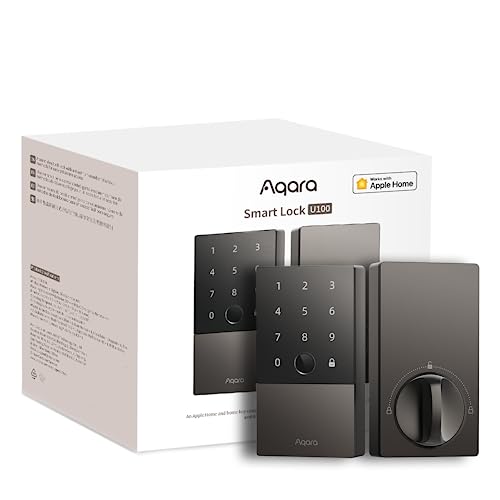
Pros
- Apple Home Key with iPhone and Apple Watch
- Fingerprint reader stores up to 50 prints
- Four AA batteries last up to 8 months
- IP65 zinc-alloy body, emergency USB-C charging
Cons
- Aqara Zigbee hub required for remote passwords
- NFC card sold separately

Pros
- Matter over Thread, compatible with major platforms
- Bluetooth app access-code management
- Backlit, fingerprint-resistant touchpad
- Proximity wakeup for faster code entry
Cons
- Hands-free entry depends on Bluetooth and geofencing
- Thread features require a compatible smart-home platform
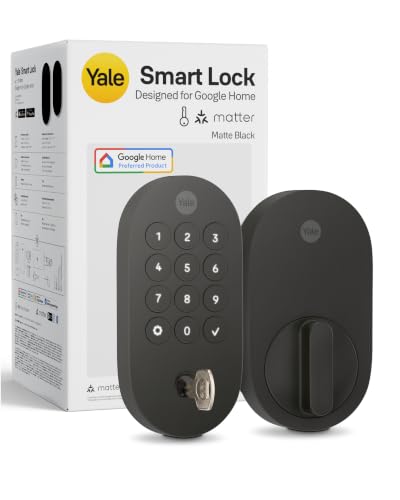
Pros
- Matter over Thread, energy-efficient mesh network
- Google Home and Google Assistant control
- Keypad, phone, voice, and backup key entry
- BHMA Grade 2 certified
- Designed for -22 to 140°F
Cons
- Matter hub required for remote access
- Google Home features limited to US and Canada

Pros
- Fingerprint access, up to 50 stored fingerprints
- Built-in Wi-Fi, no hub for app control
- 18-month battery life
- ANSI BHMA certified zinc alloy
Cons
- 2.4 GHz Wi-Fi only
- Matter requires a compatible Thread hub

Pros
- Five entry methods for flexible access
- Matter support for major smart-home platforms
- DIY installation in under 15 minutes
- Adjustable five-second auto-lock feature
Cons
- Emergency power requires a power bank
- Auto-lock begins after five seconds by default
Start With Your Smart Home System
Matter helps a lock communicate across compatible platforms, but it does not remove every equipment requirement. The Aqara UWB Smart Lock U400, Apple Home Key and Aqara Smart Lock U100, Apple Home Key need specific Apple or Aqara equipment for their Apple Home features, while the Yale Smart Lock Deadbolt with Google Matter is designed around Google Home and a Matter hub for remote access.
Thread can reduce power use and form a mesh connection, but a Thread-enabled Matter controller or border router may still be necessary. The ULTRALOQ Bolt SE Wifi Smart Deadbolt Lock adds built-in Wi-Fi for remote control without a hub, although its Matter remote features require a compatible Thread hub.
Before buying, identify which platform will manage guests and activity. For more background on the hardware between a lock and an ecosystem, review what a smart lock bridge does.
FYI: Matter connects compatible smart-home products across platforms, but each lock may still require a hub, controller, or border router for specific features.
Match Entry Methods to Daily Routines
Fingerprint access is useful for households that want a fast physical option without carrying a phone. The Aqara U100 stores up to 50 fingerprints, while the ULTRALOQ model stores up to 50 fingerprints and 50 access codes. The GUSEI Smart Matter Fingerprint Door Lock adds card entry and a handle format for bedrooms, offices, apartments, and other interior applications.
Apple households have two distinct choices. The U100 supports Apple Home Key tap entry, while the U400 adds UWB proximity detection for compatible iPhones and Apple Watches. That hands-free approach is specialized, so confirm your phone, watch, operating system, and Apple hub meet the listed requirements.
Before You Mount It: Do not assume a keypad or fingerprint reader replaces every backup method. Keep the physical key or emergency power option available, and confirm that the lock fits your existing door hardware before removing the old deadbolt.
For households sharing codes with visitors, app management matters as much as the reader itself. The Yale, Kwikset Aura Reach Smart Lock Matter Over Thread, and ULTRALOQ options support forms of code or access sharing, but their remote controls depend on their stated app and network setup.
Power, Weather, and Door Fit Matter
Battery design affects maintenance more than a feature list suggests. The Aqara U400 uses a removable rechargeable battery rated for up to six months, the U100 uses four AA batteries rated for up to eight months, and ULTRALOQ lists up to 18 months with its Thread-oriented power design.
The GUSEI lock provides Type-C emergency charging, while the U100 includes USB-C emergency charging and the U400 can recharge through USB-C without taking the lock offline. Those details matter if the exterior side is difficult to reach or the door is used frequently.
| Access style | Distinguishing feature | Suitable situation |
|---|---|---|
| Fingerprint | Fast physical entry | Busy households |
| Apple Home Key | Phone or watch tap | Apple Home users |
| Wi-Fi and Matter | Remote app control | Hub-free Wi-Fi setup |
Exterior exposure also deserves attention. The U400, U100, and ULTRALOQ models list IP65 protection, while Yale lists operation from -22 to 140°F and the U100 lists a broader temperature range. Check the door, frame, and strike alignment first; a smart lock cannot correct a door that already binds.
I keep the mechanical backup plan visible to everyone who may need it, rather than storing the only key in an inaccessible spot. The mistake I see is treating a low-battery warning as a minor notification, so set a replacement or charging routine before the warning becomes urgent.
Expert Examined
From Ray Okafor

I keep a spare entry method available for every household member, because a phone, fingerprint, or battery can fail at the same inconvenient moment. I also prefer confirming door alignment before installation, since a motorized deadbolt should not be forced against a misaligned strike.
Read more about Ray OkaforCertification gives useful context, but it is not a substitute for correct installation. BHMA references appear across these products, with Yale listing Grade 2 and the U100 describing a standard comparable to BHMA Level 3. The UL Solutions site explains why certification marks should be checked against the exact product and claim.
For door hardware basics, learn why the strike plate matters. If you are replacing both sides of the entry hardware, also consider whether you need a deadbolt and a knob lock.
Which Lock Fits Your Home
I would point Apple households that want the widest range of entry choices to the Aqara UWB Smart Lock U400, Apple Home Key. Its fingerprint reader, keypad, Apple Home Key, NFC option, physical key, and UWB support make it a strong fit for a busy exterior door, provided your Apple hub and compatible phone or watch meet the requirements.
I would choose the for an Apple Home user who wants fingerprint entry and a longer listed AA battery life without moving to UWB. For a lower-complexity smart-home setup, I would point Google households toward the , especially where Google Home control and keypad entry matter most.
If built-in Wi-Fi and broad entry options are the priority, the is the more practical direction. It supports fingerprints, codes, app access, voice control, mechanical keys, and remote management without a hub through Wi-Fi, while Matter remote access still calls for a compatible Thread hub.
The Bottom Line
The biggest mistake is buying a Matter lock while overlooking the hub, controller, or border router required for the feature you care about. Matter improves platform flexibility, but the lock’s access methods, app, battery type, and network path still differ.
First, identify the platform and hub already installed in your home, then verify the door fit and choose a backup entry method. That short check will narrow the six options more reliably than choosing by keypad appearance alone.
FAQs
Fingerprint readers and keypads avoid reaching for a phone, while Apple Home Key supports a tap from a compatible iPhone or Apple Watch. The Aqara U400 also offers UWB proximity entry for supported Apple devices, but its required hub and device conditions should be confirmed first. Some features do. Yale requires a Matter hub for remote access, Aqara features require the stated Apple or Aqara equipment, and ULTRALOQ supports built-in Wi-Fi control while requiring a compatible Thread hub for Matter remote access. Use the lock’s low-battery alerts and keep its charging or replacement routine on a calendar. Rechargeable designs such as the U400 and emergency USB-C options such as the U100 and GUSEI provide additional recovery options, but a physical key remains useful. BHMA certification indicates that a product meets stated performance requirements under the applicable grade or level. It does not confirm that every door installation will work correctly, so alignment, mounting, and strike condition still matter.Which Matter smart lock entry type is easiest for a busy household?
Do Matter smart locks need a hub or Thread border router?
How should I maintain a smart lock battery?
What does BHMA certification mean on a smart lock?
Sources
- Builders Hardware Manufacturers Association and ANSI standards. buildershardware.com
- UL Solutions product safety information. www.ul.com
- U.S. Consumer Product Safety Commission home safety resources. www.cpsc.gov