
Shopping for the best matter smart door locks means deciding whether your home values hands-free access, broad platform support, or the simplest backup entry. This selection suits homeowners comparing Apple, Google, Alexa, and mixed Matter setups before replacing a deadbolt.

Pros
- Multiple entry methods, including fingerprint and passcode
- Matter over Thread supports multiple ecosystems
- Rechargeable battery lasts up to six months
- BHMA-certified with IP65 outdoor protection
Cons
- UWB requires specific Apple devices and a Thread hub
- NFC cards sold separately

Pros
- Apple Home Key with iPhone and Apple Watch
- Fingerprint reader stores up to 50 prints
- Four AA batteries last up to 8 months
- IP65 zinc-alloy body, emergency USB-C charging
Cons
- Aqara Zigbee hub required for remote passwords
- NFC card sold separately

Pros
- Matter over Thread, compatible with major platforms
- Bluetooth app access-code management
- Backlit, fingerprint-resistant touchpad
- Proximity wakeup for faster code entry
Cons
- Hands-free entry depends on Bluetooth and geofencing
- Thread features require a compatible smart-home platform
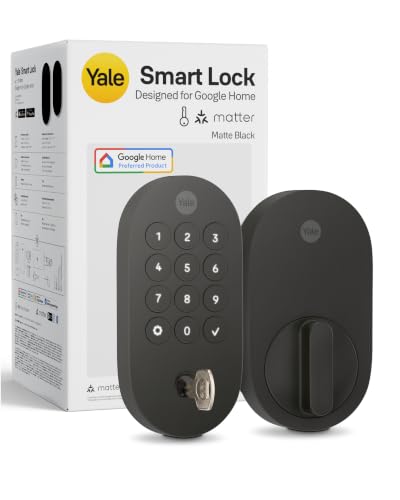
Pros
- Matter over Thread, energy-efficient mesh network
- Google Home and Google Assistant control
- Keypad, phone, voice, and backup key entry
- BHMA Grade 2 certified
- Designed for -22 to 140°F
Cons
- Matter hub required for remote access
- Google Home features limited to US and Canada

Pros
- Fingerprint access, up to 50 stored fingerprints
- Built-in Wi-Fi, no hub for app control
- 18-month battery life
- ANSI BHMA certified zinc alloy
Cons
- 2.4 GHz Wi-Fi only
- Matter requires a compatible Thread hub

Pros
- Five entry methods for flexible access
- Matter support for major smart-home platforms
- DIY installation in under 15 minutes
- Adjustable five-second auto-lock feature
Cons
- Emergency power requires a power bank
- Auto-lock begins after five seconds by default
Start With Your Smart Home Platform
Matter can make platform choice less restrictive, but the required controller still matters. The Aqara UWB Smart Lock U400, Apple Home Key and Kwikset Aura Reach Smart Lock Matter Over Thread support major ecosystems through Matter over Thread, while the Yale Smart Lock Deadbolt with Google Matter is especially aligned with Google Home and Google Assistant.
Apple households should separate Apple Home Key from general Matter support. The U400 adds tap entry and UWB hands-free access with the required Apple hardware and compatible devices, while the Aqara Smart Lock U100, Apple Home Key supports Apple Home Key, fingerprint access, passcodes, and a mechanical key.
Before buying, identify the Matter controller or Thread Border Router already in your home. The ULTRALOQ Bolt SE Wifi Smart Deadbolt Lock also has built-in Wi-Fi for app control without a hub, but its Matter over Thread functions still require a compatible hub.
Pro Tip: Confirm your controller, phone, watch, and preferred voice assistant before removing the existing deadbolt.
Match Entry Methods to Daily Routines
Fingerprint access is useful when you want a fast physical option without carrying a phone. Aqara’s U400 and U100 support fingerprint entry, while ULTRALOQ adds up to 50 fingerprints, up to 50 passcodes, app access, web access, voice control, shared credentials, and mechanical keys.
For households that share access with visitors, scheduled or temporary credentials are more practical than handing out spare keys. ULTRALOQ supports shared eKeys and passcodes, Yale offers shared access through its app or Google Home, and GUSEI provides fingerprint, code, key, card, and Tuya Smart App entry.
Before You Rely on App Access: Keep a physical key, emergency charging method, or another supported entry method available. A smart lock is only convenient if you have a plan for a depleted battery or unavailable phone.
| Entry priority | Useful feature | Best fit |
|---|---|---|
| Apple phone or watch | Home Key | Apple households |
| No phone available | Fingerprint | Shared family entry |
| Remote credential control | Wi-Fi or hub | Guests and services |
Power, Weather, and Security Details
Battery design affects maintenance more than many buyers expect. The U400 uses a removable rechargeable battery rated for up to six months, the U100 uses four AA batteries rated for up to eight months, and ULTRALOQ lists up to 18 months with its low-energy Thread connection.
Emergency power options differ, too. The U400 has USB-C charging, the U100 has USB-C emergency charging, and GUSEI accepts a power bank through Type-C. Yale uses Matter over Thread to reduce power drain, while the product information does not specify a single battery duration.
Exterior conditions and certification deserve equal attention. The U400, U100, and ULTRALOQ list IP65 protection, Yale lists BHMA Grade 2 certification, and the U400 lists BHMA certification. For background on the hardware receiving the deadbolt load, read what a strike plate does. UL Solutions explains why certification markings matter for product safety at UL Solutions.
Expert Examined
From Ray Okafor

I keep a backup entry method separate from the phone used for daily access. The mistake I see is treating a smart lock as a single point of entry, so I would set up the mechanical key or emergency charging method before the first low-battery alert.
Read more about Ray OkaforChoose the Lock for Your Household
I would point Apple-focused households toward Aqara UWB Smart Lock U400, Apple Home Key, especially when hands-free approach access matters and the home has the required Apple Thread-enabled controller. Its fingerprint, passcode, NFC card, voice, app, and physical-key choices also give you fallback options.
I would choose Aqara Smart Lock U100, Apple Home Key for an Apple home that wants Home Key and fingerprint access at a lower feature level than UWB hands-free entry. Its four AA batteries, emergency USB-C port, IP65 rating, and local encrypted fingerprint storage make the specification easy to understand.
For a mixed-platform home that prioritizes lower maintenance and built-in remote control, I would point you to ULTRALOQ Bolt SE Wifi Smart Deadbolt Lock. It combines built-in Wi-Fi, Matter over Thread support, extensive credential sharing, fingerprint entry, and a listed battery life of up to 18 months, though a Thread hub is still needed for Matter remote access.
The Bottom Line
The most common mistake is treating the Matter label as a complete compatibility answer. You still need to check the required hub, Thread controller, phone or watch requirements, and which features work in each ecosystem.
If you do one thing first, write down your preferred daily entry method and your emergency backup. Then select the lock whose battery system, controller requirements, weather rating, and access options fit that routine.
FAQs
Fingerprint, passcode, phone, voice, card, and physical-key access each suit different routines. Fingerprints help when your phone is unavailable, while app credentials are useful for remote or temporary access. Many Matter over Thread functions require a compatible Matter controller or Thread Border Router. Some models also offer built-in Wi-Fi or Bluetooth features, but those do not remove every hub requirement. Check the stated battery format and expected duration before buying. Keep the emergency charging port, rechargeable battery, or physical key available, and respond to low-battery alerts before the battery is depleted. BHMA certification indicates that the lock has been evaluated against applicable hardware performance requirements. The specific grade still matters, so compare the stated certification rather than assuming every smart lock has the same rating. IP65 indicates protection from dust and water exposure described by the product rating. It does not replace checking the model’s stated temperature range, installation fit, and manufacturer instructions.Which entry type is best for a smart door lock?
Do Matter smart locks need a hub?
How should I handle smart lock batteries?
What does BHMA certification mean on a smart lock?
Does IP65 mean a lock can handle outdoor use?
Sources
- UL Solutions www.ul.com
- Consumer Product Safety Commission www.cpsc.gov