
Shoppers comparing best Lockly smart locks need to decide whether hands-free facial recognition, a doorbell camera, or simpler fingerprint access matters most, and this choice is especially important for households sharing one front door.

Pros
- Facial recognition with dual infrared sensors
- Fingerprint sensor stores up to 99 prints
- Six entry methods, including physical key
- Built-in Wi-Fi, no bridge required
Cons
- Only fits doors 1 3/8 to 3 1/8 inches
- Remote features depend on Wi-Fi and app access

Pros
- Fingerprint entry with 0.2-second access
- 2K camera with night vision
- Apple Home Key support
- Two rechargeable batteries included
Cons
- 5.29-pound hardware may feel hefty
- Batteries need periodic recharging
Pros
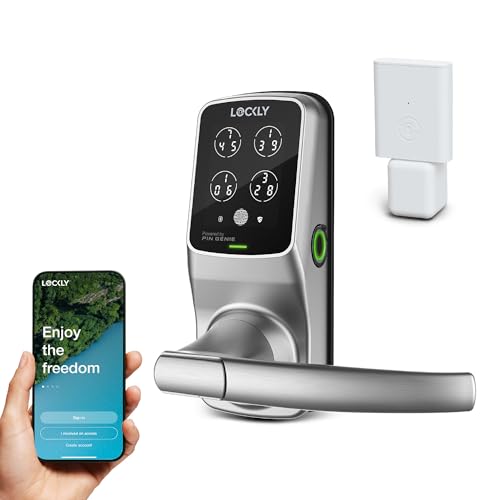
- PIN Genie keypad reshuffles numbers after each use
- 3D fingerprint sensor stores up to 99 fingerprints
- Remote monitoring and alerts through Lockly Home app
- Physical keys and 9V emergency battery port
Cons
- Secure Link Wi-Fi hub is optional
- Multiple access methods may make setup more involved

Pros
- Facial recognition works in any lighting
- Fingerprint sensor stores up to 99 prints
- Built-in Wi-Fi, no bridge required
- Supports Apple Home Key and voice assistants
Cons
- Rechargeable batteries need periodic charging
- Only fits doors 1 3/8 to 2 inches thick

Pros
- 0.2-second fingerprint recognition
- Stores up to 99 fingerprints
- Built-in Wi-Fi, no extra hub
- Anti-peep keypad with up to 49 PINs
Cons
- No Apple Home Key support
- Heavy 5.4-pound hardware
Pros
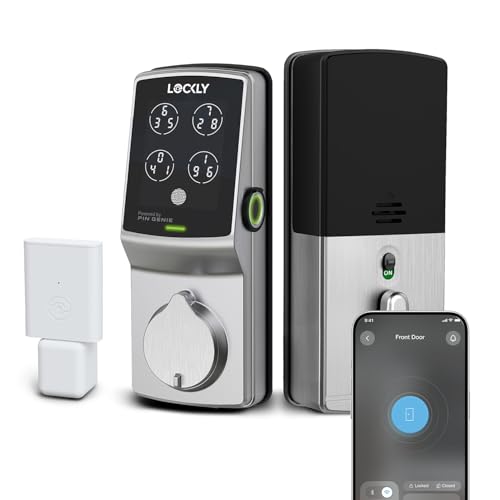
- ANSI Grade 1 residential security rating
- Fingerprint entry in 0.3 seconds
- Up to 33 PIN codes, no subscription
- Included WiFi hub for remote access
Cons
- Door dimensions need compatibility checking
- Fingerprint profiles cannot transfer via Air Transfer
Match the access method to your routine
Lockly’s Zeno models add facial recognition to fingerprint access, giving you a way to enter without reaching for a phone or touching a keypad. Both also support Apple Home Key, Alexa, Google controls, app management, and physical keys, so they suit homes where different people prefer different entry methods.
The Vision Zeno adds a 2K camera, night vision, a video doorbell, and two-way talk. That combination makes more sense when seeing visitors is part of the front-door problem. If you only need keyless entry and remote management, a fingerprint and keypad model avoids paying attention to camera features you may not use.
Pro Tip: Choose the access method your household will use most often, then confirm that every occasional guest can use a PIN or physical key.
Check the door and power arrangement first
Door compatibility is not identical across the range. The Zeno Series model fits doors from 1 3/8 to 2 inches thick, while the Visage Zeno Smart Lock supports doors from 1 3/8 to 3 1/8 inches. The Vision Zeno covers the same wider 1 3/8 to 3 1/8 inch range, and the Secure Pro Latest model supports 1 3/8 to 2 inches.
Battery design also affects upkeep. The Vision Zeno and Visage Zeno Series include two rechargeable batteries rated for up to six months with normal use, while the Secure Pro Smart Deadbolt includes a Wi-Fi hub for remote access. The Secure Pro Wi-Fi Smart Lock with Handle needs the optional Secure Link Wi-Fi hub for extended remote functionality.
| Access type | Distinguishing feature | Best fit |
|---|---|---|
| Facial recognition | Dual infrared sensors | Hands-free entry |
| Camera lock | 2K night vision | Visitor monitoring |
| Fingerprint deadbolt | PIN Genie keypad | Shared household access |
Before ordering, measure door thickness, backset, bore size, and swing direction against the product requirements. For broader door-fit guidance, review what a strike plate does, since alignment affects whether a smart deadbolt can operate smoothly.
Separate built-in Wi-Fi from hub-based access
Built-in Wi-Fi is convenient when you want the Lockly Home app to manage the door remotely without buying a bridge. The Visage Zeno Smart Lock, Vision Zeno, and Secure Pro Latest model provide that direct connection, while the older Secure Pro Smart Lock with Handle can use an optional hub.
The Secure Pro Smart Deadbolt includes the Secure Link Wi-Fi Hub, along with offline access codes, app logs, Alexa and Google Assistant compatibility, and an ANSI Grade 1 designation. That model is worth considering when local codes, remote records, and a higher stated residential security grade matter more than facial recognition or a camera.
Before You Mount It: Do not assume a hub or keypad replaces correct door alignment. Check the existing preparation and confirm the deadbolt can extend fully before relying on electronic access.
Expert Examined
From Ray Okafor

I keep seeing smart-lock problems start with a door that already rubs or fails to close squarely. I would correct the strike alignment first, then install the electronic lock so the motor is not fighting the frame.
Read more about Ray OkaforFor broader access planning, compare a smart lock with a traditional key lock box in key lock box versus smart lock safety. If you are concerned about digital access, the discussion of how smart locks can be hacked is also useful.
Which Lockly model fits your front door
I would point you to the <a href="https://besafehomesecurity.com/acms_link asin="B0DRXJB8Y6"]Lockly Visage Zeno Smart Lock when your priority is hands-free entry without adding a camera. Facial recognition, dual infrared sensors, fingerprint access, Apple Home Key, built-in Wi-Fi, and a broad door-thickness range make it the most flexible choice for a busy family entrance.
For a front door that also serves as a visitor checkpoint, I would choose the <a href="https://besafehomesecurity.com/acms_link asin="B0DRXKPQ3V"]Lockly Vision Zeno Smart Lock with Video Doorbell. Its 2K camera, night vision, doorbell function, and two-way talk add information before you open the door, while fingerprint, PIN, app, voice, and physical-key access keep entry flexible.
I would reserve the <a href="https://besafehomesecurity.com/acms_link asin="B0BXWQ3J99"]Lockly Secure Pro Smart Deadbolt Lock with WiFi for buyers who value included hub-based remote access, offline codes, access history, and ANSI Grade 1 hardware. It does not offer the Zeno facial-recognition approach, but its local fingerprint storage, rekeyable cylinder, and emergency access options suit a household focused on controlled credentials.
The Bottom Line
The mistake most buyers make is treating every Lockly model as the same type of smart lock. Facial recognition, visitor video, built-in Wi-Fi, hub-based access, battery format, and door measurements create meaningful differences.
If you do only one thing first, measure your door and identify the access method your household will actually use. Then choose between Zeno facial recognition, Vision video monitoring, or Secure Pro credential management.
FAQs
Facial recognition suits hands-free entry, while fingerprint access works well for family members who want a quick physical gesture. PIN Genie keypads and physical keys provide alternatives for guests or people who should not use biometric access. Measure door thickness, backset, bore size, swing direction, and the existing strike alignment. Match those measurements to the specific model because the supported ranges differ across Lockly products. The Zeno Series and Vision Zeno include rechargeable batteries rated for up to six months with normal use, although frequency varies. Other models use their stated power setup and include backup options such as physical keys or an emergency battery port. ANSI Grade 1 is a residential security grade stated for the Lockly Secure Pro Smart Deadbolt with WiFi. It describes the lock hardware’s classification, but it does not remove the need for correct installation and a properly aligned door.Which Lockly sensor type suits a busy household?
How do I check whether a Lockly lock fits my door?
How often do Lockly smart-lock batteries need attention?
What does ANSI Grade 1 mean on a smart lock?
Sources
- UL Solutions, Door Locks and Hardware Standards. www.ul.com
- US Consumer Product Safety Commission, Home Safety Information. www.cpsc.gov