
Installing the best live feed security cameras requires balancing real-time streaming speed against the physical barriers that degrade wireless transmission. Property layout dictates whether you need dedicated outdoor wiring, high-capacity batteries, or specialized glass mounts that record through windows. This evaluation helps homeowners and apartment dwellers select hardware that loads live video on command without stutter or dropouts.

Pros
- Bright 2600-lumen integrated LED floodlights
- 1080p HD live view with color night vision
- Dual-zone customizable motion detection
- Built-in security siren and two-way audio
Cons
- Requires existing outdoor electrical wiring
- Person detection requires paid subscription plan
- Local video storage requires separate Sync Module
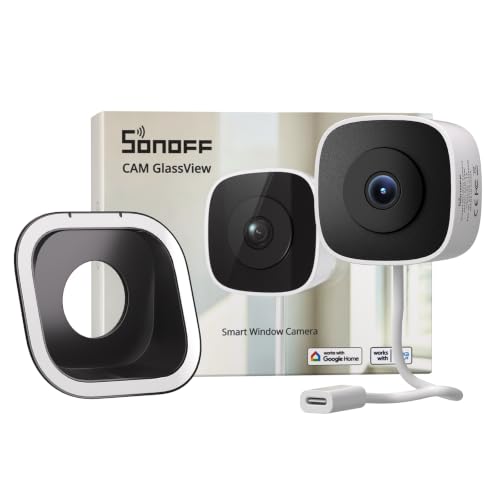
Pros
- No-drill, stick-on installation
- 2K video with color night vision
- Local web console, RTSP, and ONVIF
- Up to 128GB microSD storage
Cons
- Requires indoor window-glass placement
- Needs a power connection

Pros
- Two-year battery life with included AA lithium cells
- 1080p HD daytime video and infrared night view
- Dual-zone enhanced motion detection alerts
- Alexa integration for hands-free voice control
Cons
- Bundled Sync Module Core lacks onboard local storage
- Person detection requires an optional paid subscription
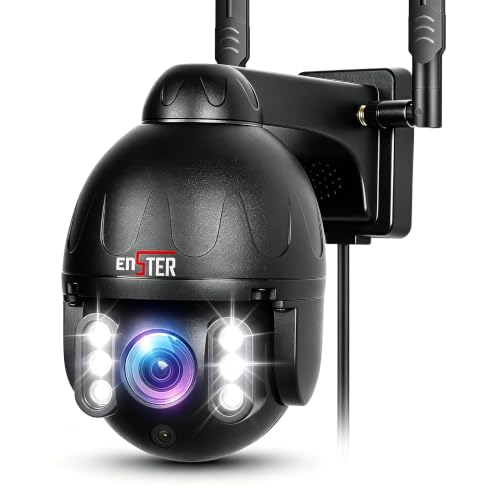
Pros
- 150-foot full-color night vision via 6 LEDs
- Dual-band 2.4G and 5G Wi-Fi transmission
- All-metal IP66 weatherproof exterior casing
- 355-degree pan and 90-degree tilt with 4X zoom
Cons
- App controls restricted to the CamHiPro platform
- Local storage requires buying a separate micro SD card

Pros
- No-drill glass installation with three brackets
- 2K resolution with Starlight color night vision
- Dual-band 2.4GHz and 5GHz Wi-Fi
- Standard ONVIF and RTSP compatibility
Cons
- MicroSD card not included
- Cloud storage requires paid subscription
- Offline AP hotspot range limited to 15 meters

Pros
- Weather-resistant outdoor design
- Versatile mounting options
- Two-way talk functionality
- Works with Alexa devices
Cons
- Requires Ring Protect for features
- Battery charging necessitates downtime
Streaming Latency and Connection Protocols
Live viewing stability hinges on network architecture. Traditional cloud-dependent models route every stream through an external server before reaching your smartphone, introducing frustrating lag during critical moments. Devices that support direct RTSP and ONVIF streams communicate over your local area network, delivering instantaneous playback on wall tablets and smart displays without bogging down outgoing internet bandwidth.
Dual-band Wi-Fi support dramatically reduces latency in dense suburban settings. While 2.4 GHz frequencies penetrate exterior brick and stucco more effectively, 5 GHz bands deliver higher throughput to handle high-bitrate video without buffering. Understanding what is an NVR and how is it different from a DVR provides clarity on how local streaming protocols bypass commercial cloud servers entirely.
| Camera Style | Primary Benefit | Best Deployment |
|---|---|---|
| Glass Mount | Zero exterior drilling | Apartments and rentals |
| Wired Floodlight | Continuous high power | Driveways and garages |
| Battery Wireless | Flexible wall placement | Fences and perimeters |
Night Vision Quality and Glass Reflections
Night monitoring presents distinct operational hurdles depending on camera placement. Standard outdoor cameras use infrared light emitters, but pointing standard infrared LEDs through a window pane creates intense white glare that blinds the lens. Window-mounted models resolve this problem by relying on high-aperture lenses and ambient street illumination to produce full-color nighttime streams without reflective backscatter.
Window Setup: Disable internal status LEDs and turn off automatic infrared illuminators in camera software if you position any lens against interior window glass.
Deciphering lens behavior helps prevent false security assumptions. Learning what do the lights on a security camera mean ensures you know whether your unit is actively streaming, buffering, or struggling with connection dropouts. The Federal Communications Commission oversees spectrum standards that regulate these dual-band radio transmissions to minimize residential signal interference.
Expert Examined
From Jenna Castellano

I see many homeowners point standard outdoor cameras at their driveway from an upstairs bedroom window. The infrared bounce turns the window into a mirror at sunset, leaving you with completely blank recordings until morning.
Read more about Jenna CastellanoPower Architecture and Continuous Monitoring
Power availability directly controls how often and how long you can hold an open video stream. Battery-powered units preserve charge by sleeping until onboard passive infrared sensors detect movement, which can introduce a two-second wake delay before live view activates. If your goal is leaving an open video feed on a kitchen tablet all day, you must select continuous line power.
Mounting Caution: Adhesive window mounts can detach under extreme summer heat if you skip cleaning the glass with isopropyl alcohol before pressing the bracket into place.
Hardwired outdoor cameras eliminate battery anxiety and power continuous floodlight illumination whenever someone approaches. Renters who face strict drilling restrictions can explore the broader security cameras category to find non-destructive mounting hardware that leaves no marks on siding.
Choosing Your Streaming Setup
For rental properties and apartment monitoring, I would point you toward the SONOFF CAM GlassView 3MP 2K Window Camera. Its bracket design sits flush against interior window glass to eliminate indoor reflections, and its native RTSP compatibility allows direct viewing through an OpenEdge console without subscription fees.
If you need wide perimeter surveillance over a large yard or long driveway, I suggest the ENSTER 2.4/5G Security Camera Outdoor. The metal housing resists severe weather, while its 355-degree motorized pan and 150-foot color night vision let you track movement across open spaces from your phone.
The Bottom Line
The most common misstep is buying a battery camera when you actually want an always-on desktop monitor. Battery models are engineered for short burst alerts, while hardwired or indoor plug-in cameras support sustained, open live streams without shutting down to save power.
Before buying any hardware, check your Wi-Fi signal strength at the exact spot you plan to mount the camera. If your phone cannot stream HD video at that exterior wall, your new camera will constantly drop its live feed regardless of the specs listed on the box.
FAQs
Can security cameras stream live video without a subscription?
Yes, cameras supporting RTSP, ONVIF, or local memory card slots stream live directly to companion apps or network video recorders without monthly fees. Subscription plans are generally only required for long-term cloud video history or advanced cloud-based artificial intelligence filters.
Why does my camera live feed lag by several seconds?
Lag happens when weak Wi-Fi causes packet loss or when video must travel to a remote cloud server before reaching your device. Connecting through a 5 GHz network band or using a local streaming protocol reduces this delay to a fraction of a second.
Do live feed cameras work through double-pane windows?
Yes, provided the camera includes specialized anti-glare brackets and you turn off built-in infrared night lights. Glare-reducing brackets hold the lens flush against the glass to block internal room reflections from washing out the daytime and nighttime video feed.
Can I keep a live camera feed open all day on a tablet?
You can maintain an open feed only on cameras with continuous line power or wired connections. Battery-powered units automatically time out after several minutes of viewing to prevent running their internal cells flat within a few days.
Sources
- Federal Communications Commission Equipment Authorization www.fcc.gov
- National Institute of Standards and Technology Video Analytics Guidelines www.nist.gov