
Shopping for the best keypad smart locks means deciding whether direct Wi-Fi control or hub-based access fits your home, especially if you need reliable guest codes or fingerprint entry. The right choice depends on your door hardware, preferred unlocking method, and how much access management you expect.
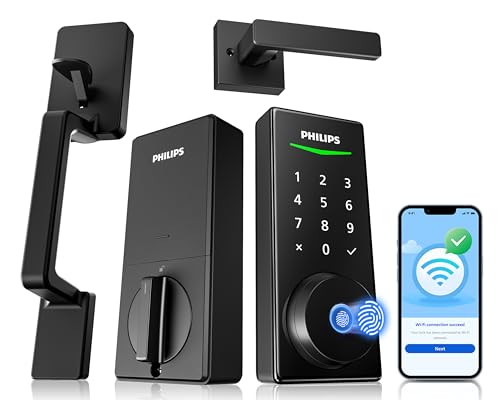
Pros
- Built-in WiFi, no hub needed
- Fingerprint entry in 0.3 seconds
- Temporary and one-time passcodes
- Alexa and Google Assistant control
Cons
- Only for wooden doors
- Fits doors 1-3/8 to 2 inches thick

Pros
- Built-in WiFi, remote control from anywhere
- Stores up to 100 access codes
- Works with Alexa and Google Home
- Forced-entry alarm and encrypted connection
Cons
- Requires Schlage Home app for smart features
- Four AA batteries last up to six months

Pros
- Apple Home Key with iPhone and Apple Watch
- Fingerprint reader stores up to 50 prints
- Four AA batteries last up to 8 months
- IP65 zinc-alloy body, emergency USB-C charging
Cons
- Aqara Zigbee hub required for remote passwords
- NFC card sold separately

Pros
- Five entry methods, including fingerprint and PIN
- Remote control through the Philips App
- Up to 100 user codes
- Auto-lock timer from 30 to 180 seconds
Cons
- Requires compatible 35 to 50mm door
- Remote features depend on Wi-Fi and app access

Pros
- Fingerprint recognition with self-learning AI chip
- Eight entry methods for flexible access
- Remote user permissions and activity logs
- USB-C emergency port and low-battery alerts
Cons
- G1 Gateway required for remote access
- Four AA batteries not included
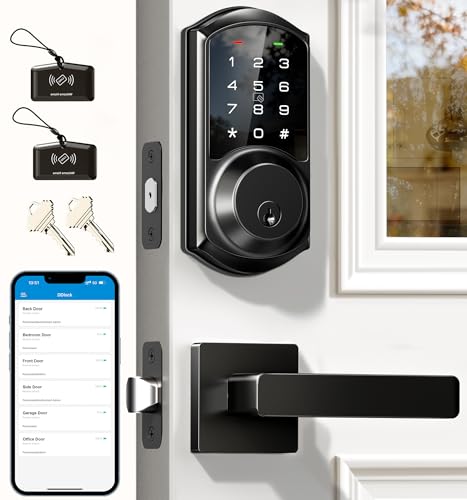
Pros
- App and web control with no subscription fee
- Stores 250+ flexible access codes
- IP54 weatherproof, BHMA/ANSI Grade 3
- IC card capacity exceeds 1,000 cards
Cons
- Remote features require separate G2 gateway
- Two-year warranty requires product registration
Start With the Way You Enter
Keypad locks are not all interchangeable in daily use. Some of these models combine PIN entry with fingerprints, while others add app access, mechanical keys, fobs, cards, or voice commands. A fingerprint reader can make family entry quick, but a keypad remains useful for visitors and service providers.
Built-in Wi-Fi is the simplest route to remote management because the lock connects directly to your network. The Philips WiFi Smart Lock with Handle Set and Schlage Encode Smart WiFi Deadbolt Lock both offer direct Wi-Fi control, while the Aqara Smart Lock U100, Apple Home Key uses an Aqara hub for remotely configurable passwords and broader third-party integrations.
If you are weighing a key lock box against connected entry, consider whether you need activity records and remote permission changes. A key lock box and smart lock safety comparison can help clarify that trade-off before you replace the hardware.
Pro Tip: Check your existing door thickness, backset, hole pattern, and handle layout before ordering. A coordinated handle set may simplify a replacement, but it still needs a compatible door and frame.
Match Access Features to Your Household
For a busy household, multiple code types can matter more than voice control. The Philips Wi-Fi Front Lock Set supports permanent, temporary, recurring, and one-time PINs, with up to 100 user codes. Veise VE017 Fingerprint Smart Door Lock with App also supports permanent, recurring, duration, and one-time codes, plus remote user permissions through its app.
Rental owners and property managers may prefer detailed access administration. Veise VE06-L Smart Deadbolt Lock with 2 Lever supports a web portal, e-keys, passcodes, IC cards, access logs, and adjustable auto-lock timing. Remote access and voice features require its separately sold gateway, so account for that dependency in your setup.
| Access style | Key distinction | Useful placement |
|---|---|---|
| Fingerprint | Fast personal entry | Family front door |
| Wi-Fi keypad | Direct remote control | Connected main entrance |
| Hub-based lock | Expanded ecosystem access | Smart-home setup |
For Apple households, the Aqara U100 adds Apple Home Key support, allowing an iPhone or Apple Watch to open the lock, including when the device has no remaining power. Its NFC card is sold separately, and sharing Apple Home Keys requires an Apple Home Hub.
Check Batteries, Weather, and Door Fit
Battery planning is easy to overlook. Schlage Encode uses four included AA batteries and indicates low power on the lock and in its app, while Aqara U100 uses four included AA batteries and provides a USB-C emergency charging port. Veise VE017 uses four AA batteries that are not included and also provides USB-C emergency power.
Door alignment matters as much as the electronics. Philips specifically cautions that a misaligned door and frame can increase latch friction and strain the handle. Before installation, review why the strike plate matters, then confirm that the latch moves freely.
Before You Mount It: Do not force a latch against a misaligned frame or allow wood shavings and dust into the cylinder. Those installation mistakes can increase friction or permanently damage the lock.
Weather ratings also vary. Aqara lists IP65 weatherproofing and a zinc-alloy body, while Veise VE06-L lists IP54 weatherproofing and BHMA/ANSI Grade 3 certification. These labels describe different specifications, so compare the stated rating with the location of your door.
Expert Examined
From Jenna Castellano

I keep seeing smart-lock problems begin with the door rather than the app. The mistake I see is tightening everything before checking whether the deadbolt moves smoothly by hand, so I check alignment first and only then finish the installation.
Read more about Jenna CastellanoFor broader maintenance context, the advice on resetting a smart lock is useful when access settings need to be cleared or rebuilt.
Which Lock Fits Your Entry Routine
I would put the Philips WiFi Smart Lock with Handle Set on a primary front door when you want a complete handle set, built-in Wi-Fi, fingerprint access, PIN codes, app control, and Alexa or Google Assistant support without an extra gateway. Its activity records and real-time alerts also suit households that want to know when the door was used.
I would point Apple-focused households to Aqara Smart Lock U100, Apple Home Key. Apple Home Key, fingerprint entry for up to 50 fingerprints, local encrypted data, IP65 weatherproofing, and an emergency USB-C port make its feature set distinctive, although remote passwords and some integrations require an Aqara hub.
For a rental, shared property, or budget-conscious entry, I would choose Veise VE017 Fingerprint Smart Door Lock with App. It supports remote user changes, detailed activity logs, several password types, local AES128-encrypted data, and a long stated battery life. Add the G1 Gateway only if remote access or voice control through Alexa or Google Assistant is important.
The Bottom Line
The mistake most keypad-lock buyers make is treating every model as equally independent from hubs, gateways, or compatible door hardware. Aqara and the Veise models can provide broader remote or voice features with separate gateways, while the Philips and Schlage Wi-Fi models connect directly to Wi-Fi.
If you do only one thing first, measure your door and inspect the latch alignment before choosing features. Then select the entry method your household will actually use, whether that is a fingerprint, PIN, Apple Home Key, app, or physical key.
FAQs
Fingerprint entry can be faster for household members, while keypad codes are more practical for guests, service providers, and temporary access. Models such as the Philips and Veise fingerprint locks combine both methods, so you do not have to choose only one. Use it on a compatible exterior entry door after checking thickness, hole dimensions, backset, and latch alignment. Handle-set models also require the door and frame to sit correctly so the latch does not bind. Watch for low-battery alerts and keep the stated battery format available. Several models include emergency charging through USB-C, but battery life depends on the model and usage, so do not ignore warnings. It identifies a stated hardware performance or security classification, not a promise that every installation will work well. For example, Veise VE06-L lists BHMA/ANSI Grade 3, while Schlage lists a highest residential Security, Durability and Finish rating from BHMA industry experts.Are fingerprint locks better than keypad-only locks?
Where should a keypad smart lock be installed?
How do smart-lock batteries get maintained?
What does BHMA or ANSI certification mean on a smart lock?
Sources
- BHMA, Builders Hardware Manufacturers Association. www.buildershardware.com
- UL Solutions, Safety and Security. www.ul.com