
Finding the best indoor security cameras requires deciding how your video footage gets stored before you ever mount a lens on the wall. While cloud subscriptions dominate shelf space, hardware that keeps clips on local storage protects personal privacy inside high-traffic living areas. Renters and homeowners often need fundamentally different mounting options and viewing angles to secure their rooms properly.

Pros
- Exclusive Apple HomeKit Secure Video end-to-end encryption
- 1080p resolution with integrated night vision
- Built-in microphone and speaker for two-way audio
- Automated detection differentiates between people and pets
Cons
- Requires an Apple HomePod or Apple TV hub
- Requires an iCloud+ subscription for video recording
Pros
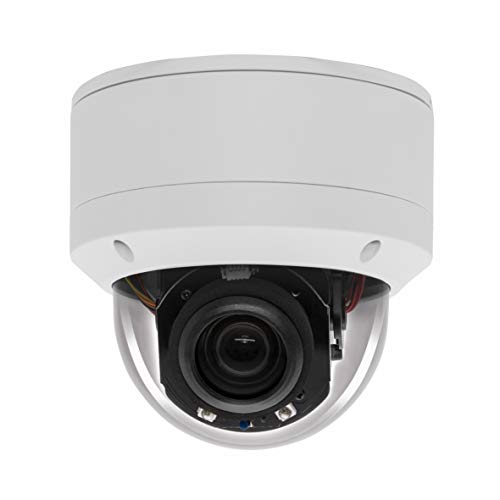
- 5MP resolution with 5x motorized optical zoom
- Wide 355-degree pan and 90-degree tilt range
- IP66 waterproof metal housing with surge protection
- Night vision reach up to 100 feet
Cons
- Power supply and PoE injector are not included
- Limited to a single year of warranty

Pros
- Crisp 2K resolution with 12x digital zoom
- Automatic privacy shield toggles closed via app
- Audio detection listens for smoke and CO alarms
- Wide 130-degree field of view captures full rooms
Cons
- Cloud video history and AI alerts require subscription
- Tethered to wall outlets by 6.5 foot power cord
Pros
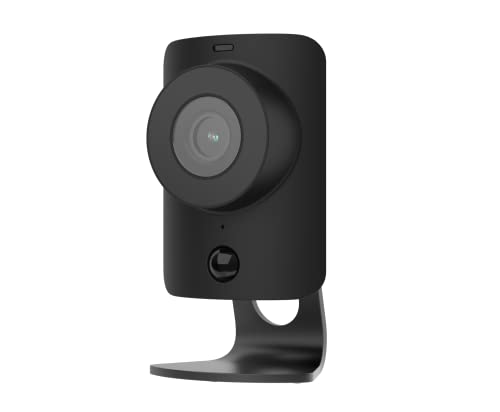
- 1080p HD resolution with 120-degree view
- Built-in stainless steel privacy shutter
- Two-way audio to speak with visitors
- Night vision for low-light monitoring
Cons
- Requires continuous AC power and Wi-Fi
- Indoor use only, not weather-rated
- Video verification requires Fast Protect plan

Pros
- 4K clarity with 3X optical zoom
- Pan and tilt with 360-degree coverage
- Person, pet, and crying sound detection
- Dual-band Wi-Fi 6 with Bluetooth setup
- Up to 512GB microSD local storage
Cons
- Indoor use only, lacks outdoor weatherproofing
- Preset views limited to 64 positions

Pros
- Spotlight-free color night vision with f/1.2 aperture
- 360-degree pan and tilt coverage with auto-tracking
- Continuous 24/7 recording with dual external antennas
- IP66 weather resistance for indoor or outdoor use
- No monthly subscription fees for stored footage
Cons
- MicroSD card not included for local storage
- Incompatible with HomeKit and HomeBase 2
- Requires wired power outlet, not battery operated
Physical Privacy and Sensor Shields
Placing a lens inside your living room introduces security trade-offs that perimeter cameras never face. Software toggles in an app can disconnect an active video feed, but an automated physical shutter provides visual confirmation that the lens cannot see into the space. A physical barrier gives everyone in the house confidence that private family hours remain unrecorded.
Certain brands integrate mechanical shields that drop over the lens the moment an authorized user arrives home. Understanding how visual indicators work helps clarify camera activity, so learning what do the lights on a security camera mean is essential before completing your indoor setup. Audio sensors also require attention, as continuous acoustic monitoring for glass breaks or smoke alarms may stay active even when video recording pauses.
Audio Eavesdropping: Microphones on networked indoor cameras remain active unless completely powered down. Verify your unit disconnects audio recording alongside video shuttering to maintain complete room privacy.
Local Storage Versus Cloud Dependability
Choosing between continuous local recording and cloud clips determines whether your hardware works during an internet outage. On-board microSD storage and network video recorders keep capturing footage even when your router loses its broadband connection. You can learn more about dedicated recording appliances by reading what is an NVR and how is it different from a DVR for high-capacity setups.
| Storage Format | Network Need | Best Placement |
|---|---|---|
| MicroSD Card | Local Wi-Fi | Single Nursery |
| Dedicated NVR | Ethernet Cable | Whole Home |
| Cloud Server | High Bandwidth | Hallway Entry |
Cloud systems rely entirely on steady uplink bandwidth to preserve footage. If an intruder unplugs the modem or the service provider drops the signal, cloud cameras fail to log critical incidents. Local hard drive hubs eliminate monthly fees while maintaining uncompressed high-resolution feeds across multiple rooms.
Expert Examined
From Dana Whitfield

The mistake I see most often is placing wide-angle units directly across from unshaded windows. The bright daylight blinds the sensor, leaving indoor motion tracking completely washed out when someone walks across the room.
Read more about Dana WhitfieldField of View and Pan Tilt Mechanics
A static wide-angle lens works well in small square bedrooms or tight entryways where a 120-degree span captures both walls. Larger open-plan living rooms often leave blind spots that a fixed lens cannot cover without distortion. Motorized pan and tilt heads solve this issue by rotating horizontally across 360 degrees to track pets or family members automatically.
When selecting motor-driven tracking, consider acoustic noise and repositioning latency. Rapid movements can trigger false alerts if the camera software fails to filter out stationary background objects. For legal questions regarding domestic recorded video, check our guide on is security camera footage admissible in court to ensure compliance with local surveillance rules according to guidelines from the Federal Trade Commission.
Pro Tip: Position motorized pan-tilt models on a central shelf rather than ceiling mounting to keep automated tracking at natural eye level across the entire room.
Matching the Hardware to Your Space
I would point dedicated Apple households toward the Eve Cam (2 Pack, Apple Home) because it operates entirely through HomeKit Secure Video with end-to-end encryption. The system deactivates the camera feed automatically when your household devices register as present, avoiding unwanted domestic recording.
For open-concept main floors where blind spots are common, I recommend the REOLINK 4K Pan Tilt Indoor Camera. Its 3X optical zoom captures sharp detail from across a long living space, and the dual-band Wi-Fi 6 connection provides smooth video streaming without requiring a monthly cloud subscription. You can explore broader configurations in our Security Cameras section.
If your priority is nursery safety or monitoring a sleeping baby, the Arlo Essential Indoor Baby Camera 2K (3rd Gen) serves that role effectively. Its mechanical privacy shield closes with a tap, while its acoustic detection identifies crying sounds and smoke alarms reliably.
The Bottom Line
Most buyers mistakenly assume higher video resolution guarantees better indoor protection, yet lens placement and privacy shutters play a far larger role in daily satisfaction. A 4K camera positioned opposite a bright window or lacking a physical lens cover often ends up unplugged because household members feel uncomfortable with an active lens staring into the room.
Start by auditing the rooms where you actually need monitoring, prioritizing shared living spaces with dedicated privacy shutters and selecting bedrooms with targeted crying or motion alerts. Confirm whether you prefer maintaining footage on local memory cards or through automated cloud servers, and mount the hardware where ambient lighting remains stable throughout the day.
FAQs
Do indoor cameras continue recording if the internet goes down?
Cameras equipped with internal microSD cards or connected to a local network video recorder keep recording during internet outages. Models that rely entirely on cloud ecosystems stop archiving video until the network connection restores.
Where is the worst place to put an indoor security camera?
Placing an indoor camera facing directly toward a large sunny window creates severe backlighting that reduces people in the room to dark silhouettes. Avoid placing units on unstable shelves where vibrations from footsteps cause recurring false motion notifications.
How does an automated privacy shutter operate?
An automated shutter uses a small mechanical motor that slides a physical metal or plastic cover directly over the camera lens. The shutter activates via an app button, an automated home schedule, or geofencing triggers whenever you enter the house.
Can indoor security cameras distinguish pets from people?
Modern indoor cameras use on-device processing algorithms to differentiate the silhouette and movement speed of pets from humans. This feature helps prevent constant false smartphone notifications when a dog or cat wanders across the room.
Sources
- Federal Trade Commission Consumer Advice www.ftc.gov
- National Institute of Standards and Technology www.nist.gov