
Locking into the best home security cameras without subscription stops ongoing cloud fees while putting video ownership directly onto local hardware inside your home. The real split in this category is between standalone micro-SD cards, wireless base stations, and central recording drives. Homeowners and renters need setups that store footage securely without risking data loss if an outdoor unit is removed.

Pros
- True 4K 3840x2160 resolution with IR night vision
- Motorized 355-degree pan and 90-degree tilt
- Dual-band 2.4GHz and 5GHz wireless support
- Included 1TB hard drive requires no subscription
- 16-channel NVR supports up to 16 cameras
Cons
- Cameras and NVR require plug-in electrical power
- Simultaneous app viewing capped at 4 users
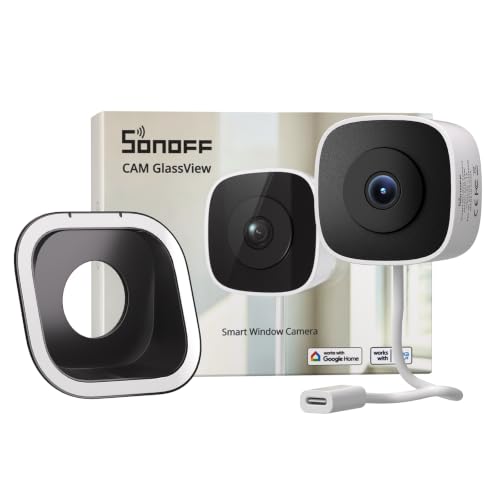
Pros
- No-drill, stick-on installation
- 2K video with color night vision
- Local web console, RTSP, and ONVIF
- Up to 128GB microSD storage
Cons
- Requires indoor window-glass placement
- Needs a power connection

Pros
- Crisp 4K video with 24/7 continuous recording
- Motorized 360-degree pan-and-tilt auto tracking
- Color night vision via integrated deterrent spotlight
- On-device AI tracks humans, pets, and crying
- Local SD card storage without subscription fees
Cons
- HomeKit streams capped at 1080P resolution
- Micro SD card not included in box

Pros
- Dual PIR sensors with AI human recognition
- 128GB encrypted local storage, no subscription
- 5W solar panel and 8000mAh battery
- 2.5K 4MP video with color night vision
Cons
- WiFi only, no 4G or LTE support
- App required for zones and sensitivity settings

Pros
- Spotlight-free color night vision with f/1.2 aperture
- 360-degree pan and tilt coverage with auto-tracking
- Continuous 24/7 recording with dual external antennas
- IP66 weather resistance for indoor or outdoor use
- No monthly subscription fees for stored footage
Cons
- MicroSD card not included for local storage
- Incompatible with HomeKit and HomeBase 2
- Requires wired power outlet, not battery operated

Pros
- 128GB encrypted local storage, no monthly fees
- 4MP video with color night vision
- Solar powered with 8000mAh battery
- 360-degree coverage and auto tracking
Cons
- Auto tracking must be enabled in the app
- 5GHz Wi-Fi has weaker long-distance range
Local Storage Formats and Hardware Safety
Choosing equipment without monthly cloud fees means deciding where the recorded files actually sit. Standalone cameras with built-in micro-SD slots keep hardware simple, but mounting an SD-card camera within easy reach outdoors creates a distinct security vulnerability. If someone steals or smashes the camera, your physical evidence disappears with it.
Indoor base stations and networked recorders solve this vulnerability by relaying footage across your local network to an indoor vault. Understanding what is an NVR and how it differs from a DVR helps clarify why dedicated central drives provide continuous 24/7 video without slowing down routine home internet activity. The drive remains safe indoors even if an exterior camera is damaged.
Avoid Card Theft: Never install cameras that rely exclusively on onboard micro-SD cards below nine feet on an exterior wall. Anyone with a pole or short ladder can take the camera along with every recorded clip.
Power Delivery and Network Bandwidth Constraints
Subscription-free cameras handle power in two ways: continuous wired power or rechargeable solar systems. Continuous wired power allows non-stop loop recording, capturing every single second of activity regardless of motion triggers. Battery and solar units rely on infrared wake-up sensors to preserve power, recording exclusively when thermal movement trips the sensor.
| Storage Type | Power Delivery | Primary Placement |
|---|---|---|
| Onboard MicroSD | Continuous Plug-in | Indoors or high eaves |
| Home Hub Base | Solar or Battery | Yards and perimeters |
| Network NVR Drive | Continuous Wired | Whole-property perimeter |
Bandwidth handling is equally critical when streaming high-resolution feeds locally. Operating multiple 2K or 4K streams simultaneously can choke older 2.4GHz home routers. Dual-band models that support 5GHz or modern Wi-Fi standards maintain smooth live viewing and prevent playback stutters, which the security cameras category requires for responsive alerts.
Expert Examined
From Dana Whitfield

The mistake I see most often is placing a solar panel under a partial roof overhang where it only gets indirect shade. Solar-assisted cameras require at least three hours of unfiltered, direct sunlight daily to maintain battery equilibrium through winter weather.
Read more about Dana WhitfieldOn-Device Detection and Network Protocols
Without a cloud server processing your video, the camera hardware must process motion alerts on its own processor. Modern local chipsets run on-device artificial intelligence capable of differentiating humans and vehicles from blowing branches or wandering pets. This edge computing prevents phones from receiving dozens of false alarms every windy afternoon.
For smart home integration, open protocols like RTSP and ONVIF allow hardware to stream feeds into independent platforms like Home Assistant rather than proprietary vendor silos. Learning what the lights on a security camera mean during pairing ensures local network handshakes succeed without leaking feeds beyond your firewall, in line with consumer guidance from the Federal Trade Commission.
Pro Tip: Check whether a camera supports local web consoles or ONVIF streaming if you plan to keep your video feeds working during wide-area internet service outages.
Matching the Setup to Your Property
For detached homes needing broad perimeter security without recurring invoices, I would point you toward the Hiseeu 4K Security Cameras Wireless Outdoor. Its 1TB hard drive and 16-channel expansion capacity provide true continuous 24/7 recording for large properties, ensuring clips remain completely safe inside your living room.
If you cannot drill exterior holes or run wiring to your fence lines, the 4MP Security Cameras Wireless Outdoor package fits best. Its four solar-powered units pair with an indoor home hub storing up to 128GB locally, shielding data even if a yard unit is targeted.
For rental apartments or indoor monitoring, I would put the eufy Security 4K Indoor Camera E30 in the living space. It delivers pan-and-tilt tracking with local micro-SD storage while working smoothly with HomeKit and local voice assistants.
The Bottom Line
The single thing most buyers get wrong is assuming wireless cameras record non-stop video around the clock. Battery-powered and solar-assisted models only capture motion-triggered bursts to protect their charge, whereas continuous 24/7 capture requires uninterrupted wired power connected to an NVR or large local card.
Before purchasing hardware, measure the physical path from your router to each intended mounting point. Verify whether you have exterior electrical outlets for continuous power or enough unshaded sky for solar panels, then install your local indoor storage hub first.
FAQs
Do security cameras without subscriptions still send phone alerts?
Yes. Local processing chips detect movement, humans, or vehicles and push notifications to your smartphone app instantly through your home internet connection without requiring a paid subscription plan.
Can I view footage remotely away from home without a subscription?
Yes. Most non-subscription camera systems offer encrypted peer-to-peer remote viewing through their mobile apps, letting you check live video and past clips from anywhere with mobile data.
What happens when the local storage drive becomes full?
Local hard drives and memory cards use automatic loop recording. Once capacity is reached, the system writes new video events directly over the oldest recorded footage automatically.
Do wireless outdoor cameras work during an internet outage?
Cameras connected to an indoor hub or NVR continue recording footage locally during an internet outage. You will temporarily lose remote mobile alerts until home network connectivity returns.
Sources
- Federal Trade Commission Consumer Advice www.ftc.gov
- Federal Communications Commission Equipment Authorization www.fcc.gov