
Choosing among the best doorbell cameras with motion detection requires more than checking video resolution. The key split is whether you want broad activity coverage or fewer alerts filtered for people, making this useful for households narrowing down models for a specific porch.

Pros
- 2K HD video with 166-degree wide view
- No subscription for alerts and playback
- HDR night vision up to 10 meters
- MicroSD storage support up to 128GB
Cons
- 2.4 GHz Wi-Fi only
- Built-in battery is non-removable

Pros
- 2K resolution for clearer facial details
- 160° head-to-toe field of view
- Free person detection reduces alerts
- Local storage without a subscription
Cons
- 2.4GHz Wi-Fi only
- microSD card required for local storage

Pros
- 2K video with color night vision
- 150-degree wide-angle view
- Battery or wired installation
- Motion detection with real-time alerts
Cons
- AI alerts require a separate monitoring plan
- Battery must be removed for USB-C charging
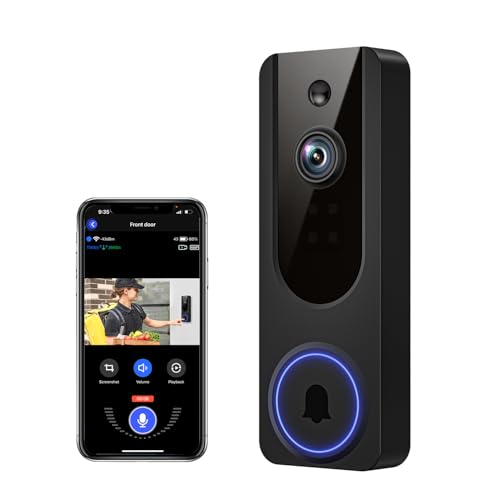
Pros
- AI human detection filters unnecessary motion alerts
- 1080p video with four-LED night vision
- Two-way audio from a smartphone
- Encrypted cloud storage with AES-128
Cons
- 2.4GHz WiFi only
- Cloud subscription required for recording storage

Pros
- AI identifies people and filters vehicles and animals
- AES-128 encrypted cloud storage
- Sharp night vision in total darkness
- Two-way audio for visitors and deliveries
Cons
- Not compatible with 5GHz Wi-Fi
- Pre-capture recording requires cloud subscription

Pros
- Dual cameras capture visitors and packages
- 2K video with color night vision
- Built-in 8GB local storage
- Wireless or wired installation
Cons
- Supports 2.4 GHz Wi-Fi only
- Rechargeable battery requires periodic charging
Match Detection to Your Porch
A wide field of view helps when visitors approach from the side or packages sit below the camera. The BOIFUN Video Doorbell Camera reaches 166 degrees, while the Tapo 2K Wireless Smart Video Doorbell w/Chime offers a 160-degree head-to-toe view. The eufy Security Video Doorbell E340, Dual Cameras adds a downward camera for doorstep packages.
Person detection is more useful than a basic motion trigger when cars, pets, branches, or passing neighbors create unwanted notifications. BOIFUN, Tapo, VanaOrbi, Orbitell, and eufy Security describe human or person-focused detection, while Chamberlain myQ provides motion alerts and optional AI alerts tied to a monitoring plan.
For placement, aim the view at the approach path rather than a busy street or moving tree line. If the frame misses the ground near the threshold, a wide horizontal view alone may not show a parcel clearly. The advice in this doorbell camera angle tutorial can help you think through that adjustment.
Pro Tip: Choose activity zones that cover the visitor approach and doorstep, then exclude the busiest parts of the street.
Resolution, Night View, and Coverage
2K models provide more detail for identifying faces than 1080p models, but the field of view still determines what enters the frame. BOIFUN, Tapo, Chamberlain myQ, and eufy Security offer 2K-class video, while VanaOrbi and Orbitell use 1080p resolution.
Night viewing also varies in approach. BOIFUN uses HDR with invisible 940 nm infrared and describes visibility up to 10 meters. Tapo uses a motion-activated spotlight for full-color night vision, eufy Security uses color night vision, and VanaOrbi and Orbitell use infrared LEDs for dark scenes.
| Detection approach | Video detail | Useful placement |
|---|---|---|
| Human filtering | 2K or 1080p | Busy approaches |
| Basic motion alerts | 2K or 1080p | Quieter entrances |
| Package-focused cameras | 2K | Doorstep coverage |
Color night vision can make a scene easier to interpret, while infrared avoids visible red illumination. Keep the choice tied to the lighting around your entrance instead of assuming one night mode suits every home. For broader setup context, see the advice on doorbell camera connection problems.
Power, Storage, and Ongoing Costs
Wireless models simplify placement but require a charging routine. BOIFUN uses a built-in, non-removable rechargeable battery and states that laboratory battery life can reach up to 60 days under specific activity conditions. Tapo also uses a rechargeable battery, while eufy Security offers a quick-release rechargeable battery or a wired installation.
Chamberlain myQ can operate as a battery or wired doorbell and recharges through USB-C. Storage choices matter just as much: BOIFUN supports microSD cards up to 128GB, Tapo supports cards up to 512GB, and eufy Security includes 8GB of local storage. VanaOrbi and Orbitell center cloud storage, with core alerts and communication available without cloud subscriptions.
Before You Mount It: Do not assume a wireless doorbell works on every home network. BOIFUN, Tapo, eufy Security, VanaOrbi, and Orbitell specify 2.4 GHz Wi-Fi, and Orbitell is not compatible with 5 GHz Wi-Fi.
I keep battery placement practical: a doorbell that is difficult to remove may be ignored when charging is due. If local recording matters, confirm the card or built-in storage arrangement before choosing the mounting spot. A doorbell chime kit explanation is also useful when phone alerts alone are not enough.
Expert Examined
From Jenna Castellano

I keep seeing the same household mistake with wireless doorbells: the owner chooses a high-traffic viewing angle, then silences alerts after too many notifications. A narrower activity zone and person filtering usually make the alert stream more useful than simply increasing sensitivity.
Read more about Jenna CastellanoWhich Doorbell Fits Your Home
I would point you to the Tapo 2K Wireless Smart Video Doorbell w/Chime for a porch where person filtering, head-to-toe coverage, and flexible storage matter. Its 160-degree view, free person detection, microSD support, ring-call feature, and spotlight-assisted color night vision create a balanced setup for a busy entrance.
I would put the BOIFUN Video Doorbell Camera on a home that wants a wide view and essential features without a required subscription. Its 166-degree coverage, human detection, local microSD support, anti-theft alarm, and stated battery guidance suit a wire-free installation on a porch with dependable 2.4 GHz Wi-Fi.
For households focused on deliveries, I would choose the eufy Security Video Doorbell E340, Dual Cameras. The second camera looks downward toward packages, and the built-in 8GB local storage avoids a subscription for recorded footage. Its wireless or wired installation also gives you more power flexibility.
The Bottom Line
The mistake most buyers make is treating motion detection as one universal feature. A basic trigger, human filtering, activity zones, and package-focused camera views produce different alert patterns, even when two doorbells advertise similar resolution.
Start by watching the approach to your door and deciding what must trigger an alert. Then select the field of view, detection style, storage method, and power format that match that exact scene rather than choosing by resolution alone.
FAQs
Person detection can reduce alerts caused by vehicles, animals, and other moving objects, while basic motion detection may notify you about any activity in its configured area. A busy entrance usually benefits from human filtering and activity zones, while a quiet entry may work well with broader motion alerts. Aim it toward the visitor approach and the doorstep, while limiting views of busy streets or moving vegetation. A wide field of view helps with side approaches, but a downward-looking camera is especially useful for seeing packages near the threshold. Charging frequency depends on motion activity, recording length, Wi-Fi conditions, and environmental factors. BOIFUN states up to 60 days in laboratory conditions with a specific activity pattern, but actual battery performance can vary. Use motion zones and sensitivity settings to reduce unnecessary activity. A certification can indicate that a product was assessed against a defined safety or performance standard, but the specific mark and scope matter. Do not assume a certification applies unless it is clearly identified on the product documentation or packaging. The UL Solutions site explains how recognized safety marks are treated.Is person detection better than basic motion detection?
Where should a motion-detecting doorbell camera point?
How often do wireless doorbell cameras need charging?
What does a security certification mean on a doorbell camera?
Sources
- UL Solutions www.ul.com
- National Fire Protection Association www.nfpa.org