
Choosing the best doorbell cameras with a monitor means deciding how much connectivity you actually need at the entrance. A no-Wi-Fi system suits households that want a direct indoor screen, while a connected model adds smart-home features and broader video options.

Pros
- No WiFi, app, or subscription required
- 4.5-inch IPS indoor monitor
- Full-duplex two-way audio
- Automatic photos and MicroSD video recording
Cons
- Indoor monitor needs continuous USB-C power
- Outdoor unit limited to IP54 protection
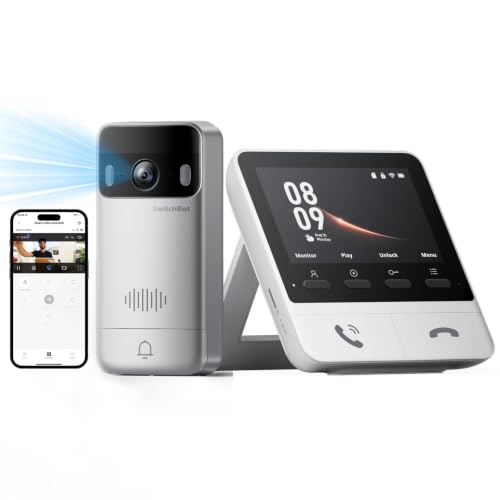
Pros
- 2K video with 165° ultra-wide view
- Color night vision in complete darkness
- 4 GB SD card, no subscription required
- 5,000 mAh wireless outdoor unit
Cons
- Indoor monitor requires a power outlet
- Thick walls can affect range and response
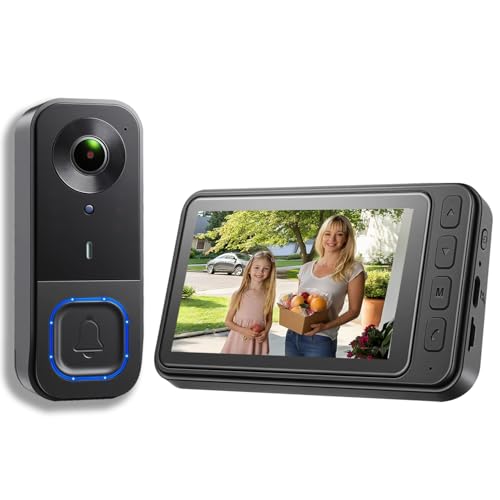
Pros
- 1080p video resolution
- Included monitor screen for live viewing
- Local storage without subscription fees
- 160° view with night vision
Cons
- MicroSD card not included
- No WiFi or app connectivity

Pros
- 2K video with 165° head-to-toe view
- Color night vision for dark entrances
- 4.3-inch monitor with quick response button
- Free 4GB SD card, no subscription
Cons
- Indoor monitor requires a power cable
- Best connection within 5 metres

Pros
- 720P video on a 4.5-inch IPS screen
- Two-way audio without opening the door
- No WiFi, app, or subscription required
- IP54 outdoor protection and IR night vision
Cons
- Indoor monitor should stay connected to charging
- TF card required for local recording, not included

Pros
- No WiFi, app, or subscription required
- 4.3-inch indoor IPS monitor
- 170° wide-angle view with LED lighting
- IP65 outdoor protection
Cons
- Monitor needs to stay plugged in
- Walls and metal doors reduce range
Start With the Monitor Connection
The biggest split is the link between the outdoor button and the indoor display. TKMARS, KALOGL, and FUNNYPANDA use a private 2.4GHz connection without home Wi-Fi, an app, or a monthly subscription. That arrangement is useful for apartments, older family members, or anyone who wants visitors to appear on a dedicated screen.
SwitchBot adds Wi-Fi, Alexa support, optional cloud storage, and compatibility with selected SwitchBot Smart Lock setups. Its monitor needs power and works best close to the outdoor unit, with the manufacturer recommending no more than 5 meters for faster connectivity. Thick walls, metal doors, and multiple floors can affect response.
If your entrance is far from the room where you will answer, check the stated range before mounting. The TKMARS wireless models describe different operating distances, while SwitchBot focuses on short to medium indoor spacing. For any system, temporarily position both units and confirm the live view before fixing hardware in place.
Pro Tip: Place the monitor where you naturally pass during deliveries, not in a rarely used room. Keep its power cable secured and leave the display connected for regular daily use.
Match the View to Your Entrance
A wide viewing angle helps when the visitor stands close to the door or when packages sit below the camera. The SwitchBot models specify a 165° head-to-toe view, the older TKMARS model specifies 170°, and KALOGL specifies 160°. TKMARS Doorbell Camera Wireless No Subscription and FUNNYPANDA use 120° viewing angles, which may suit a straightforward doorway but cover less of the surrounding area.
Resolution is another practical distinction. KALOGL and the TKMARS 170° model specify 1080p, while the SwitchBot options specify 2K. FUNNYPANDA specifies 720p. Night visibility also varies, with infrared night vision on several models and color night vision specified for SwitchBot.
| System type | Main viewing detail | Suitable setting |
|---|---|---|
| No-Wi-Fi monitor | Direct indoor screen | Apartments and simple entries |
| Connected monitor | 2K, 165° view | Smart-home households |
| Wide-angle local system | Up to 170° view | Close or broad entrances |
Mounting angle matters as much as the headline field of view. If the camera points too high, it can miss packages and shorter visitors; if it points toward bright sky or a reflective surface, the image may be harder to read. Use the advice in how to angle a video doorbell down before drilling or applying adhesive.
Plan Storage and Power Before Installation
Local recording avoids recurring storage fees, but the card requirements differ. TKMARS Doorbell Camera Wireless No Subscription supports MicroSD cards up to 128GB, KALOGL supports local storage but does not include its MicroSD card, and the SwitchBot monitor includes a 4GB SD card with support for cards up to 512GB. The TKMARS 170° model records video with an 8GB to 32GB FAT32 TF card and stores ring-triggered photos internally.
Battery descriptions also need careful reading. Several outdoor units use a rechargeable 1,000mAh battery, while SwitchBot lists a 5,000mAh outdoor battery. Indoor monitors generally need outlet power for dependable daily operation, even when they include a battery for limited emergency use.
Do not confuse wireless communication with a completely cordless setup. The outdoor unit may be battery powered while the screen still needs a cable. For broader maintenance advice, see why a doorbell camera keeps disconnecting.
Before You Mount It: Confirm the outdoor unit has a clear signal and that the screen can stay powered. A metal door, thick wall, or poor placement can reduce range, while an uncharged monitor can prevent you from seeing a visitor.
Expert Examined
From Jenna Castellano

I keep the indoor screen near the main route through the home rather than beside the television. The mistake I see is mounting the camera first and discovering that the display is too far away or the cable cannot remain connected.
Read more about Jenna CastellanoWhich System Fits Your Household
I would point apartment residents and privacy-focused buyers toward video doorbells with local viewing, especially TKMARS Doorbell Camera Wireless No Subscription. It provides a 4.5-inch monitor, direct 2.4GHz communication, two-way audio, infrared night vision, and local recording without home Wi-Fi or a subscription. Its stated range can suit many apartment or house layouts, but walls and interference still matter.
I would choose SwitchBot 2K Doorbell Camera with Monitor for a shorter indoor distance where 2K detail, a 165° view, color night vision, Alexa, and Smart Lock compatibility are useful. For a lower-complexity local system with a very wide stated angle, KALOGL Video Doorbell Wireless with Screen 1080p is worth considering, provided you account for its separate MicroSD card and confirm the monitor location first.
The Bottom Line
The mistake most buyers make is treating every wireless doorbell as equally wireless. Some avoid Wi-Fi but still require a powered monitor, and connected models can be more sensitive to distance, walls, and metal doors.
If you only do one thing first, map the path between the outdoor button and indoor screen. Then choose local no-Wi-Fi communication for simplicity, or SwitchBot connectivity when smart-home control and a wider 2K view justify the extra setup.
FAQs
A wider angle can show more of a close doorway, packages, and visitors standing off-center. The products listed range from 120° to 170°, so choose based on the entrance shape and camera distance rather than resolution alone. Yes. Several listed systems connect the outdoor unit directly to an indoor monitor through a private 2.4GHz connection. They do not require home Wi-Fi, an app, cloud storage, or a subscription, although the monitor still needs regular power. Keep the lens clear, check the outdoor battery periodically, and leave the monitor connected for normal use where the instructions call for it. Local storage cards should match the supported capacity and format for the specific model. These are dust and water protection ratings for the outdoor unit, not a promise that the device can be submerged. IP65 indicates the listed TKMARS outdoor unit has stronger stated protection than IP54, but mounting should still avoid exposed water flow.Which viewing angle is best for a video doorbell with a monitor?
Can a wireless doorbell camera work without Wi-Fi?
How should I maintain the camera and battery?
What does IP54 or IP65 mean on a doorbell camera?
Sources
- UL Solutions and IP protection information. www.ul.com
- US Consumer Product Safety Commission and home safety information. www.cpsc.gov