

Choosing the best doorbell cameras for renters means balancing a removable installation with reliable coverage at the entry. The key split is whether you value a wide head-to-toe view, longer battery life, or storage without monthly fees. Renters need practical mounting, 2.4GHz Wi-Fi compatibility, and a device that can leave without damage.

Pros
- 180-degree head-to-toe viewing angle
- 2K 3MP video with night vision
- No subscription required for local storage
- 5200mAh battery supports up to two months
Cons
- Only compatible with 2.4GHz WiFi
- Built-in battery is non-removable

Pros
- Lifetime free cloud storage, no subscription
- 4000mAh battery, up to 60 days standby
- Human detection and motion push alerts
- IP66 weatherproof outdoor construction
Cons
- TF card needed for local storage
- 720P video is modestly detailed
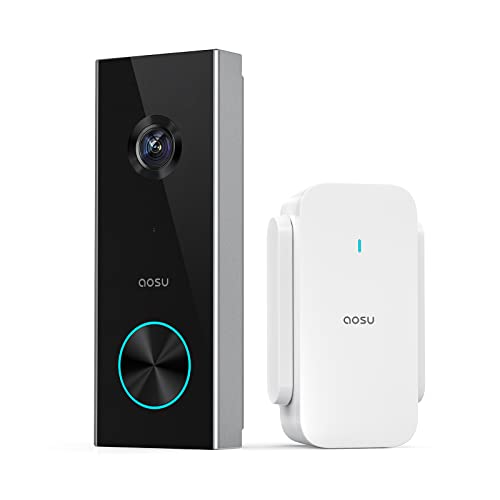
Pros
- 2K resolution with 166° ultra-wide view
- AI human detection reduces unnecessary alerts
- Local storage without a subscription
- Two-way talk with quick replies
- Included base adds Wi-Fi and chime
Cons
- 2.4 GHz Wi-Fi only, no 5 GHz support
- MicroSD card sold separately

Pros
- 2K video with 170° head-to-toe view
- Person detection reduces irrelevant alerts
- No subscription required for essential features
- Local microSD or optional cloud storage
Cons
- 2.4 GHz Wi-Fi only, no 5 GHz support
- microSD card sold separately

Pros
- No subscription required
- 4000mAh rechargeable battery
- Human and PIR motion detection
- 38 chimes plus mute mode
Cons
- 2.4GHz WiFi only
- App required for video calls and alerts

Pros
- Wire-free placement with up to 10-month battery life
- 2K 4MP video with 150°×150° head-to-toe view
- No subscription required for smart detection
- Local storage supports SD cards up to 512GB
Cons
- Chime not included
- Solar charger sold separately
Start With the Building Rules
Before choosing a model, check whether your lease or property manager limits cameras in shared hallways. A doorbell aimed at your own threshold is usually easier to justify than one that records a broad communal corridor. You should also confirm whether adhesive mounting is permitted and whether the door frame has enough flat surface.
Battery-powered models avoid drilling and can suit apartments, but the camera still needs a dependable wireless signal. The ieGeek Video Doorbell Camera, both aosu models, the ViewBell model, and the visiPower model use 2.4GHz Wi-Fi. The REOLINK Battery Video Doorbell (2nd Gen) also supports 5GHz, which may help when your router is crowded, though the camera still needs a suitable location.
For placement ideas, see the advice on angling a video doorbell down. A slightly downward view can show parcels while limiting unnecessary views of neighbors.
Pro Tip: Choose the mounting method before buying: adhesive installation is convenient, but the wall surface must be clean, smooth, and suitable for removal without paint damage.
Match the View to Your Doorstep
Vertical head-to-toe coverage matters when packages sit close to the door. The ieGeek model offers a 180° head-to-toe view, while the aosu 2K model with aosuBase provides a 166° view and the other aosu model provides 170°. These designs are better suited to narrow entries where a visitor and a parcel need to appear together.
The REOLINK model uses a 150° by 150° view with a 1:1 format, 2K 4MP detail, HDR, and night vision. The ViewBell model records at 720P, and the visiPower model provides night vision without a stated resolution in the supplied specifications. For a darker landing, night vision and the camera angle matter more than a headline field-of-view number alone.
| View style | Key strength | Suitable location |
|---|---|---|
| Wide vertical | Shows people and parcels | Narrow apartment threshold |
| Square head-to-toe | Balanced framing | Door with close packages |
| Standard view | Simpler coverage | Open entry area |
Person detection can reduce alerts caused by animals, shadows, or small moving objects. The aosu models, REOLINK, ieGeek, and visiPower specify human or person detection, while ViewBell combines proactive human detection with motion alerts.
Before You Mount It: Never place a camera where its installation blocks a fire exit, interferes with a door closer, or creates a trip hazard. Avoid attaching accessories to shared building equipment without permission.
Plan Charging and Storage
Battery maintenance is the main renter trade-off. The ieGeek battery is rated for up to two months under its stated usage conditions, ViewBell lists up to 60 days of standby time, and REOLINK lists up to 10 months based on five minutes of recording per day. Actual service depends on activity, signal conditions, and recording behavior.
Local storage can keep recurring fees out of the decision. ieGeek supports a Micro SD card up to 128GB and also provides basic cloud storage, while aosu models support cards up to 128GB. REOLINK supports local options including an SD card up to 512GB, a Home Hub, NVRs, or FTP. Card capacity does not remove the need to check retention settings and account security.
I keep a charging reminder tied to the expected battery interval rather than waiting for a low-power alert. The mistake I see is mounting the camera high or behind furniture where removing it becomes awkward, so leave enough access for charging and inspection.
Which Model Fits Your Entry
I would point apartment shoppers toward the video doorbell category when they need to compare wireless options against building restrictions. For a close package drop zone, I would choose the ieGeek Video Doorbell Camera because its 180° head-to-toe view, 2K 3MP image, local storage support, and two mounting methods suit a compact threshold.
I would put the REOLINK Battery Video Doorbell (2nd Gen) in a rental where charging access is inconvenient. Its stated battery duration, dual-band Wi-Fi, 2K 4MP view, and local storage choices make it the most flexible option for a busier entrance, although its chime is not included. For a lower-cost setup with free cloud storage, the Doorbell Camera Wireless No Subscription with Free offers 720P video, two-way audio, a 4000mAh battery, and tool-free setup.
For renters who want an included indoor chime and smart person alerts, I would also consider the aosu 2K Wireless Doorbell Camera with aosuBase. Its base combines Wi-Fi extension, storage support, and chime duties, but it requires 2.4GHz Wi-Fi and a microSD card is sold separately.
The Bottom Line
The biggest mistake renters make is treating wireless as universally flexible. Every model still depends on a suitable Wi-Fi band, a safe mounting surface, and a charging plan that does not require risky access.
If you do only one thing first, measure the entry and identify the exact area you need to see. Then choose the viewing format and mounting method that cover that space without pointing into shared areas.
FAQs
A vertical head-to-toe view is useful when the doorstep is narrow or packages sit directly below the camera. The ieGeek and aosu models specify wide views designed to include visitors and packages, while REOLINK uses a square 1:1 format. Several listed models support wireless installation, and ieGeek specifies both nailing and pasting options. Check your lease and use an adhesive method only on a suitable surface that can support the device safely. The supplied estimates vary by model and usage. REOLINK states up to 10 months under a specific recording condition, while ieGeek states up to two months and ViewBell lists up to 60 days of standby time. IP66 indicates protection against dust and strong water jets, but it does not describe video quality, battery life, or permission to mount in a shared area. Follow the manufacturer’s placement instructions and building rules.Which doorbell camera view works best for an apartment?
Can renters install a battery doorbell without drilling?
How often will a wireless doorbell need charging?
What does an IP66 rating mean for a doorbell camera?
Sources
- National Fire Protection Association www.nfpa.org
- US Consumer Product Safety Commission www.cpsc.gov
- UL Solutions www.ul.com