
Choosing the best doorbell cameras for apple home starts with one practical split: do you want HomeKit Secure Video as the main experience, or a doorbell whose own app adds deeper detection and storage options? That distinction matters most for Apple households deciding between wired installations and broader smart-home control.
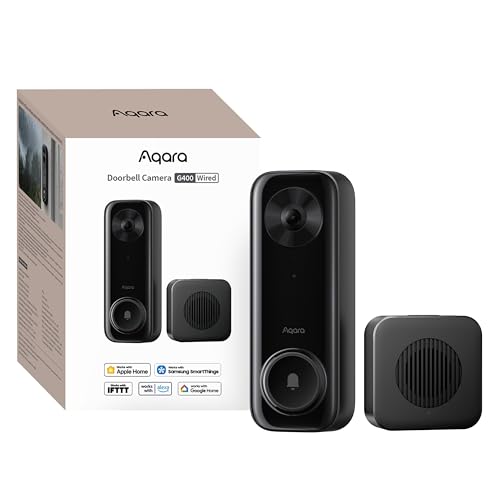
Pros
- 2K video with 165-degree head-to-toe view
- Local person and zone intrusion detection
- HomeKit, Alexa, Google, and SmartThings support
- PoE or 8–24V wired power options
Cons
- Requires wired power or PoE installation
- HomeKit needs iCloud+ and an Apple home hub

Pros
- MmWave radar for more accurate human detection
- 2K wide-angle video with 2-way audio
- Built-in Zigbee and Matter hub
- HomeKit Secure Video and major ecosystem support
Cons
- HomeKit limits resolution to 1600×1200
- MicroSD card for local storage not included

Pros
- 180° panoramic view from ground to ceiling
- 9MP Ultra HD with color night vision
- AI tracking and automatic subject framing
- Local storage with no monthly fees
Cons
- Wired installation required
- SD card for expansion is not included
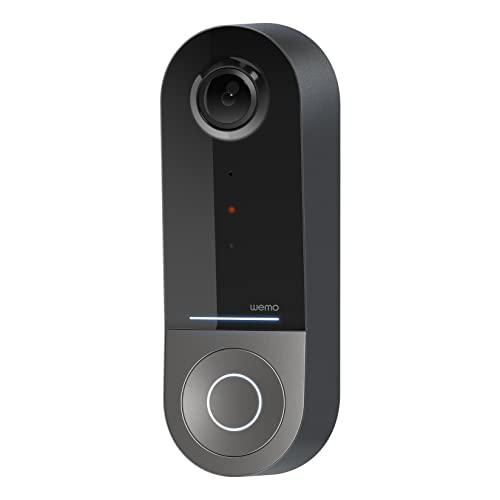
Pros
- 223° diagonal field of view
- Infrared video for dark conditions
- Apple HomeKit Secure Video support
- 2.4GHz and 5GHz WiFi bands
Cons
- Requires an existing 16-24V AC system
- Compatible only with Apple HomeKit
HomeKit Support Is Not the Whole Story
All four products are presented as Apple-compatible, but their strengths differ outside Apple Home. The Aqara Doorbell Camera G400 with Chime, Wired/PoE supports HomeKit Secure Video, RTSP, ONVIF, NVR integration, local detection, and continuous microSD recording. The Aqara Smart Doorbell Camera G410 with Chime adds Matter and a built-in Zigbee hub.
The eufy Security 3K Wired Doorbell Cam S4 pairs HomeKit with a wide 180° by 180° view, AI tracking, auto-framing, and local storage. The Wemo Smart Video Doorbell focuses more narrowly on HomeKit Secure Video, iCloud motion history, dual-band Wi-Fi, and a very broad diagonal field of view.
HomeKit Secure Video requires an iCloud+ plan and an Apple home hub for the Aqara models. Apple Home also limits the Aqara G400 to 1200p and the G410 to 1600×1200, so the app and platform you use most can affect the image resolution.
Pro Tip: Check that your Apple home hub and iCloud+ plan are ready before buying for HomeKit Secure Video.
Match the View and Detection to the Entry
Vertical coverage is useful when packages sit close to the threshold. The G400 provides a 165° head-to-toe view with a 3:4 aspect ratio, while the Wemo offers a 223° diagonal field of view. The eufy model takes a different approach with its panoramic view, VR mode, tracking, and auto-framing.
Detection also separates these choices. The G400 uses local person recognition and zone intrusion detection, while the G410 uses mmWave radar for human-presence detection and local face recognition. Eufy emphasizes AI detection and subject tracking, and Wemo lists HomeKit face recognition rather than a separate local detection system.
For more placement context, read these video doorbell angling tips. A downward angle can help show parcels, but the correct view depends on the doorway and the camera’s stated field of view.
| View approach | Detection approach | Best fit |
|---|---|---|
| Head-to-toe view | Local person detection | Packages near door |
| Radar presence | Local face recognition | Aqara smart-home setup |
| Panoramic tracking | AI auto-framing | Wide entry area |
Power, Storage, and Weather Details
These products are wired rather than battery doorbells. The G400 can use PoE or existing 8–24V AC/DC wiring, while the G410 supports wired or wireless operation according to its product name and includes a chime. Wemo requires a wired 16–24V AC doorbell system, so check the existing system before selecting it.
Local storage varies in form. The G400 records continuously to a microSD card up to 512GB and can back footage up to an SMB-compatible NAS. The G410 stores microSD footage in its indoor chime, while eufy includes 4GB of eMMC storage and supports expansion up to 1TB by SD card.
The G400 carries an IP65 rating for dust and water resistance. Before working on existing wiring, review safe hardwiring practices from this video doorbell wiring resource and consult NFPA for electrical safety information.
Before You Mount It: Confirm the voltage and wiring arrangement first. A doorbell that needs a compatible wired system cannot be safely treated like a battery model.
Expert Examined
From Ray Okafor

I keep seeing doorbell projects fail because the buyer plans around the camera but forgets the chime, wiring, or storage location. I would map the existing doorbell circuit and decide whether footage belongs in iCloud, local storage, or both before choosing a model.
Read more about Ray OkaforPrivacy and Smart-Home Expansion
Apple users may value encrypted recording and notifications, but each product adds different privacy controls. The G410 stores face data locally and offers privacy masking through Aqara Home, while the G400 offers local recognition and local detection without cloud processing for those functions.
The G410 is the most expansion-focused Aqara option because its built-in Zigbee and Matter hub can connect sensors, lights, and locks without an extra hub. The G400 is stronger for advanced recording setups, including RTSP, ONVIF, NVR integration, and NAS backup.
If package visibility is your main concern, pair the camera decision with practical delivery protection such as guidance on where to put a package lock box. Keeping the camera view and package location aligned is more useful than choosing a specification you will not use.
Which Apple Home Doorbell Fits Your Setup
I would point you to the Aqara Doorbell Camera G400 with Chime, Wired/PoE if you want the broadest recording and installation options. Its PoE or 8–24V wiring support, 165° head-to-toe view, local detections, 24/7 microSD recording, and NAS backup make it the most flexible choice for a homeowner planning a more advanced Apple Home system.
I would choose the Aqara Smart Doorbell Camera G410 with Chime for an Apple household that also wants to grow a Matter or Zigbee setup. Its built-in hub, mmWave radar, local face recognition, indoor microSD slot, and loud 95dB chime give it a clear role beyond simple visitor notifications.
For a very wide entrance, I would consider the eufy Security 3K Wired Doorbell Cam S4. Its 180° panoramic view, AI tracking, auto-framing, 9MP video, color night vision, and local storage suit a doorway where a conventional view may leave nearby activity outside the frame.
The Bottom Line
The mistake most Apple Home buyers make is treating every HomeKit label as identical. Resolution limits inside Apple Home, local storage options, detection methods, wiring requirements, and the size of the viewing area can change which model makes sense.
If you only do one thing first, verify your existing doorbell wiring and decide where recordings should live. That immediately narrows the choice between Wemo’s 16–24V requirement, Aqara’s flexible local options, and eufy’s panoramic storage-focused design.
FAQs
The eufy Security 3K Wired Doorbell Cam S4 lists a 180° by 180° panoramic view and VR mode. The Wemo Smart Video Doorbell lists a 223° diagonal field of view, while the Aqara G400 lists a 165° ultra-wide view with a vertical aspect ratio. The Wemo requires a wired 16–24V AC doorbell system, and the G400 supports PoE or existing 8–24V AC/DC wiring. Check each product’s power arrangement against your current doorbell system before installation. Yes. The G400 supports continuous microSD recording up to 512GB and SMB-compatible NAS backup. The G410 uses a microSD card in its indoor chime, and eufy includes 4GB of eMMC storage with expansion up to 1TB by SD card. HomeKit Secure Video supports encrypted recording, iCloud storage, and notifications on Apple devices for compatible products. The Aqara models require an iCloud+ plan and an Apple home hub, and their HomeKit resolution is limited compared with their listed camera resolution.Which HomeKit doorbell has the widest view?
Do these Apple Home doorbells need wired power?
Can I store doorbell video locally?
What does HomeKit Secure Video provide?
Sources
- National Fire Protection Association, electrical safety resources. www.nfpa.org
- UL Solutions, safety standards information. www.ul.com