
Choosing the best DIY video doorbells is less about maximum resolution than matching the camera to your doorway, Wi-Fi band, and charging tolerance. Renters and homeowners alike need a model that covers packages without creating constant false alerts or a difficult installation.

Pros
- 2K HD video with 166-degree wide view
- No subscription for alerts and playback
- HDR night vision up to 10 meters
- MicroSD storage support up to 128GB
Cons
- 2.4 GHz Wi-Fi only
- Built-in battery is non-removable

Pros
- Solar power with built-in dual batteries
- 2K HDR head-to-toe video
- Radar, dual PIR, and AI detection
- Free local storage up to 128GB
- Alexa support and two-way audio
Cons
- MicroSD card not included
- Requires Wi-Fi for wireless operation

Pros
- 5MP resolution with 180-degree panoramic view
- AI person and package detection
- 32GB SD card included
- Up to 180 days of battery operation
Cons
- 2.4GHz WiFi only
- Battery requires periodic recharging

Pros
- 1:1 head-to-toe view, 150° × 150° coverage
- 1536x1536 HD+ video with color night vision
- Wire-free or AC hardwired installation
- Two-way audio and visitor auto-responses
Cons
- Chime options sold separately
- Micro SD card sold separately
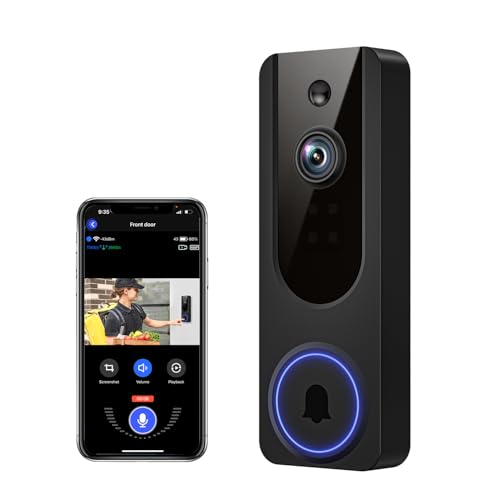
Pros
- AI human detection filters unnecessary motion alerts
- 1080p video with four-LED night vision
- Two-way audio from a smartphone
- Encrypted cloud storage with AES-128
Cons
- 2.4GHz WiFi only
- Cloud subscription required for recording storage

Pros
- 180° panoramic, head-to-toe coverage
- 5MP video resolution
- AI human and visitor detection
- Up to 150 days per charge
Cons
- 2.4GHz WiFi only
- Rechargeable battery needs periodic charging
Match the view to your entryway
A narrow porch may not need an ultra-wide lens, while a package placed directly below the door benefits from head-to-toe coverage. The BOIFUN model offers a 166-degree view, the Wyze camera uses a 1:1 view with a 150 by 150-degree field, and both BOTSLAB models provide 180-degree panoramic coverage.
Resolution matters most when visitors stand far enough away for facial detail to shrink. The BOTSLAB models use 5MP video, while BOIFUN and anyfree specify 2K or 2K HDR video. If packages are tucked close to the threshold, angle the camera downward rather than assuming a wider lens solves every placement problem. These doorbell angle tips can help.
Pro Tip: Aim for the visitor’s face and the floor area where packages land, then confirm that the mounting surface does not block the lens.
Decide how much charging you will tolerate
Battery format is a daily-use decision, not just an installation detail. BOIFUN uses a built-in rechargeable battery, Wyze can run wire-free or from AC power, and the second BOTSLAB model also supports AC power for continuous use. The BOTSLAB base-station model specifies a 6400mAh battery and up to 180 days of operation, while Wyze specifies up to six months.
Solar assistance may suit a sunny entrance, making the anyfree model worth considering because it combines solar power with built-in batteries. Actual battery performance varies with motion activity and environment, so a high-traffic walkway can require more charging. If you are replacing an existing wired doorbell, review safe video doorbell hardwiring practices before connecting power.
Before You Mount It: Never connect a doorbell to existing wiring until you know the circuit and the device support that power arrangement. A wireless model is not automatically suitable for a wired connection.
Choose alerts and storage deliberately
Human detection is available on BOIFUN, BOTSLAB, Wyze, and VanaOrbi, while BOTSLAB adds package recognition. anyfree combines radar, PIR sensors, and AI logic to reduce unwanted motion alerts. These features can make notifications more useful, but detection zones and placement still matter near sidewalks or busy driveways.
Local storage avoids relying entirely on a cloud plan. BOIFUN supports a microSD card up to 128GB, anyfree supports up to 128GB, BOTSLAB includes a 32GB card, and Wyze supports cards up to 256GB. VanaOrbi keeps core alerts and two-way audio available without a subscription, but its cloud recording features require one. For more on recurring fees, see common doorbell connection problems.
Expert Examined
From Dana Whitfield

I keep seeing people mount a doorbell where the lens faces a bright window or a busy street. The better fix is to adjust the viewing angle and detection area before increasing alert sensitivity.
Read more about Dana WhitfieldWi-Fi compatibility also deserves attention. BOIFUN, both BOTSLAB models, and VanaOrbi specify 2.4GHz-only operation, while anyfree supports 2.4GHz and 5GHz Wi-Fi. A 2.4GHz-only camera may offer useful range, but your router must provide that band.
| Camera type | Main distinction | Suitable placement |
|---|---|---|
| 2K wide view | Broad porch coverage | Standard front door |
| 5MP panoramic | Package and visitor detail | Wide or open porch |
| Solar-assisted | Reduced charging | Sunlit entrance |
Which doorbell fits your household
I would point you to the BOTSLAB 5MP Doorbell Camera when package recognition, panoramic coverage, and included local storage matter more than the simplest setup. Its stated combination of radar, PIR, AI detection, a 32GB card, and a 6400mAh battery suits a busy entrance where unwanted alerts and frequent charging are frustrations.
For a sunny doorway, I would put the anyfree Built-in Solar Doorbell Camera higher on the shortlist. It combines solar assistance, dual batteries, 2K HDR head-to-toe video, local storage, and support for both major Wi-Fi bands. If you want flexible power instead, the Wyze Battery Video Doorbell Wireless Camera makes more sense because it supports battery operation or AC wiring and offers color night vision.
Before selecting any model, I would check whether your router broadcasts 2.4GHz, whether the mounting spot sees the package drop zone, and whether you want a microSD card. The doorbell chime explanation is also useful if an alert sound must reach rooms away from the entrance.
The Bottom Line
The mistake most DIY doorbell buyers make is choosing by resolution alone. A sharp camera still performs poorly if the lens misses the threshold, the Wi-Fi band is unavailable, or motion alerts cover a busy sidewalk.
If you only do one thing first, stand at the proposed mounting spot and map the visitor’s face, doorway edges, and package area. Then choose the field of view, power format, and storage method that fit that exact scene.
FAQs
PIR sensors detect heat movement, radar can help judge motion, and AI processing can classify people or packages. Models that combine these methods may reduce unwanted alerts, but correct placement and detection zones remain important. Mount it where the lens can see faces and the area immediately below the door. Avoid pointing directly toward strong glare, and adjust the angle if packages sit close to the threshold. The interval depends on motion activity, recording length, Wi-Fi conditions, and weather. Manufacturer figures are stated under particular conditions, so high-traffic entrances may require more frequent charging. A certification or listing can indicate that a product was assessed against a particular safety standard, but the mark must match the product and its installation conditions. Check the device documentation and the official information from UL Solutions before relying on any symbol.Which sensor type is useful in a video doorbell?
Where should a wireless video doorbell be mounted?
How often do battery doorbells need charging?
What does a doorbell certification mean?
Sources
- UL Solutions product safety information. www.ul.com
- US Consumer Product Safety Commission home safety information. www.cpsc.gov