
Installing the best DIY home security cameras requires deciding how you plan to deliver continuous power and where video clips live after capture. Choosing between wire-free convenience and continuous recording splits this category entirely. Homeowners wanting complete coverage without recurring fees will find their fit across these hardware configurations.

Pros
- 180-degree panoramic dual-lens coverage
- Detailed 8MP video at 20fps
- Accurate human and vehicle motion detection
- 100-foot smart color night vision
- IP67 weatherproof rated housing
Cons
- Two-way audio requires specific Anpviz NVR
- PoE switch or power supply not included
- No Mac or Linux software support

Pros
- Motorized 2.7 to 13.5mm optical zoom lens
- 4K 8MP resolution with 120dB True WDR
- Human and vehicle AI perimeter classification
- IP67 weather resistance down to -22 degrees
Cons
- Full 8MP capture caps at 20fps
- Requires network wiring and configuration
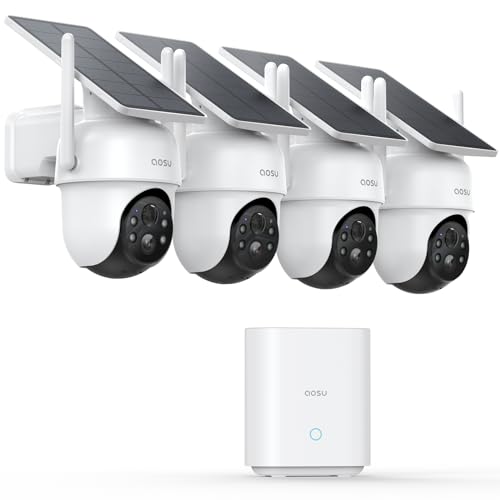
Pros
- 32GB local hub storage with zero subscription fees
- Integrated solar panels eliminate separate power cords
- 2K resolution with 360-degree pan-tilt auto tracking
- Full-color night vision via built-in spotlights
Cons
- Base station requires a wired router Ethernet connection
- App-only live view with no HDMI or TV output
- Event-triggered recording only with no continuous mode

Pros
- 2K video with 24/7 wired recording
- Person and vehicle detection
- Color night vision up to 32 feet
- 256GB local storage, no monthly fees
Cons
- Wired installation requires cable runs
- Six cameras use one 8-channel DVR

Pros
- Includes three months of professional 24/7 monitoring
- Tool-free wireless setup requires no professional technician
- Centralized management through the single Cove app
- Expandable with additional compatible Cove sensors
Cons
- Ongoing 24/7 monitoring requires a paid plan
- Included indoor camera requires a camera supported subscription

Pros
- 2K video with color night vision
- IP65 waterproof indoor or outdoor use
- Two-way talk through the phone app
- White light and siren motion deterrent
Cons
- Plug-in power required
- MicroSD card not included
Power Delivery and Mounting Flexibility
Power access dictates where cameras can physically sit on your exterior walls. Wire-free units equipped with integrated solar panels eliminate structural drilling, relying on ambient daylight to maintain battery reserves. If your roofline blocks direct sun exposure, dedicated low-voltage wiring provides uninterrupted current through stormy weather.
Ethernet cabling through Power over Ethernet carries both data and electrical current over an individual cord. Running category cable into attics requires more labor upfront, but it bypasses home network congestion. Learning what do the lights on a security camera mean helps identify whether connection drops stem from power loss or network drops during physical installation.
| System Format | Power Source | Best Location |
|---|---|---|
| Solar Wireless | Built-in Panel | Sunlit exterior walls |
| Wired PoE | Network Cable | Soffits and high eaves |
| Plug-in Adapter | Wall Outlet | Indoor rooms and porches |
Sunlight Calculation: Check that solar mounting locations receive at least three hours of direct, unshaded sunlight daily before sinking mounting screws into siding.
Video Storage Formats and Network Independence
Self-installed cameras handle footage retention through either local base stations, onboard memory cards, or remote cloud servers. Base stations keep recordings inside your home on solid-state drives, protecting your video clips from disappearing if an outdoor unit suffers physical damage. Standalone slots require an individual memory card for each viewpoint.
Continuous recording systems save every second to a central hard drive, which differs fundamentally from motion-only clip capture. When sorting through multi-camera kits, understanding what is an NVR and how is it different from a DVR prevents buying the wrong storage hardware for your wiring layout. Hardware that processes clips locally also preserves home network bandwidth during daytime internet use.
Network Overload: Battery and solar cameras typically capture short motion events rather than 24/7 video streams to prevent network saturation and battery depletion.
Lens Configurations and Detection Capabilities
Fixed wide-angle lenses maximize horizontal visibility across yards, while varifocal lenses let you adjust focus onto narrow gates or long driveways. Dual-lens bodies stitch adjacent sensors into an unbroken panoramic vista without distortion around the edges. Matching the lens angle to the physical property boundary prevents capturing irrelevant street movement that triggers constant alerts.
Onboard analytics identify people, vehicles, and pets directly on the camera processor. Built-in white spotlights and colored warning strobes activate automatically when an unauthorized subject crosses a perimeter boundary line. For legal documentation after an event, property owners often question if is security camera footage admissible in court, making sharp optical resolution crucial for evidentiary detail.
Expert Examined
From Dana Whitfield

I frequently see property owners angle cameras too high, trying to capture the whole horizon. Pointing the sensor slightly downward captures critical facial features at ground level and eliminates false alerts from passing clouds and neighborhood street traffic.
Read more about Dana WhitfieldMatching Camera Systems to Property Layouts
For perimeter yards with generous sun exposure, I would point you toward the aosu D1 Classic 4-Cam Kit. Its pre-paired base station handles 32GB of local footage without monthly subscriptions, and the individual solar panels eliminate the headache of drilling power cords through exterior masonry.
If you need to watch a wide open lawn or a broad commercial driveway, I recommend the Anpviz 4k 8MP Wired Dual Lens PoE IP Camera. The 180-degree panoramic view eliminates blind spots along flat walls, while the dual red and blue warning lights create an active visual deterrent against trespassers.
For large perimeter setups requiring round-the-clock video capture, I suggest the Swann Home Security Camera System,6 Cams H.265. Its six wired cameras feed continuous footage directly into a local recorder, giving you dependable 2K coverage that functions independently of wireless interference.
The Bottom Line
Most buyers assume that higher camera resolution alone solves home security, but poor wireless range and sluggish motion alerts ruin daily usability. A high-pixel sensor cannot help your property if weak network connectivity delays critical app notifications during an active intrusion.
Start by auditing the physical mounting locations on your exterior structures before buying any hardware. Confirm whether you have accessible wall outlets, clear sunlight for solar panels, or clear attic pathways for running network cables.
FAQs
Do DIY outdoor security cameras require monthly subscription fees?
No, many DIY cameras operate without recurring subscription costs. Systems that include local hard drives, pre-installed base station storage, or micro SD card slots retain recorded events directly on your local hardware. Cloud storage plans remain optional upgrades for off-site backup rather than functional necessities.
What is the difference between motion-activated and continuous recording?
Motion-activated cameras sleep until an infrared sensor or software algorithm detects movement, which conserves battery reserves on wire-free models. Continuous recording systems run 24 hours a day on dedicated power, capturing every second of activity to a local drive regardless of sensor triggers.
How high should DIY security cameras be mounted on exterior walls?
The ideal mounting height for residential cameras is between eight and ten feet off the ground. This elevation keeps the physical camera out of easy reach of vandals while keeping the lens angle low enough to capture clear facial features and license plate characters.
Can solar-powered security cameras survive freezing winter temperatures?
Solar cameras run on rechargeable lithium batteries that accept charge efficiently down to freezing thresholds. The UL Solutions safety standards govern electrical enclosures, and cameras carrying IP65 or IP67 ratings handle snow and rain, though sub-zero weather slows battery charging rates temporarily.
Sources
- Federal Communications Commission www.fcc.gov
- UL Solutions Standards Directory www.ul.com