
Shopping for the best battery powered video doorbells means deciding how much charging and cloud storage you are willing to manage. Renters, busy households, and homes without existing doorbell wiring need different compromises, especially around alerts, indoor viewing, and local recording.

Pros
- 2K HD video with 166-degree wide view
- No subscription for alerts and playback
- HDR night vision up to 10 meters
- MicroSD storage support up to 128GB
Cons
- 2.4 GHz Wi-Fi only
- Built-in battery is non-removable

Pros
- Head-to-Toe 2K video resolution
- Three AA lithium batteries included
- Two-way audio with noise cancellation
- IP65 weather-resistant design
Cons
- Person detection requires a separate subscription
- Three AA batteries eventually need replacement

Pros
- Retinal 2K video with wide-angle coverage
- Up to 6x Enhanced Zoom
- Live View and Two-Way Talk
- Real-time phone motion notifications
Cons
- USB-C charging cable not included
- Ring Protect subscription sold separately

Pros
- 2K video with 165° head-to-toe view
- Color night vision for dark entrances
- 4.3-inch monitor with quick response button
- Free 4GB SD card, no subscription
Cons
- Indoor monitor requires a power cable
- Best connection within 5 metres

Pros
- 2K video with color night vision
- 150-degree wide-angle view
- Battery or wired installation
- Motion detection with real-time alerts
Cons
- AI alerts require a separate monitoring plan
- Battery must be removed for USB-C charging
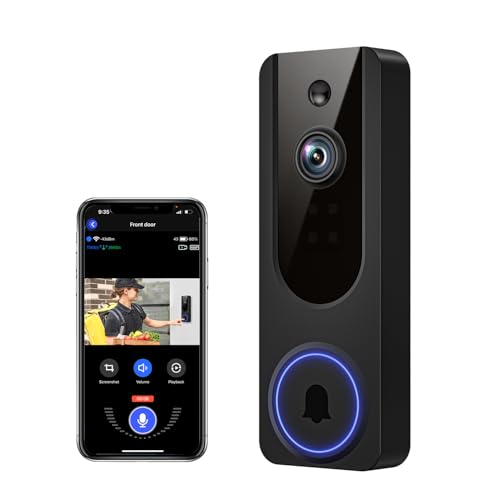
Pros
- AI human detection filters unnecessary motion alerts
- 1080p video with four-LED night vision
- Two-way audio from a smartphone
- Encrypted cloud storage with AES-128
Cons
- 2.4GHz WiFi only
- Cloud subscription required for recording storage
Battery format matters at the front door
A built-in rechargeable battery keeps the installation wire-free, but you must remove the unit when it needs power. That applies to the BOIFUN Video Doorbell Camera, Ring Battery Doorbell 2K (newest model), and SwitchBot Video Doorbell Camera. The BOIFUN model states up to 60 days in laboratory conditions, while SwitchBot uses a 5000 mAh battery.
The Blink Battery Doorbell 2K+ (newest model) uses three AA Energizer lithium batteries and is described as providing months of battery power. Chamberlain myQ Video Doorbell | 2K Camera can operate as either a battery or wired doorbell, which suits a home where you may later add permanent power.
Pro Tip: Choose a mounting position that is easy to reach for charging, without placing the camera where visitors can easily tamper with it.
Motion frequency, recording length, wireless signal, and weather all affect maintenance. A busy walkway can produce more activity than a quiet entrance, so battery estimates should be treated as usage guidance rather than a guarantee.
Resolution is only useful with the right view
Wide coverage helps when packages sit below the visitor’s face. BOIFUN lists a 166° field of view, SwitchBot lists 165° with a head-to-toe 16:9 view, Chamberlain lists 150°, and Blink emphasizes its head-to-toe 2K view. Ring adds up to 6x enhanced zoom, which may help inspect details farther from the door.
Night performance also varies by approach. BOIFUN lists HDR night vision with invisible 940 nm infrared up to 10 meters, while SwitchBot specifies color night vision and VanaOrbi lists four infrared LEDs. If the entrance is dim, consider how the camera handles both faces and packages rather than focusing on resolution alone.
| Device type | Key distinction | Best placement |
|---|---|---|
| Battery rechargeable | Remove to recharge | Easy-reach door frame |
| AA battery powered | Replace lithium cells | Rental or quick setup |
| Battery or wired | Flexible power choice | Existing doorbell wiring |
Mounting angle affects whether the camera favors faces, parcels, or the walkway. For positioning help, use these instructions on angling a video doorbell downward.
Storage and alerts shape daily use
BOIFUN keeps real-time alerts, two-way audio, human detection, and video playback available without a required subscription, and it supports microSD cards up to 128GB. SwitchBot includes a 4GB SD card, supports cards up to 512GB, and offers optional cloud storage after a free trial period.
Blink identifies person detection as requiring a compatible subscription sold separately. Ring lists AI-powered alerts and video history with a Ring Protect subscription, while Chamberlain says recognized-face and unknown-person alerts are available with its Video Monitoring Plan. VanaOrbi keeps two-way audio, human detection, and real-time notifications available without cloud service, but cloud viewing and playback require a subscription.
Before You Mount It: A removable camera can be stolen if the mount is exposed and the tamper protection is ignored. BOIFUN specifically lists a built-in anti-theft alarm, but any model should be mounted securely and checked periodically.
Cloud storage can simplify remote playback, while a memory card avoids recurring service for supported features. If your Wi-Fi signal is weak at the entrance, review advice on why a doorbell camera keeps disconnecting before final placement.
Expert Examined
From Dana Whitfield

I keep seeing front-door cameras placed where the lens captures too much sky and not enough of the delivery area. I would first check the visitor’s face and the doorstep from standing height, then adjust the angle before committing to the mount.
Read more about Dana WhitfieldWhich doorbell fits your household
I would point renters toward the Blink Battery Doorbell 2K+ (newest model) when quick installation and replaceable AA lithium batteries matter. Its head-to-toe 2K view, noise-canceling two-way audio, IP65 weather resistance, and person detection make the feature set practical for a wire-free entrance, although person detection requires a compatible subscription.
I would choose the BOIFUN Video Doorbell Camera for a household that wants core alerts and playback without a required subscription. Its 166° view, 940 nm infrared night vision, local microSD support, and built-in anti-theft alarm cover several common front-door needs, provided the home has a reliable 2.4 GHz connection.
For an older family member or a home where phone alerts are easy to miss, I would put the SwitchBot Video Doorbell Camera on the shortlist. Its 4.3-inch indoor monitor, 2K head-to-toe view, 5000 mAh battery, local SD storage, and operation even without internet support a more visible indoor workflow. Keep the monitor and exterior doorbell within the stated five-meter radius for a strong connection.
The Bottom Line
The mistake most buyers make is treating every battery doorbell as equally maintenance-free. Battery type, motion activity, storage rules, and the distance to the Wi-Fi or indoor monitor can change how often you charge the unit and whether important clips remain available.
If you do only one thing first, inspect the doorway’s power and network conditions. Decide whether you can reach the camera for charging, whether 2.4 GHz Wi-Fi reaches the mounting point, and whether local storage or a subscription better matches how you want to retrieve recordings.
FAQs
A head-to-toe view can show both a visitor’s face and a package near the threshold. Blink and SwitchBot specifically describe head-to-toe coverage, while BOIFUN, SwitchBot, and Chamberlain list wide viewing angles that help cover the approach. Mount it where the lens can see faces and the doorstep without excessive sky or glare. Keep the unit reachable for charging, and check the wireless signal at the exact mounting location before securing it. There is no universal interval because motion activity, recording length, signal quality, and weather affect battery use. BOIFUN gives a laboratory estimate of up to 60 days under specified activity, while Blink describes months with three AA Energizer lithium batteries. The supplied product details do not list a certification for these models, so do not assume one from the product category alone. For safety information about consumer products, consult the US Consumer Product Safety Commission and check the manufacturer’s documentation.Which video doorbell view is best for packages?
Where should I mount a battery video doorbell?
How often do battery video doorbells need charging?
Does a video doorbell need a safety certification?
Sources
- US Consumer Product Safety Commission www.cpsc.gov
- UL Solutions www.ul.com