
Shopping for the best battery powered video doorbells without subscription means separating genuinely free core features from optional cloud services. The key decision is whether you want simple phone alerts, local recording, or an indoor screen, especially if you rent or want fewer recurring costs.

Pros
- 2K HD video with 166-degree wide view
- No subscription for alerts and playback
- HDR night vision up to 10 meters
- MicroSD storage support up to 128GB
Cons
- 2.4 GHz Wi-Fi only
- Built-in battery is non-removable

Pros
- Head-to-Toe 2K video resolution
- Three AA lithium batteries included
- Two-way audio with noise cancellation
- IP65 weather-resistant design
Cons
- Person detection requires a separate subscription
- Three AA batteries eventually need replacement

Pros
- Retinal 2K video with wide-angle coverage
- Up to 6x Enhanced Zoom
- Live View and Two-Way Talk
- Real-time phone motion notifications
Cons
- USB-C charging cable not included
- Ring Protect subscription sold separately

Pros
- 2K video with 165° head-to-toe view
- Color night vision for dark entrances
- 4.3-inch monitor with quick response button
- Free 4GB SD card, no subscription
Cons
- Indoor monitor requires a power cable
- Best connection within 5 metres

Pros
- 2K video with color night vision
- 150-degree wide-angle view
- Battery or wired installation
- Motion detection with real-time alerts
Cons
- AI alerts require a separate monitoring plan
- Battery must be removed for USB-C charging
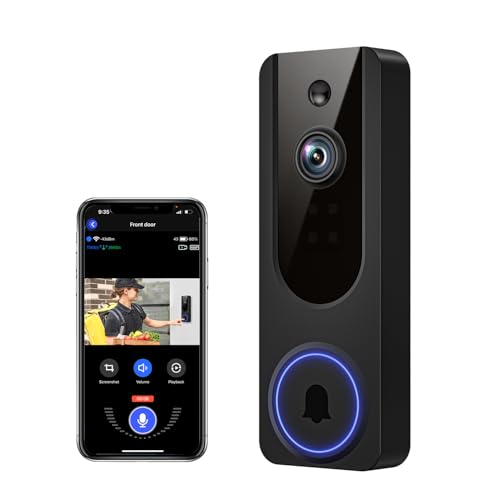
Pros
- AI human detection filters unnecessary motion alerts
- 1080p video with four-LED night vision
- Two-way audio from a smartphone
- Encrypted cloud storage with AES-128
Cons
- 2.4GHz WiFi only
- Cloud subscription required for recording storage
Free Features and Storage Matter Most
A no-subscription doorbell should still provide useful alerts and communication without forcing a cloud plan. BOIFUN keeps real-time alerts, human detection, two-way audio, and playback available without a subscription, while its microSD slot supports cards up to 128GB.
SwitchBot includes a 4GB SD card and supports cards up to 512GB, making it the clearest fit for local storage from the listed products. VanaOrbi also keeps two-way audio, human detection, and real-time notifications available without cloud service, but cloud storage requires a subscription for live viewing and saved recordings.
Other models make their subscription boundaries more important. Blink identifies person detection as requiring a compatible subscription, while Ring and CHAMBERLAIN reserve features such as AI alerts, expanded history, or recognized-person alerts for paid plans.
Pro Tip: Choose local storage when you want recorded clips to remain available without depending on a cloud plan.
Match the View to the Porch
Wide coverage helps when visitors stand close to the frame or packages sit below the camera. BOIFUN offers a 166° field of view, SwitchBot provides a 165° ultra-wide angle with a head-to-toe format, and CHAMBERLAIN uses a 150° wide-angle lens.
Resolution is not the only consideration. Blink, SwitchBot, Ring, BOIFUN, and CHAMBERLAIN all list 2K video, while VanaOrbi lists 1080p. If your priority is seeing a delivery and a visitor in one view, the wider angle and head-to-toe framing may matter more than resolution alone.
| View type | Storage approach | Best placement |
|---|---|---|
| 2K wide view | Local or optional cloud | Front porch |
| 2K head-to-toe | Local SD included | Door and packages |
| 1080p motion view | Cloud optional | Basic entry coverage |
Mounting angle also affects whether the camera captures faces or only the top of a visitor’s head. If the frame feels too high or too low, these doorbell angling instructions explain the adjustment problem without changing the device.
Battery Format and Indoor Awareness
Battery maintenance differs sharply between these choices. Blink uses three AA Energizer lithium batteries and lists months of operation, whereas Ring uses a built-in battery that detaches for USB-C charging. BOIFUN also has a built-in, non-removable rechargeable battery, with laboratory battery life listed up to 60 days under stated usage conditions.
SwitchBot adds a 5000 mAh battery and a 4.3-inch indoor color monitor. The monitor needs a power cable and works best within five metres of the exterior doorbell, so it suits homes where someone wants to see or answer the door without reaching for a phone.
Before You Mount It: A rechargeable battery is not the same as continuous power. Confirm how the unit is removed or recharged, and do not alter existing wiring unless the installation is suitable for that doorbell.
For wiring questions, the safe hardwiring information is a useful reference. A wired option can reduce charging interruptions, but CHAMBERLAIN is the only listed model that explicitly supports battery or wired installation.
Expert Examined
From Dana Whitfield

I keep the charging decision visible before choosing a mounting spot. The mistake I see is placing a rechargeable doorbell where removing it requires a ladder or blocked access, so plan the service path before drilling.
Read more about Dana WhitfieldMy Picks for Different Homes
I would point renters toward <a href="Blink Battery Doorbell 2K+ (newest model) when AA battery replacement and a quick installation matter. Its 2K head-to-toe view, noise-canceling two-way audio, IP65 weather resistance, and months of battery power make the feature set straightforward, although person detection requires a compatible subscription.
I would put SwitchBot Video Doorbell Camera at a door used by children, older family members, or anyone who benefits from an indoor display. The 4.3-inch monitor, included 4GB SD card, 2K head-to-toe view, and operation even without internet give it a distinct role.
For a porch where avoiding monthly fees is the central concern, I would choose BOIFUN Video Doorbell Camera. It combines local microSD support, free human detection and playback, a 166° view, HDR night vision, and a built-in tamper alarm.
The Bottom Line
The mistake most buyers make is treating every no-subscription label as identical. Some models keep alerts and communication free but place person detection, AI events, or recorded history behind a plan, while others provide local storage for a more independent setup.
If you only do one thing first, decide whether you need recorded video without cloud service. Then match that choice to the available storage, battery access, view angle, and indoor-monitor needs before selecting a mounting location.
FAQs
A model with local storage and accessible charging is usually simpler for ongoing ownership. BOIFUN supports microSD storage, while SwitchBot includes a 4GB SD card and supports larger cards, so both reduce reliance on cloud recording. Place it where the camera can cover faces and packages without an obstructed view. Check the angle before fixing the mount, and make sure a rechargeable unit can be removed for charging without unsafe access. The interval depends on motion activity, recording length, settings, and environment. BOIFUN lists up to 60 days under specific laboratory conditions, while Blink describes months with three AA lithium batteries, so actual service needs vary by home. No. Core alerts, communication, or human detection may remain available, while cloud recording, expanded history, or advanced AI can require payment. Check the feature boundary for the specific model before relying on it for saved footage.Which video doorbell type is easiest to maintain without a subscription?
Where should a battery video doorbell be mounted?
How often do battery doorbells need charging?
Does no subscription mean every feature is free?
Sources
- UL Solutions www.ul.com
- US Consumer Product Safety Commission www.cpsc.gov