
Installing the best 4K security cameras resolves the frustration of pixelated digital zoom, but it forces an immediate choice between pre-packaged kits and modular network hardware. Complete multi-camera packages suit property owners wanting an integrated recorder, while standalone IP models serve custom network storage arrays. Selecting the right lens profile prevents costly blind spots across your perimeter.

Pros
- 4K 8MP resolution with dedicated person and vehicle detection
- Pre-installed 2TB hard drive supports 24/7 continuous recording
- PoE connection runs power and video over single 330-foot cables
- NVR storage expands up to 16TB across two drives
Cons
- Wired PoE design requires running physical Ethernet cables
- Includes only four cameras for the eight-channel system

Pros
- Ultra-wide 180-degree panoramic viewing angle
- High-resolution 8MP 4K video recording
- Single-cable Power over Ethernet installation
- IP66 weatherproof rating for outdoor mounting
Cons
- Incompatible with Reolink, Lorex, and Amcrest NVRs
- Requires manual IP setup via ONVIF protocol

Pros
- 4K 8MP resolution at 20 frames per second
- 24/7 full-color night vision reaching 65 feet
- Weatherproof IP67-rated enclosure for outdoor use
- Wide 105-degree field of view on 2.8mm lens
- Single-cable Power over Ethernet data and power
Cons
- Incompatible with Reolink, Lorex, or Amcrest NVRs
- Wall mount and junction brackets sold separately
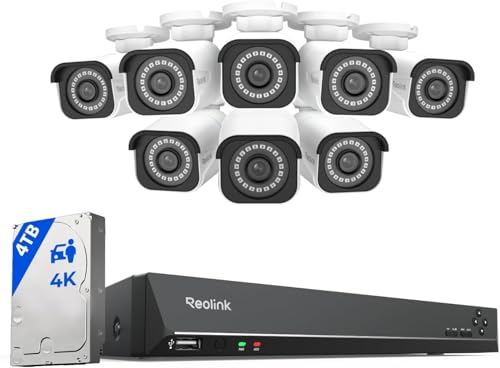
Pros
- 8MP 4K resolution with digital zoom
- Smart person and vehicle shape detection
- Pre-installed 4TB HDD expandable to 16TB
- PoE network cables reach up to 330 feet
Cons
- Cameras only work with Reolink PoE NVRs
- No compatibility with Alexa or smart home systems
- Wired PoE only with no Wi-Fi support

Pros
- Motorized 5X optical zoom lens
- Sharp 4K 8MP resolution with 110-degree coverage
- Smart dual-light night vision reaching 98 feet
- Built-in mic and speaker for two-way talk
- Works with Blue Iris and third-party PoE NVRs
Cons
- Requires separate PoE switch or injector
- Flashing alarm feature defaults to off

Pros
- 180-degree panoramic dual-lens coverage
- 4K 8MP resolution with 65ft color night vision
- IP66 weatherproof metal housing
- Power over Ethernet for single-cable setup
Cons
- Incompatible with Reolink, Lorex, and Amcrest NVRs
- Tech support limited to weekday business hours
Lens Profiles and Perimeter Coverage
Resolution alone cannot compensate for an incorrect field of view. A standard wide-angle lens stretching between 105 and 110 degrees works well for close monitoring near doorways, walkways, and patios. When placed over an open lawn, however, fixed wide lenses disperse pixels across too vast an area to capture fine facial characteristics.
Panoramic 180-degree hardware combines specialized wide glass or dual sensors to monitor an entire property boundary without blind spots. Homeowners managing long driveways or deep setback lines often benefit more from motorized optical zoom. Adjusting the focal length mechanically preserves full sensor clarity at a distance rather than stretching the image through software interpolation.
| Camera Style | Field of View | Primary Purpose |
|---|---|---|
| Fisheye Dome | 180 Degrees | Open yards |
| Turret Fixed | 105 Degrees | Entryway doors |
| Motorized Zoom | 110 to 30 Deg | Gated driveways |
Storage Capacity and Bandwidth Management
Streaming 3840 by 2160 video creates substantial network traffic and consumes drive space rapidly. Efficient video compression such as H.265 reduces file footprints significantly compared to older standards, allowing standard drives to hold weeks of continuous activity. Without efficient compression, multi-camera arrays will overwhelm residential network switches.
Continuous recording requires dedicated hard drives engineered for constant surveillance writes. Checking what is an NVR and how is it different from a DVR helps clarify how modern network video recorders manage these high-bitrate video streams locally. Using localized drives avoids recurring subscription fees and preserves frame rates during internet disruptions.
NVR Compatibility Warning: Verify software protocols before mixing brands. Many standalone cameras require open ONVIF protocol support and will not link correctly with closed, proprietary NVR recorder platforms.
Illumination and Night Video Clarity
Sensor size dictates how much ambient light reaches the pixels when the sun sets. Traditional infrared night vision projects invisible beams to render monochrome images up to 65 or 98 feet away. Infrared excels at discreet illumination, though reflective license plates and outdoor foliage can cause localized glare.
Full-color night vision utilizes supplemental white LEDs to record true color palettes throughout the dark hours. Decoding what the lights on a security camera mean helps you configure whether these auxiliary spotlights trigger on motion or run continuously. Clear color capture provides vital descriptive details if you ever need admissible security camera footage for local authorities.
Expert Examined
From Ray Okafor

I keep seeing homeowners mount ultra-wide panoramic cameras high under second-story roof eaves, which wastes valuable resolution on empty sky and siding. Mounting hardware between eight and ten feet from the ground maintains optimal facial identification angles and prevents night illuminators from reflecting off gutters.
Read more about Ray OkaforCable Pulling Tip: Run solid copper Cat6 Ethernet cabling rather than copper-clad aluminum wire to ensure sufficient Power over Ethernet wattage reaches distant outdoor cameras during cold weather.
Matching Hardware to Your Property Layout
For a complete property overhaul without configuration headaches, I would point you toward the REOLINK 8CH 4K/8MP Home Security Camera System. It provides a dedicated 2TB hard drive and balanced turret cameras that identify vehicles and people accurately, making it ideal for standard suburban homes.
If you already operate an existing network switch or surveillance server, standalone hardware offers superior placement flexibility. I recommend the Tennoz 8MP 4K PoE IP Security Camera with 5X for long driveways where optical zoom captures vehicle plates clearly. For wide backyards where you want to replace multiple aging units with a single mount, the Real HD 4K 8MP PoE IP Fisheye 180° Panoramic delivers expansive perimeter coverage across a flat wall or soffit.
The Bottom Line
The primary error buyers make is purchasing Ultra HD cameras without accounting for recorder compatibility and drive capacity. High-resolution sensors demand substantial storage and proper network protocols, meaning mismatched third-party hardware often fails to record continuously or loses critical smart alert functionality.
Before purchasing your equipment, map your exterior mounting points and confirm cable pathways back to your central network switch. Selecting your camera styles to match specific focal distances guarantees sharp security coverage across every exterior approach.
FAQs
Do 4K security cameras slow down home Wi-Fi networks?
Most 4K systems utilize Power over Ethernet cables rather than Wi-Fi, running traffic directly through an isolated recorder or local switch. This hardwired architecture prevents heavy surveillance streams from interfering with everyday home internet traffic.
How much hard drive space does a 4K camera use daily?
A single 4K camera recording continuously with H.265 compression typically requires between 40 and 60 gigabytes per day. A four-camera setup running around the clock will generally fill a standard 2TB hard drive in roughly ten days.
What is the difference between digital zoom and optical zoom?
Digital zoom simply crops and enlarges pixels inside the video stream, resulting in grainy images. Optical zoom uses motorized internal glass elements to adjust the physical focal length, maintaining complete image resolution without distortion.
Are 4K security cameras weatherproof for winter use?
Outdoor units feature IP66 or IP67 ingress ratings that seal sensitive electronic boards against heavy rain, dust, and snow. Always verify that your mounting hardware includes a sealed junction box to protect the RJ45 cable connection from moisture.
Sources
- ONVIF Interoperability Standards www.onvif.org
- Federal Communications Commission www.fcc.gov
- National Institute of Standards and Technology www.nist.gov