
Shopping for the best smart thermostats that work with Home Assistant starts with the connection standard, not the screen design. The important split is between Matter, Zigbee, and hub-dependent models, especially for homeowners matching a thermostat to an existing HVAC system.

Pros
- SmartThings, SwannOne, and Almond compatibility
- Personalized installation and wiring instructions
- Simple LED screen with limited icons
- Supports scheduling and remote control
Cons
- Compatible hub required for scheduling
- Additional ZigBee platform support is pending

Pros
- Matter support across major smart-home platforms
- Flexible 24/7 heating and cooling schedules
- Remote app and voice control
- Alerts for filters and system malfunctions
Cons
- C-wire required for some wiring configurations
- Not compatible with electric baseboard heaters
- Compatibility check required before purchase

Pros
- Matter support across major smart-home platforms
- No new app or account required
- Local and remote control through existing app
- Supports conventional and heat-pump systems
Cons
- Matter controller required for outside-home connectivity
- Not compatible with 120V or 240V systems
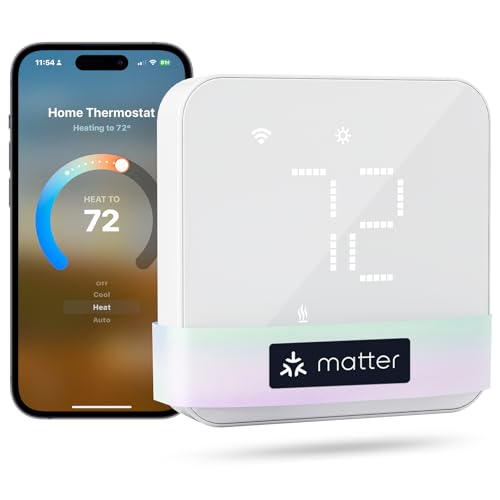
Pros
- Matter support for major smart-home platforms
- Flexible 24/7 heating and cooling schedules
- Remote app and voice control
- Smart alerts for filters and malfunctions
Cons
- C-wire may be required and is not included
- Not compatible with electric baseboard heaters

Pros
- ENERGY STAR certified
- Customizable 4.3-inch touchscreen
- Humidity monitoring for indoor air quality
- Works with Alexa, Matter, Apple Home, Google
Cons
- C-wire required for installation
- Not compatible with 120-240V electric baseboard heat

Pros
- Built-in mmWave radar detects human presence
- 4-inch full-color touchscreen
- Matter 1.4 supports major smart-home platforms
- Built-in Zigbee hub and Thread border router
Cons
- C-wire adapter sold separately when needed
- Apple Adaptive Temperature requires newer Apple devices
Start With Home Assistant Compatibility
Matter is the clearest fit among these choices because both meross models, the LUX model, the Honeywell Home model, and the Aqara model list Matter-based integration with major smart-home platforms. The meross Matter Smart Thermostats for Home models specifically name Home Assistant, while the TQ1-Black Matter Over WiFi Smart Thermostat lists Home Assistant alongside Apple Home, Google Home, Alexa, and SmartThings.
The Zen Thermostat – ZigBee Edition takes a different route. It supports SmartThings, SwannOne, and Securifi Almond hubs, with additional Zigbee platform support described as forthcoming, and it requires a compatible connected-home hub for scheduling and remote control. If your Home Assistant setup already bridges Zigbee devices through a compatible hub, confirm that path before buying rather than assuming the thermostat will pair directly.
Pro Tip: Check your Home Assistant integration plan and HVAC wiring before ordering. A familiar voice assistant logo does not by itself confirm the connection method you need.
Match the Thermostat to Your HVAC Wiring
Compatibility warnings matter more than touchscreen size. The meross models exclude 110V, 120V, and 240V electric baseboard heaters, millivolt thermostats, and two-wire systems, while some configurations require a C-wire. The Honeywell Home X7B also excludes electric baseboard heat, but includes a voucher for a Honeywell Home C-Wire Adapter if your system lacks one.
The LUX TQ1 supports several conventional and heat-pump configurations, plus millivolt heating, but it is not compatible with 120V or 240V line-voltage systems. Its C-Wire Adapter and trim plates are sold separately. Aqara says the W200 suits about 85% of HVAC systems and offers a separately sold C-Wire Adapter for systems without a C-wire.
Before You Wire: Never connect a thermostat to a line-voltage system unless the product specifically supports it. Verify the existing system type and terminal wiring first, and obtain qualified help if the labels are unclear.
| Connection type | Key requirement | Best fit |
|---|---|---|
| Matter over Wi-Fi | Controller or compatible network | Home Assistant households |
| Zigbee | Compatible connected hub | Existing Zigbee users |
| Matter with display | C-wire or adapter check | HVAC upgrades |
Consider Control, Scheduling, and Local Operation
For flexible daily routines, both meross thermostats provide 24/7 scheduling, remote app control, and alerts for filter life, system malfunctions, and long-term operation. Their listed Matter integration operates locally with Matter-certified platforms, which can reduce dependence on separate manufacturer apps.
The LUX model keeps configuration at the device and uses a Matter-enabled smart-home speaker or controller for connectivity outside the home. Honeywell Home adds a customizable 4.3-inch display, humidity monitoring, ENERGY STAR certification, and support for 2.4 or 5.0 GHz Wi-Fi. Aqara adds a 4-inch touchscreen, built-in mmWave radar presence detection, and local Matter 1.4 control across several platforms.
Home Assistant users who are also comparing connected sensors may benefit from reviewing Zigbee smoke detectors for Home Assistant to keep the wider system consistent. The right thermostat should fit the same connectivity philosophy as your other devices.
Expert Examined
From Ray Okafor

I keep the wiring label photo with the thermostat model details before any installation decision. The mistake I see is choosing a platform first and discovering later that the HVAC system needs a C-wire, adapter, or different voltage support.
Read more about Ray OkaforWhich Thermostat Fits Your Home Assistant Setup
I would point most Home Assistant shoppers toward the meross Matter Smart Thermostats for Home when their HVAC system fits the listed requirements and a C-wire is available where needed. It explicitly names Home Assistant, supports local Matter integration, provides flexible scheduling, and adds alerts for filter life and system problems.
I would choose the TQ1-Black Matter Over WiFi Smart Thermostat for a household that wants device-based configuration and already has a Matter-enabled smart-home speaker or controller. Its broad conventional, heat-pump, PTAC, fan-coil, and millivolt support is useful, but you should account for the separately sold C-Wire Adapter and trim plates.
For a more advanced display and presence-focused setup, I would consider the Aqara Smart Thermostat W200 with Apple Adaptive. Its built-in mmWave radar, Matter 1.4 support, trim kit, and broad platform compatibility suit a connected home that values local control and automatic presence responses. If the priority is humidity monitoring and a large customizable display, Honeywell Home X7B Smart Wi-Fi Programmable is the more direct match.
The Bottom Line
The mistake most buyers make is treating Home Assistant compatibility as proof that every HVAC system will work. Matter or Zigbee describes communication, while C-wire needs, voltage limits, heat-pump support, and system configuration determine whether installation is appropriate.
First, photograph or record your existing thermostat wiring and identify the HVAC type. Then compare that information with the model’s compatibility notes before choosing the platform features you want.
FAQs
Matter models are the most direct match in this group because several explicitly list Home Assistant support. The meross models, LUX TQ1, Honeywell Home X7B, and Aqara W200 use Matter, while the Zen model uses Zigbee and requires a compatible connected-home hub for scheduling and remote control. C-wire requirements vary by model and wiring configuration. The meross models may require one, Honeywell Home requires one but includes an adapter voucher, LUX sells its adapter separately, and Aqara offers a separately sold adapter for systems without a C-wire. The meross models and Honeywell Home X7B do not support 110V, 120V, or 240V electric baseboard heaters. LUX also excludes 120V and 240V line-voltage systems, so identify the system voltage before purchase. Matter is a smart-home interoperability protocol used by compatible platforms and controllers. In these products, Matter supports connections with platforms such as Home Assistant, Apple Home, Google Home, Alexa, or SmartThings, depending on the model.Which smart thermostat type works best with Home Assistant?
Do these thermostats require a C-wire?
Can I use a smart thermostat with electric baseboard heat?
What does Matter mean for thermostat control?
Sources
- US Consumer Product Safety Commission www.cpsc.gov
- UL Solutions www.ul.com