
Shopping for the best DIY smart thermostats starts with matching the thermostat to your HVAC wiring, not choosing the most attractive screen. The key split is between conventional systems, heat pumps, and air conditioners such as mini splits, so this selection suits homeowners who want app control without guessing at compatibility.

Pros
- Remote app control and real-time monitoring
- 7-day programmable temperature scheduling
- Backlit LCD for dark rooms
- Temperature control within 2°F
Cons
- Requires a 24V C-wire and no batteries
- Works only with 2.4GHz Wi-Fi

Pros
- Remote control through Smart Life App
- Alexa and Google Home compatible
- 7-day or 5-1-1 scheduling
- Supports non-programmable mode
Cons
- Requires C-wire, cannot use batteries
- Not compatible with multi-stage systems

Pros
- ENERGY STAR certified
- Common wire not required in most applications
- Alexa compatible with remote access
- Usage reports and maintenance reminders
Cons
- Some applications require a common wire
- HVAC compatibility varies by home

Pros
- ENERGY STAR certified
- Flexible scheduling and remote access
- Large color touchscreen display
- Usage reports and maintenance reminders
Cons
- Common wire required for installation
- Smart controls require Wi-Fi and mobile app
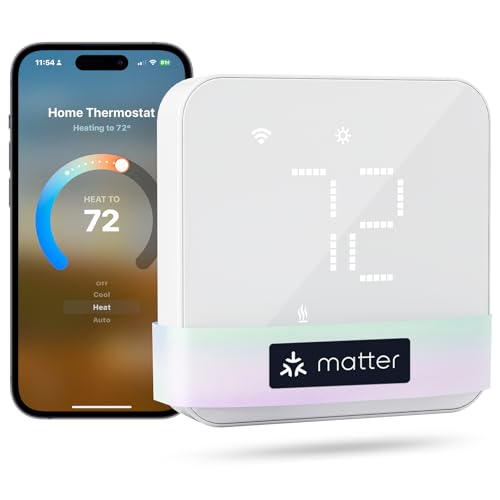
Pros
- Matter support for major smart-home platforms
- Flexible 24/7 heating and cooling schedules
- Remote app and voice control
- Smart alerts for filters and malfunctions
Cons
- C-wire may be required and is not included
- Not compatible with electric baseboard heaters

Pros
- Remote control from anywhere via app
- Alexa and Google Home compatible
- Customizable weekly temperature schedules
- Usage and cost tracking
- DIY WiFi setup with plug-in power
Cons
- Requires WiFi and app for smart controls
- Limited to compatible HVAC systems
Match the thermostat to your HVAC system
Start by identifying whether your home uses a conventional single-stage system, a heat pump, or a separate air conditioner or mini split. The Riseem model is narrowly intended for conventional single-stage 1 Heat/1 Cool systems and does not support heat pumps or multi-stage equipment. That makes an accurate wire and system match especially important.
The XuLuaba model supports gas, oil, electric, some heat pump setups without auxiliary or emergency heat, heat-only systems, cool-only systems, and two-transformer systems. The meross model covers a broader range that includes heat pumps, furnaces, boilers, humidifiers, and dehumidifiers, although it is not designed for line-voltage baseboard heat, millivolt systems, or two-wire systems.
Before You Wire: Do not connect a thermostat until the existing terminals and HVAC system match the manufacturer’s compatibility details. An incorrect match can cause abnormal operation or leave heating and cooling controls unavailable.
Wiring and power decide the installation
A C-wire is a major dividing line in this group. Riseem, XuLuaba, Sensi Touch, and meross require C-wire power, while the standard Sensi model says a common wire is not required in most applications. A C-wire is not the same as a battery compartment, so check the wall wiring before removing the old thermostat.
Wi-Fi also matters during setup. Riseem works only with a 2.4GHz network, while the other listings specify app-based control or connected-home compatibility without stating the same band limitation. If your router separates network bands, confirm which network the thermostat can join before starting installation.
| System type | Key requirement | Suitable direction |
|---|---|---|
| Conventional single-stage | C-wire and 2.4GHz | Riseem or Sensi |
| Heat pump or broad HVAC | Verify auxiliary heat | meross or XuLuaba |
| Mini split or window AC | Outlet-powered controller | BOLDR Klima |
For broader advice about connected energy devices, the Smart Energy and Climate Control category provides useful context. You should also keep the thermostat’s installation instructions nearby because terminal labels alone do not confirm system type.
Choose controls that fit your routine
Remote adjustment is available across the listed smart options, but scheduling formats vary. Riseem supports seven-day or zero-day programming, XuLuaba adds five-one-one scheduling, and meross offers flexible plans for different times of day. Sensi adds usage reports, equipment alerts, and maintenance reminders, which can be more useful than a decorative display.
Voice and platform support may narrow the choice further. XuLuaba works with Alexa and Google Home, meross uses Matter with Apple Home, Alexa, Google Home, Home Assistant, and SmartThings, and BOLDR Klima works with Alexa and Google Assistant. Matter is the clearest fit if you want one thermostat to participate in several supported smart-home platforms.
Pro Tip: Before installation, photograph the existing terminal connections and write down the HVAC type. This gives you a reference if the new app asks for system details during setup.
Expert Examined
From Dana Whitfield

I keep seeing homeowners focus on the display while overlooking the equipment label and unused wire in the wall. The safer approach is to identify the HVAC system first, then choose a thermostat whose supported terminals and power requirements match it.
Read more about Dana WhitfieldThe Smart Thermostats category is also useful if you are comparing this type of controller with other connected climate products. For general electrical safety information, consult the US Consumer Product Safety Commission rather than relying on a wiring guess.
Which thermostat fits your home
I would point you to Sensi Smart Thermostat, Wi-Fi, DIY, Alexa if you want familiar button controls, flexible scheduling, remote access, and the possibility of installing without a C-wire in many applications. Its traditional shape can also reduce wall patching concerns.
For a conventional single-stage furnace and air conditioner with a confirmed C-wire, I would consider WiFi Thermostats for Home Smart Thermostat. Its 2.4GHz-only connection and narrow system support make it a focused choice rather than a universal one.
If your setup includes a heat pump, boiler, humidifier, or dehumidifier, I would look first at meross Matter Smart Thermostat for Home. Matter support and alerts for filter life or system malfunctions add useful flexibility, provided your wiring is compatible.
The Bottom Line
The single mistake most buyers make is treating a smart thermostat as a universal replacement. Heat pumps, multi-stage systems, millivolt equipment, line-voltage heaters, and mini splits can require very different compatibility details.
If you do only one thing first, photograph the current wiring and identify the HVAC system type before ordering. Then compare those details with the product’s supported terminals, C-wire requirement, and network requirements.
FAQs
A heat pump needs a thermostat that explicitly supports heat-pump equipment. XuLuaba supports heat pumps without auxiliary or emergency heat, while meross lists heat pumps among supported systems, so verify your exact configuration before purchase. No. Riseem, XuLuaba, Sensi Touch, and meross require C-wire power, while the standard Sensi model says a C-wire is not required in most applications. Confirm the wiring before removing the existing thermostat. The BOLDR Klima is specifically designed for window air conditioners, mini splits, and heat pumps, and it plugs into a regular power outlet. Conventional wired thermostats in this selection should not be assumed to control a mini split. Matter lets the meross thermostat integrate locally with supported platforms such as Apple Home, Alexa, Google Home, Home Assistant, and SmartThings. It does not remove the need to verify HVAC compatibility or C-wire requirements.How do I choose a smart thermostat for a heat pump?
Does every DIY smart thermostat need a C-wire?
Can I use a smart thermostat with a mini split?
What does Matter compatibility mean for a thermostat?
Sources
- US Consumer Product Safety Commission www.cpsc.gov
- UL Solutions www.ul.com