
Shopping for the best WeMo smart plug alternatives means matching the plug to your home platform before comparing features. The key split is between Alexa-only, Alexa and Google Home, and Matter-compatible models, so this selection is for households replacing WeMo without creating another control problem.

Pros
- Alexa and Google Home voice control
- Remote control through Kasa app
- Scheduling, timers, and countdowns
- UL certified with a 2-year warranty
Cons
- Requires 2.4GHz Wi-Fi
- App required for setup and remote control

Pros
- Four-pack of compact smart plugs
- Alexa and Google Assistant voice control
- Bluetooth or WiFi connection
- Schedules and group controller
- ETL and FCC certified
Cons
- 2.4GHz WiFi only
- Requires the Govee Home app

Pros
- Compact design leaves the second outlet free
- Alexa voice control and app access
- Schedules support sunrise and sunset routines
- Four-pack covers multiple appliances
Cons
- Works with Alexa only
- Requires 2.4 GHz Wi-Fi

Pros
- Alexa and Google Assistant voice control
- Remote control through three compatible apps
- Schedules and timers for connected devices
- Group control and family sharing
- ETL and FCC listed
Cons
- 2.4GHz WiFi only
- Alexa and Google setup requires the GHome app first
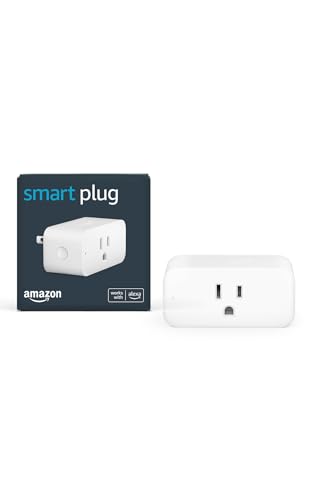
Pros
- No smart home hub required
- Compact design keeps second outlet free
- Alexa Routines automate everyday tasks
- Automatically reconnects after outages
Cons
- Requires Alexa app and compatible account
- Works only with physical on/off switches

Pros
- Matter support for major smart home platforms
- 15A/1800W capacity
- Remote app control from anywhere
- Voice control with Siri and Alexa
- Timers and schedules for automation
Cons
- Requires 2.4GHz Wi-Fi and IPv6
- Hub required for most Matter platforms
Start With Your Home Platform
Platform support is the first filter because the cheapest setup is usually the one that works inside the system you already use. Amazon Basics Smart Plug, Works with Alexa Only and Amazon Smart Plug, Works with Alexa, Simple Setup are focused on Alexa, while Govee Smart Plug, WiFi Outlet Compatible, Kasa Smart Plug Ultra Mini 15A, EP10P2, and GHome Smart Plug, WiFi Smart Plugs that Work support Alexa and Google Assistant.
Linkind Matter Smart Plug, Work with Apple Home adds the broadest platform coverage, including Apple Home, Alexa, Google Home, Siri, and SmartThings. Matter does require a compatible hub or controller for those platforms, although the AiDot app can be used without a hub.
For more platform-specific ideas, compare these plugs with HomeKit-compatible devices when Apple Home is central to your setup.
Pro Tip: Choose the voice platform first, then confirm the plug supports your home’s 2.4GHz network.
Wi-Fi Limits Matter More Than They Sound
Every model in this selection uses 2.4GHz Wi-Fi, so a phone connected to a 5GHz-only network will not complete setup by itself. Govee and GHome also describe Bluetooth or Wi-Fi connection support, which can help with initial connection and stability.
Remote control and scheduling are common across the group, but app arrangements differ. Kasa uses its app, GHome works with GHome, Smart Life, and Tuya, Amazon models use Alexa, and Linkind can use certified Matter platforms or AiDot.
| Control style | Network requirement | Best placement |
|---|---|---|
| Alexa only | 2.4GHz Wi-Fi | Alexa rooms |
| Alexa and Google | 2.4GHz Wi-Fi | Mixed-platform homes |
| Matter multi-platform | 2.4GHz plus controller | Apple Home setups |
Before adding several outlets, decide whether you want each device managed separately or grouped. Govee and GHome provide group control, while scheduling can automate lamps, fans, humidifiers, and other listed appliances.
Before You Connect: Do not assume a Matter plug works without a controller in every platform. Check whether your home has a compatible hub or use the manufacturer’s app option where available.
Safety Ratings and Everyday Loads
Certifications help distinguish documented safety claims from vague marketing. Govee is ETL and FCC certified, GHome is ETL and FCC listed, Linkind is ETL certified, and Kasa identifies its plug as UL certified. UL Solutions explains how recognized safety certification fits into product evaluation.
Pay attention to the electrical rating stated for the specific model rather than assuming every smart plug handles the same load. Govee lists 10A and 1200W at 120V, while Linkind lists 15A and 1800W, so the appliance and plug rating should agree before you automate it.
Expert Examined
From Ray Okafor

I keep smart plugs away from cramped, heat-prone arrangements where the body or cord is under pressure. The mistake I see is treating a compact plug as permission to ignore the appliance rating, so I check both labels before assigning a schedule.
Read more about Ray OkaforFor broader household safety planning, the smart sensors and home automation category is useful when plugs are only one part of the setup.
Which Alternative Fits Your Home
I would point Alexa-only households toward Amazon Basics Smart Plug, Works with Alexa Only when direct Alexa setup and routines matter more than cross-platform flexibility. It manages connected devices in the Alexa app, supports remote control and schedules, and its compact design leaves the other socket free.
I would put Kasa Smart Plug Ultra Mini 15A, EP10P2 in a home that uses both Alexa and Google Home and wants a two-pack with scheduling and app control. Its 2.4GHz requirement is clear, and its UL certification and two-year warranty add useful reassurance.
For an Apple Home household, I would choose Linkind Matter Smart Plug, Work with Apple Home. It supports Siri, Apple Home, Alexa, Google Home, and SmartThings, plus local control after setup, but you should already have the required Matter controller or plan to use AiDot.
The Bottom Line
The mistake most buyers make is treating every smart plug as interchangeable. Platform support, 2.4GHz Wi-Fi, Matter controller requirements, and the stated electrical rating can change whether a model fits your home.
If you do one thing first, identify the platform that should control the outlet. Then check the network band and the appliance rating before choosing the model that offers the scheduling or group control you actually need.
FAQs
Alexa-only models keep setup inside the Alexa app, while Alexa and Google Home models offer more flexibility if your household uses both platforms. Amazon Basics Smart Plug, Works with Alexa Only and Amazon Smart Plug, Works with Alexa, Simple Setup are the most platform-specific choices in this selection. The listed models require 2.4GHz Wi-Fi. Govee and GHome also mention Bluetooth or Wi-Fi connection support, but their Wi-Fi requirement remains 2.4GHz. Linkind requires a Matter-certified hub or controller for Apple Home, Alexa, Google Home, and SmartThings. Its AiDot app can be used without a separate hub, according to the product information. These markings identify stated certification or listing claims associated with safety, electrical compliance, or communications requirements. They do not replace checking the plug’s stated load rating and using it with an appropriate appliance.Which smart plug type is best for an Alexa home?
Do these smart plugs work on 5GHz Wi-Fi?
Does a Matter smart plug need a hub?
What do ETL, FCC, and UL markings mean here?
Sources
- UL Solutions product safety resources. www.ul.com
- US Consumer Product Safety Commission. www.cpsc.gov