
Shopping for the best kasa smart plugs usually starts with one practical choice: do you need a compact plug, a built-in outlet, or a power strip? This selection suits households that want app and voice control without adding a hub.

Pros
- Alexa and Google Home voice control
- Remote control through Kasa app
- Scheduling, timers, and countdowns
- UL certified with a 2-year warranty
Cons
- Requires 2.4GHz Wi-Fi
- App required for setup and remote control

Pros
- Four-pack covers multiple appliances
- Works with Alexa and Google Assistant
- Remote control from anywhere via Kasa app
- Timer and countdown scheduling
- UL certified for safety
Cons
- Requires a 2.4GHz Wi-Fi connection
- Kasa app required for setup and remote control

Pros
- Matter support across major smart home platforms
- Compact design helps preserve nearby outlet access
- UL certified flame-retardant design
- Scheduling, timers, app, and voice control
Cons
- 2.4 GHz Wi-Fi only
- Limited to 15A/1800W maximum
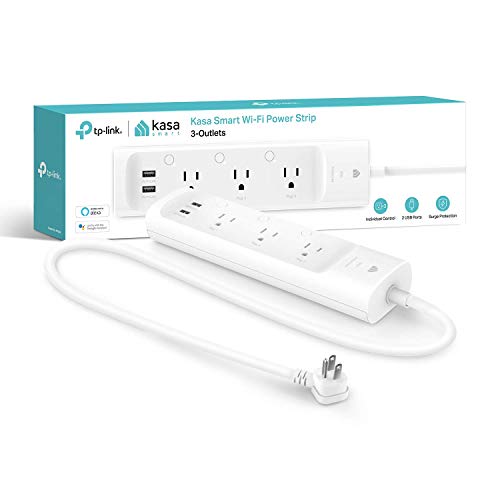
Pros
- Three individually controlled smart outlets
- Two always-on USB charging ports
- ETL-certified surge protection
- Alexa and Google Assistant support
Cons
- USB ports cannot be individually controlled
- Remote control requires the Kasa app

Pros
- Controls two devices separately or together
- Alexa and Google Home voice control
- Remote control, schedules, and scenes
- ETL certified, no hub required
Cons
- Wi-Fi required for connected features
- In-wall installation, not a plug-in unit
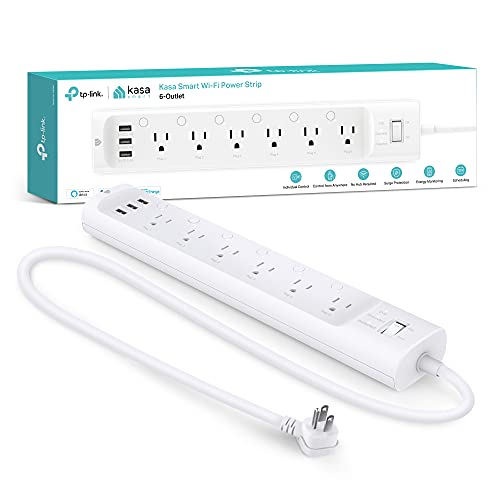
Pros
- Six individually controlled smart outlets
- Three built-in USB charging ports
- ETL certified surge protection
- Energy monitoring through Kasa app
Cons
- App or voice assistant needed for remote control
- 15A, 1875W total load limit
Match the format to the space
A compact plug works well for a lamp, fan, humidifier, or seasonal lights when you want to keep the existing outlet. The Kasa Smart Plug Ultra Mini, EP10P2 is a two-pack, while the Kasa Smart Plug HS103P4, Smart Wi-Fi Outlet supplies four units for several rooms.
An in-wall outlet takes a different approach. The Kasa Smart Plug KP200, In-Wall Smart Home Wi-Fi controls two connected devices individually or together, so it avoids stacking external plugs in a busy living room, kitchen, or bedroom.
Pro Tip: Choose the format before choosing features: count the devices, check available outlet space, and decide whether an in-wall installation suits the room.
Platform support changes the buying decision
Every option here supports remote control and scheduling through its associated app, while several also respond to Alexa and Google Assistant. That makes a standard Kasa plug a straightforward choice for lamps and appliances you want to switch from anywhere or automate with a timer.
The TP-Link Tapo Matter Supported Smart Plug Mini adds Matter compatibility for Apple Home, Alexa, Google Home, and Samsung SmartThings. Matter can also allow local network control between compatible devices when the home internet is offline, which makes this model especially relevant if your household uses more than one smart-home platform.
For broader home automation ideas, the Smart Sensors & Home Automation category provides useful context on how connected devices fit together.
| Device type | Main distinction | Best placement |
|---|---|---|
| Compact plug | Individual outlet control | Lamps and small appliances |
| Matter plug | Multi-platform support | Mixed smart-home systems |
| Power strip | Several controlled outlets | Desks and entertainment areas |
Power strips for several devices
A power strip is more suitable than several individual plugs when devices already share one location. The kasa smart Plug Power Strip KP303 offers three individually controlled outlets plus two always-on USB ports, while the Kasa Smart Plug Power Strip HS300, Smart Outlet expands that arrangement to six controlled outlets and three USB ports.
Both strips include surge protection and remote app control. The HS300 also adds energy monitoring for connected devices, whereas the KP303 keeps the setup simpler for charging accessories and switching a smaller group of electronics.
Check the load: Do not treat a smart plug as a replacement for a properly rated electrical installation. Check the connected appliance requirements and use the product only within its stated electrical limits.
The US Consumer Product Safety Commission offers consumer safety information worth consulting before changing an outlet or powering multiple appliances from one strip.
Expert Examined
From Ray Okafor

I keep seeing people choose a power strip for one lamp, then leave most outlets unused. I would first identify every device that needs separate control, because individually controlled outlets matter only when each device needs its own schedule or command.
Read more about Ray OkaforWhich plug fits your household?
I would point renters or anyone adding control without altering wiring to the Smart Plugs & Outlets category and the Kasa Smart Plug Ultra Mini 15A, EP10P2. Its compact format, scheduling, remote control, and two-pack suit a pair of lamps or small appliances, while the required 2.4GHz Wi-Fi keeps the setup specific and clear.
I would choose the TP-Link Tapo Matter Supported Smart Plug Mini for a home that mixes Apple Home, Alexa, Google Home, or Samsung SmartThings. Matter compatibility and Bluetooth onboarding make its platform support the central reason to select it.
For a desk, media area, or small office with several electronics, I would put the Kasa Smart Plug Power Strip HS300, Smart Outlet ahead of a group of separate plugs. Six individually controlled outlets, three USB ports, surge protection, and energy monitoring give that placement more useful control than a basic single-outlet model.
The Bottom Line
The most common mistake is buying a compact plug when the real need is several separately controlled devices in one location, or choosing a strip when each room needs an independent outlet.
Start by counting the devices and identifying the smart-home platform you already use. Then choose the smallest format that provides the required outlet control, scheduling, and compatibility.
FAQs
Choose a compact plug for an individual lamp or appliance, an in-wall outlet for two controlled devices in one location, or a power strip for several electronics. A Matter model fits homes using multiple supported smart-home platforms. The listed Kasa and Tapo plug options are designed for Wi-Fi control and do not require a separate hub. Setup and control use the relevant Kasa or Tapo app, with 2.4GHz Wi-Fi required for the listed Wi-Fi models. Check that the outlet location and connected devices suit the product requirements, and follow appropriate electrical safety practices. If you are unsure about wiring, consult a qualified electrician rather than improvising an installation. UL certification and ETL certification indicate that the product carries a recognized safety certification for the stated use. They do not mean every appliance or load is automatically suitable, so you still need to follow the product limits.Which type of Kasa smart plug should I choose?
Do these smart plugs need a hub?
What should I check before installing an in-wall outlet?
What does UL or ETL certification mean here?
Sources
- US Consumer Product Safety Commission www.cpsc.gov
- UL Solutions www.ul.com