
Shopping for the best smart plugs for SmartThings starts with one compatibility choice: Matter, Zigbee, or Z-Wave. You will get the smoothest setup by matching that standard to the hub already running your home, whether you need one outlet or several.
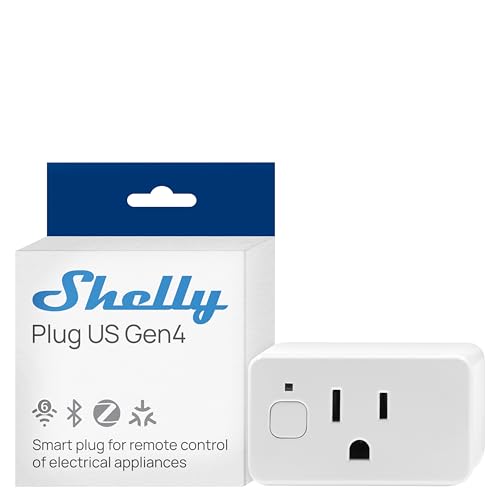
Pros
- Real-time power monitoring
- Wi-Fi, Matter, Bluetooth, and Zigbee
- UL Certified
- Built-in schedules and timer
- Three-year warranty and support
Cons
- Best suited to small appliances
- App-based control requires setup

Pros
- Local control, no Eve cloud or tracking
- Matter support across major platforms
- UL-certified
- App and voice control
Cons
- Requires a compatible platform hub
- Requires supported iOS, iPadOS, or Android

Pros
- Precise real-time power monitoring, ±1% accuracy
- Enhanced Zigbee repeater extends mesh coverage
- Space-saving design avoids blocking adjacent sockets
- ETL certified, 15A outlet
- Voice control with compatible Echo devices
Cons
- Zigbee hub required for setup
- Power-on restoration support is platform-limited

Pros
- 800 Series chip with S2 security
- Built-in repeater extends Z-Wave coverage
- 15A grounded outlet for small appliances
- Scheduling and scene automation support
Cons
- Requires a compatible Z-Wave hub
- Cannot connect directly with Echo Plus

Pros
- Real-time energy monitoring
- 15A outlet rating
- Zigbee repeater functionality
- ETL certified
- Space-saving design preserves adjacent socket
Cons
- Zigbee hub required
- Energy monitoring needs supported hub

Pros
- Matter support across major platforms
- Power monitoring for connected appliances
- Local control without Eve cloud or tracking
- UL-certified with Thread network technology
Cons
- Requires a compatible platform hub
- Requires iOS 16.4 or Android 8.1
Match the plug to your SmartThings hub
SmartThings compatibility does not mean every plug connects in the same way. Eve Energy (Matter) – Smart Plug and Eve Energy (Matter) 2-Pack require a SmartThings Hub v3, while the Minoston Smart Plug, Mini Plug-in Z-Wave 800 requires a Z-Wave hub. The two THIRDREALITY packs require a compatible Zigbee hub.
The Shelly Smart Plug UL WiFi Bluetooth Zigbee Matter offers the broadest range of connection options in this group, including Wi-Fi, Matter, Bluetooth, and Zigbee. It also includes an ambient light sensor, power monitoring, local schedules, and app control, so it suits a more varied smart-home setup.
Before ordering, identify the hub model and protocol you already use. For more ecosystem context, the smart sensors and home automation category can help you map other connected devices around the same hub.
Pro Tip: Check the SmartThings hub requirement before buying. A plug may support SmartThings while still needing a specific Matter, Zigbee, or Z-Wave hub for pairing.
Power monitoring versus simple switching
Power monitoring is useful when you want to see how much electricity a connected appliance uses. Shelly describes precise, real-time monitoring, while THIRDREALITY lists monitoring support for SmartThings, Home Assistant, Hubitat, and its own compatible hubs.
The Eve models provide app and voice control, scheduling, presence-based control, and local communication without Eve cloud registration or tracking. Minoston focuses on wireless on and off control, scheduling, scenes, and a built-in repeater, making it a practical fit for a Z-Wave network.
| Connection type | Key feature | SmartThings requirement |
|---|---|---|
| Matter and Thread | Local control | Hub v3 |
| Zigbee | Power monitoring | Zigbee hub |
| Z-Wave | Repeater and schedules | Z-Wave hub |
For a broader look at Zigbee equipment, see the Zigbee devices for Home Assistant coverage. The same protocol-first thinking helps prevent a mismatched purchase.
Choose the right quantity and network role
A single outlet makes sense for one lamp, fan, or small appliance. The Eve Energy (Matter) 2-Pack and both THIRDREALITY four-packs are better suited to rooms where several appliances need grouped control, such as a living room or home office.
THIRDREALITY models also act as Zigbee repeaters, helping extend the Zigbee mesh. Minoston includes a built-in repeater and supports SmartStart and S2 authenticated security, while its Long Range capability depends on whether the hub supports that feature.
Space can matter as much as protocol. The THIRDREALITY plugs use a space-saving design that avoids blocking the adjacent socket, and Shelly adds a protective socket cover with a child-conscious design for shared family spaces.
Before You Mount It: Do not treat a smart plug as a replacement for safe appliance use. Use the connected device only with the outlet and load requirements stated by the manufacturer, and avoid relying on remote control as a reason to leave a risky appliance unattended.
Expert Examined
From Ray Okafor

I keep the hub and protocol details beside the outlet location when planning a room. The mistake I see is buying several plugs first, then discovering that the household hub cannot pair them without another bridge.
Read more about Ray OkaforFor homes centered on Z-Wave smoke safety, the Z-Wave smoke detector coverage offers a useful reminder that hub compatibility affects more than one device category.
Which plug fits your SmartThings setup
I would point you to the Minoston Smart Plug, Mini Plug-in Z-Wave 800 if your SmartThings arrangement already includes a compatible Z-Wave hub. Its repeater function, scheduling, S2 security, and support for lamps or small appliances make it a focused choice for extending a Z-Wave network.
For several Zigbee outlets, I would choose the THIRDREALITY Smart Plug Gen3 4 Pack,Precise. It combines four outlets with real-time power monitoring, a Zigbee repeater, space-saving construction, and compatibility with SmartThings 2015/2018 and other listed Zigbee hubs.
I would reserve the Eve Energy (Matter) 2-Pack for a household that already has a SmartThings Hub v3 and wants Matter over Thread with local communication. Its two-pack format suits grouped lights or appliances, while the no-registration and no-tracking approach may appeal to privacy-focused households.
The Bottom Line
The most common mistake is treating SmartThings support as a universal connection method. These plugs still depend on the right hub and protocol, so a Matter device, Zigbee device, and Z-Wave device are not interchangeable during setup.
If you only do one thing first, confirm your hub model and its supported standard. Then choose between a single outlet, a multi-pack, power monitoring, or repeater capability based on the room you are automating.
FAQs
Matter, Zigbee, and Z-Wave plugs can work with SmartThings when the required hub is present. The products in this selection specify different hub requirements, so check the protocol before pairing. Yes, the listed products require a hub or compatible platform equipment. Eve specifies a SmartThings Hub v3, Minoston requires a Z-Wave hub, and the THIRDREALITY models require a Zigbee hub. Shelly and the THIRDREALITY models include real-time power or energy monitoring features. Support for viewing that information depends on the connected platform, including SmartThings for the listed compatible models. UL and ETL listings indicate that the relevant product has certification from a recognized safety testing organization. They do not remove the need to follow the manufacturer’s load and appliance-use instructions. UL Solutions explains its certification role at its official site.Which smart plug type works with SmartThings?
Do these smart plugs need a hub?
Can these plugs monitor energy use?
What does UL or ETL certification mean here?
Sources
- UL Solutions www.ul.com
- US Consumer Product Safety Commission www.cpsc.gov