
Shopping for the best smart plugs under $30 means deciding whether your home needs simple Alexa control, broader platform support, or two controlled outlets built into the wall. This selection suits renters, homeowners, and anyone automating lamps, fans, holiday lights, or other devices with physical power switches.

Pros
- Controls two devices separately or together
- Alexa and Google Home voice control
- Remote control, schedules, and scenes
- ETL certified, no hub required
Cons
- Wi-Fi required for connected features
- In-wall installation, not a plug-in unit

Pros
- Compact design leaves the second outlet free
- Alexa voice control and app access
- Schedules support sunrise and sunset routines
- Four-pack covers multiple appliances
Cons
- Works with Alexa only
- Requires 2.4 GHz Wi-Fi

Pros
- Alexa and Google Assistant voice control
- Remote control through three compatible apps
- Schedules and timers for connected devices
- Group control and family sharing
- ETL and FCC listed
Cons
- 2.4GHz WiFi only
- Alexa and Google setup requires the GHome app first
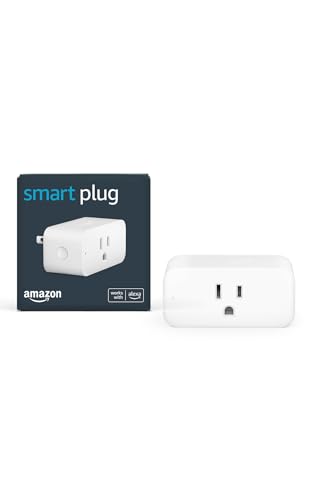
Pros
- No smart home hub required
- Compact design keeps second outlet free
- Alexa Routines automate everyday tasks
- Automatically reconnects after outages
Cons
- Requires Alexa app and compatible account
- Works only with physical on/off switches

Pros
- Matter support for major smart home platforms
- 15A/1800W capacity
- Remote app control from anywhere
- Voice control with Siri and Alexa
- Timers and schedules for automation
Cons
- Requires 2.4GHz Wi-Fi and IPv6
- Hub required for most Matter platforms
Start With Your Smart Home Platform
Platform compatibility is the first filter because a plug that fits your outlet may not fit your routines. Amazon Basics Smart Plug, Works with Alexa Only and Amazon Smart Plug, Works with Alexa, Simple Setup are focused on Alexa control through the Alexa app, while GHome Smart Plug, WiFi Smart Plugs that Work supports Alexa and Google Assistant after setup through its app.
Linkind Matter Smart Plug, Work with Apple Home supports Apple Home, Alexa, Google Home, SmartThings, and AiDot. Its Matter features require a compatible hub or controller for several platforms, although the AiDot app can operate without one. If you use Apple Home or want local network control during an internet outage, that distinction matters.
Pro Tip: Check your phone’s preferred smart home platform before choosing a plug. A broad compatibility label does not always mean a hub is unnecessary.
Match Outlet Design to the Room
A conventional plug is the simplest choice for a lamp, fan, coffee maker, or similar appliance. Compact designs can leave the second receptacle available, which is useful behind furniture or on a crowded power strip. The Amazon Basics model is sold as a four-pack, making it practical when several rooms need the same Alexa routine.
The Kasa Smart Plug KP200, In-Wall Smart Home Wi-Fi is different because it replaces an in-wall outlet and controls two plugged-in devices either together or separately. That can reduce plug clutter in a living room, kitchen, or bedroom, but an in-wall installation is a larger commitment than adding a plug to an existing receptacle.
| Device type | Platform focus | Best placement |
|---|---|---|
| In-wall outlet | Alexa, Google Home | Fixed room upgrade |
| Compact plug | Alexa | Lamps and fans |
| Matter plug | Multiple platforms | Connected home systems |
Before You Plug In: Never use a smart plug as a substitute for a device’s required safety control. Confirm the appliance has a physical on/off switch and follow its electrical instructions before automating it.
Plan for Wi-Fi, Scheduling, and Outages
Most options here use 2.4GHz Wi-Fi, so your network must provide that band during setup. GHome Smart Plug, WiFi Smart Plugs that Work can use Bluetooth or Wi-Fi for connection and supports schedules, timers, grouping, and family sharing through compatible apps.
Scheduling can turn lights on or off at set times, sunrise, sunset, or random intervals, depending on the model. Kasa adds Away mode for randomized operation, while Amazon Smart Plug, Works with Alexa, Simple Setup is described as reconnecting to Alexa after power or Wi-Fi outages. For broader automation planning, the smart sensors and home automation category offers related device ideas.
Expert Examined
From Dana Whitfield

I keep seeing smart plugs placed where the connected appliance has a soft power button that stays off after an outage. I look for a physical on/off switch first, then keep the plug accessible enough to reset without moving heavy furniture.
Read more about Dana WhitfieldCertifications also need careful reading. ETL and FCC listings can provide useful information about compliance and radio equipment, but they do not make every appliance safe to automate. Linkind additionally states a 15A/1800W capacity and protection against short circuits and overloads, so check the plug’s stated limits against the device you plan to connect.
For general electrical safety information, consult the U.S. Consumer Product Safety Commission. If your home uses specialized hubs or wireless standards, related resources on HomeKit-compatible devices can also help you think through platform fit before adding more equipment.
Which Plug Fits Your Home
I would put the Kasa Smart Plug KP200, In-Wall Smart Home Wi-Fi in a room where two devices need independent control and you want the outlet itself to become part of the setup. Alexa and Google Home support, schedules, scenes, grouping, and Away mode make it the most room-integrated option here. Its in-wall format is best for a permanent upgrade rather than a quick temporary addition.
I would point Alexa households toward Amazon Basics Smart Plug, Works with Alexa Only when several lamps, fans, or seasonal devices need matching routines. Its compact design leaves the neighboring socket open, and setup can happen directly through Alexa without a third-party app or hub.
For a mixed-platform home, I would choose Linkind Matter Smart Plug, Work with Apple Home. It offers voice control across Apple Home, Siri, Alexa, Google Assistant, and SmartThings, plus offline-ready local communication after Matter setup. Choose it only if you have a compatible controller or plan to use the AiDot app.
The Bottom Line
The mistake buyers make most often is treating every smart plug as platform-neutral. Alexa-only models are straightforward, but Matter models may need a certified hub, while app-based options can require setup before voice assistants recognize them.
If you do one thing first, identify the platform and Wi-Fi band already used in the room. Then confirm the appliance has a physical on/off switch and select the outlet style, compact plug or in-wall replacement, that matches how permanently you want the automation installed.
FAQs
Choose a compact plug for lamps, fans, and other appliances with physical on/off switches. Choose an in-wall outlet when you want two receptacles controlled from one installed unit, or choose Matter when broad platform support and local network control are priorities. The listed Wi-Fi models specify 2.4GHz support, and Linkind also identifies 2.4GHz Wi-Fi only. Check your router settings before setup, especially if it combines both bands under one network name. No. The connected appliance should have a physical on/off switch so power restoration allows it to operate as intended. You should also compare the appliance’s electrical requirements with the plug’s stated capacity and instructions. ETL certification indicates evaluation by an organization recognized for product safety certification, but it does not remove the need to follow installation and appliance instructions. Certification is one consideration alongside platform compatibility, electrical limits, and correct use. Linkind states that a Matter-certified hub or controller is required for Apple Home, Alexa, Google Home, and SmartThings platforms. Its AiDot app can be used without a separate hub, while Matter devices on a local network can continue communicating when internet access is unavailable.Which type of smart plug should I buy?
Do these smart plugs work on 5GHz Wi-Fi?
Can a smart plug control any appliance?
What does ETL certification mean on a smart plug?
Does a Matter smart plug need a hub?
Sources
- U.S. Consumer Product Safety Commission www.cpsc.gov
- UL Solutions www.ul.com