
Shopping for the best smart plugs with remote control is mainly a choice between app compatibility and electrical capacity. You need a model that matches your voice assistant, supports your network, and suits the appliance you want to control.
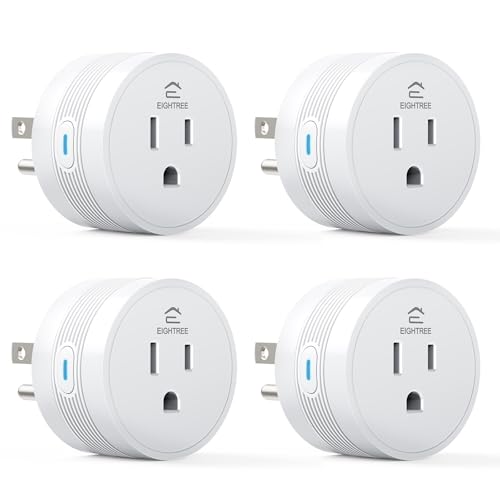
Pros
- 15A/1800W capacity for high-power appliances
- Compact 1.2-inch thickness fits crowded outlets
- Alexa and Google Home voice control
- FCC and ETL certified
- Four-pack supports grouped device control
Cons
- Requires 2.4GHz WiFi only
- Smart Life app required for setup

Pros
- Compact design leaves the second outlet free
- Alexa voice control and app access
- Schedules support sunrise and sunset routines
- Four-pack covers multiple appliances
Cons
- Works with Alexa only
- Requires 2.4 GHz Wi-Fi

Pros
- Four smart outlets in a compact 2-in-1 design
- Independent control for each socket
- WiFi and Bluetooth app control
- Works with Alexa and Google Assistant
Cons
- Does not support 5G WiFi
- Requires a Govee Home App account

Pros
- Alexa and Google Assistant voice control
- Remote control through three compatible apps
- Schedules and timers for connected devices
- Group control and family sharing
- ETL and FCC listed
Cons
- 2.4GHz WiFi only
- Alexa and Google setup requires the GHome app first

Pros
- Matter support across major smart-home platforms
- 15A/1800W capacity for household electronics
- Remote control, timers, and scheduling
- FCC certified with overload protection
Cons
- Hub required for most listed platforms
- 2.4GHz Wi-Fi and IPv6 network only

Pros
- Matter support for major smart home platforms
- 15A/1800W capacity
- Remote app control from anywhere
- Voice control with Siri and Alexa
- Timers and schedules for automation
Cons
- Requires 2.4GHz Wi-Fi and IPv6
- Hub required for most Matter platforms
Match the Plug to Your Smart Home
Alexa households have a particularly simple route with the smart sensors and home automation category as a starting point. The Amazon Basics model works directly through the Alexa app, with no third-party app or hub required. That simplicity is useful if you do not need Google Home, Apple Home, or another platform.
For mixed households, EIGHTREE, Govee, and GHome Smart support Alexa and Google Home. Linkind adds Apple Home, Siri, Google Home, Alexa, and SmartThings through Matter, although those platforms require a compatible Matter hub or controller. The AiDot app is the stated hub-free alternative.
Pro Tip: Check your preferred voice platform before opening the package. A plug can offer remote app control yet still require a separate hub for Matter-based voice control.
Remote Control Depends on the Network
Every model here relies on 2.4GHz Wi-Fi, with Govee specifically using Wi-Fi and Bluetooth during setup and control. None of these products is presented as a 5GHz Wi-Fi option, so confirm that your router can provide a 2.4GHz connection during pairing.
Remote access lets you switch connected appliances on or off while away, while schedules and timers handle recurring routines. GHome Smart also supports Smart Life and Tuya, whereas EIGHTREE uses Smart Life and Govee uses the Govee Home app.
| Control type | Network requirement | Best fit |
|---|---|---|
| App and voice | 2.4GHz Wi-Fi | Everyday appliances |
| Matter platforms | 2.4GHz and IPv6 | Mixed ecosystems |
| Dual outlet control | Wi-Fi and Bluetooth | Two devices nearby |
Linkind’s Matter models can continue communicating across your local network if internet access goes offline after setup. That is different from remote access away from home, which still depends on the relevant app and network connection.
Check Load and Outlet Layout
High-demand appliances deserve closer attention than lamps or small fans. EIGHTREE and both Linkind versions specify 15A and 1800W capacity, with examples including coffee makers, air fryers, heaters, and other household appliances. The remaining products list appliance and lighting uses but do not provide the same 15A and 1800W detail in their feature summaries.
Physical design matters too. EIGHTREE has a compact round body described as 1.2 inches thick, while Amazon Basics is designed to occupy one socket and leave remaining sockets available. Govee takes a different approach: two independently controlled plugs fit across a single normal vertical outlet fixture.
Before You Plug In: Never exceed the plug’s stated electrical capacity, and do not assume a compact housing makes every appliance suitable. Check the appliance requirements and the smart plug rating before connecting heaters, air fryers, or other high-power equipment.
Certification is another useful filter. EIGHTREE lists FCC and ETL certification, Govee lists ETL certification, GHome Smart lists ETL and FCC, and both Linkind models list ETL certification alongside their stated safety features.
Expert Examined
From Jenna Castellano

I keep smart plugs away from crowded, hard-to-reach sockets where a status light or reset button cannot be seen. The mistake I see is choosing the smallest body first, then discovering that the appliance, plug, and nearby furniture leave no safe space for heat and access.
Read more about Jenna CastellanoWhich Plug Fits Your Household
I would point Alexa-only households toward the smart plugs and outlets category choice represented by home automation buyers who want a direct app experience: Amazon Basics Smart Plug, Works with Alexa Only keeps setup inside Alexa and does not require a hub or third-party app. It also fits one socket while leaving the remaining socket available.
For Google Home users or anyone needing higher stated capacity, I would choose EIGHTREE 15A Smart Plug Works with Alexa & Google. Its 15A and 1800W rating, compact body, Smart Life remote control, schedules, and group control make it a practical match for several similar appliances.
I would reserve Linkind Matter Smart Plug, Work with Apple Home for a household already using Apple Home, SmartThings, Alexa, or Google Home with a Matter controller. Its local-network operation after setup is the strongest reason to select it, while the 4-pack suits several rooms.
The Bottom Line
The biggest mistake is treating remote control as the only buying criterion. Network band, voice platform, Matter hub requirements, outlet layout, and appliance load can matter more than the app itself.
If you do one thing first, identify the appliance and its electrical requirements, then confirm your home’s 2.4GHz network and preferred assistant. That short check will remove most unsuitable models before setup begins.
FAQs
Matter is the most flexible option among these products because Linkind supports Apple Home, Alexa, Siri, Google Home, and SmartThings. A compatible Matter hub or controller is required for those platforms, while the AiDot app can work without a hub. The listed models specify 2.4GHz Wi-Fi only, and Govee also notes that it does not support 5G Wi-Fi. Check your router settings and connect the plug to the 2.4GHz network during setup. EIGHTREE and Linkind specify 15A and 1800W capacity and name high-power appliances among their examples. Confirm the appliance requirements and the plug rating before use, rather than assuming every smart outlet handles the same load. The product data identifies ETL as a safety certification on several models and FCC as a certification or listing on others. These markings are useful checks, but they do not replace following the plug’s capacity, setup, and usage instructions. The UL Solutions site explains how safety certification fits into product evaluation.Which smart plug type suits a mixed smart home?
Can these smart plugs work on 5GHz Wi-Fi?
Can a smart plug control a heater or air fryer?
What do ETL and FCC markings mean here?
Sources
- UL Solutions and Product Safety Standards www.ul.com
- US Consumer Product Safety Commission and Electrical Safety www.cpsc.gov