
Choosing the best local control smart plugs means deciding whether you want direct LAN control through Matter or a hub-based Zigbee network. Renters and busy households can use this comparison to match that control method with the outlet, appliance, and installation limits in each room.

Pros
- Matter support across major smart home platforms
- Compact design helps preserve nearby outlet access
- UL certified flame-retardant design
- Scheduling, timers, app, and voice control
Cons
- 2.4 GHz Wi-Fi only
- Limited to 15A/1800W maximum
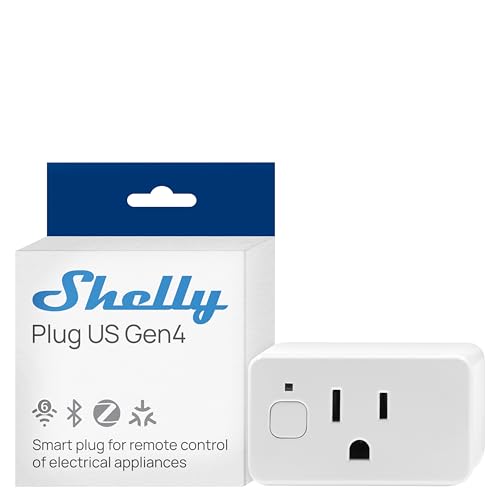
Pros
- Real-time power monitoring
- Wi-Fi, Matter, Bluetooth, and Zigbee
- UL Certified
- Built-in schedules and timer
- Three-year warranty and support
Cons
- Best suited to small appliances
- App-based control requires setup

Pros
- Controls two devices independently or together
- Matter certified for major smart-home platforms
- Energy monitoring for connected devices
- ETL certified with improved load capacity
Cons
- Requires neutral wiring for installation
- 2.4GHz Wi-Fi required for setup

Pros
- Real-time energy monitoring
- 15A outlet rating
- Zigbee repeater functionality
- ETL certified
- Space-saving design preserves adjacent socket
Cons
- Zigbee hub required
- Energy monitoring needs supported hub

Pros
- Matter support across major smart-home platforms
- 15A/1800W capacity for household electronics
- Remote control, timers, and scheduling
- FCC certified with overload protection
Cons
- Hub required for most listed platforms
- 2.4GHz Wi-Fi and IPv6 network only

Pros
- Matter support for major smart home platforms
- 15A/1800W capacity
- Remote app control from anywhere
- Voice control with Siri and Alexa
- Timers and schedules for automation
Cons
- Requires 2.4GHz Wi-Fi and IPv6
- Hub required for most Matter platforms
Start With the Local Network
Matter is the clearest route for a mixed-platform home because certified devices can work with Apple Home, Alexa, Google Home, and Samsung SmartThings. The TP-Link Tapo Matter Supported Smart Plug Mini and both Linkind options are designed for direct communication on the local network after setup, so control can continue within the LAN if the internet connection drops.
That does not mean every Matter setup is hub-free. Linkind specifies a Matter controller for Apple Home, Alexa, Google Home, and SmartThings, while its AiDot app can be used without one. Tapo also highlights local app control without Wi-Fi, making its in-wall P210M especially interesting when you want a permanent outlet rather than a plug-in accessory.
Pro Tip: Choose the platform you already use before pairing anything. A compatible Matter controller or Zigbee hub can matter more than the plug’s app features.
Match the Hardware to the Room
Plug-in models are the simplest choice for lamps, fans, humidifiers, and seasonal lighting because you can move them without changing the wall. The compact Tapo model and Linkind plugs are suited to crowded outlets, while the THIRDREALITY four-pack can extend a Zigbee setup across several rooms when a compatible hub is already part of the home.
An in-wall outlet changes the installation decision. The Tapo Smart Plug, Wi-Fi in-Wall Outlet, P210M controls two connected devices independently or together, but it requires neutral wiring and 2.4GHz Wi-Fi. That makes it a better fit for an owned home and a planned electrical replacement than for a renter who needs removable hardware.
| Control type | Main requirement | Best placement |
|---|---|---|
| Matter plug | LAN and controller | Flexible rooms |
| Zigbee plug | Compatible hub | Hub-based homes |
| In-wall outlet | Neutral wire | Permanent installation |
Before replacing an outlet, confirm the wiring and follow appropriate electrical practices. The US Consumer Product Safety Commission provides consumer safety information, but the product specifications still determine whether a particular installation is suitable.
Energy Monitoring and Everyday Safeguards
Energy information is useful when you want to identify a device that quietly consumes power. Shelly provides real-time power monitoring, while the Tapo in-wall outlet and THIRDREALITY plugs also describe energy monitoring through their supported apps or hubs. Linkind focuses on scheduling, timers, overload protection, and short-circuit protection rather than an advertised usage readout.
Scheduling can turn off lamps, fans, humidifiers, and other small appliances automatically. Shelly adds local schedules, app control, notifications, and a protective socket cover, while Tapo and Linkind provide timer or schedule functions. Keep the connected appliance within the stated electrical capacity and avoid treating a smart plug as a replacement for appliance-specific safety controls.
Check the Load: A smart plug should not be used casually with equipment that exceeds its stated capacity. Verify the appliance rating, the outlet condition, and the installation requirements before relying on automation.
Expert Examined
From Ray Okafor

I keep seeing people choose a hub-based plug for a room where no compatible hub exists. The mistake is easy to avoid: map the controller, network, and outlet type first, then select the plug that fits all three.
Read more about Ray OkaforFor broader automation, Zigbee can be attractive because the THIRDREALITY plugs can also act as Zigbee repeaters. They require a Zigbee hub, however, and energy monitoring support depends on systems such as Home Assistant, SmartThings, Hubitat, or a THIRDREALITY hub. Readers building around Home Assistant may also want to review these Zigbee devices for Home Assistant before standardizing their network.
Which Plug Fits Your Home
I would point renters and mixed-platform households toward the TP-Link Tapo Matter Supported Smart Plug Mini because its compact form avoids blocking an adjacent outlet, its setup uses Bluetooth onboarding, and Matter supports several major platforms. It also offers scheduling and voice control through the Tapo app, Siri, Alexa, Google Assistant, or SmartThings.
I would put the Shelly Smart Plug UL WiFi Bluetooth Zigbee Matter in a room where energy visibility matters, such as a workspace or family area. Its combination of Wi-Fi, Bluetooth, Zigbee, Matter, real-time power monitoring, local schedules, socket cover, and three-year warranty gives it a broad feature set without requiring a single control ecosystem.
For a permanent upgrade in an owned home, I would choose the Tapo Smart Plug, Wi-Fi in-Wall Outlet, P210M when neutral wiring is available. Independent control of two devices, energy monitoring, Matter compatibility, and local control during an internet outage make it more capable than a removable plug, but the wiring requirement should decide the placement.
The Bottom Line
The mistake most buyers make is treating “local control” as one universal feature. Matter devices communicate on a LAN, Zigbee devices depend on a compatible hub, and an in-wall outlet adds wiring requirements that do not apply to plug-in models.
If you do only one thing first, identify the controller or hub that will remain available in the room. Then choose between Matter, Zigbee, or an in-wall design based on that network decision and the electrical setup.
FAQs
Matter smart plugs can communicate directly on the local network after setup, including when the internet is unavailable. You still may need a compatible Matter controller for Apple Home, Alexa, Google Home, or SmartThings, depending on the product and platform. Yes. The THIRDREALITY ZigBee Smart Plug 4 Pack requires a compatible Zigbee hub or an Echo device with a built-in Zigbee hub. Its energy monitoring support also depends on the hub or platform handling the feature. The Tapo P210M requires neutral wiring and 2.4GHz Wi-Fi for setup. Check the existing wiring and use suitable electrical practices before replacing a wall outlet, especially in an older home. UL and ETL are safety certification marks associated with recognized testing organizations and product requirements. They do not guarantee platform compatibility, local control, or suitability for every appliance, so those specifications still need separate confirmation.Are Matter smart plugs better for local control?
Do Zigbee smart plugs need a hub?
Can I install an in-wall smart outlet anywhere?
What does UL or ETL certification mean on a smart plug?
Sources
- US Consumer Product Safety Commission www.cpsc.gov
- UL Solutions www.ul.com