
Shopping for the best non wifi smart plugs means deciding which local network your home already supports, not simply avoiding Wi-Fi. Hub compatibility is the key split, so this selection suits households that want dependable automation without adding another Wi-Fi device.
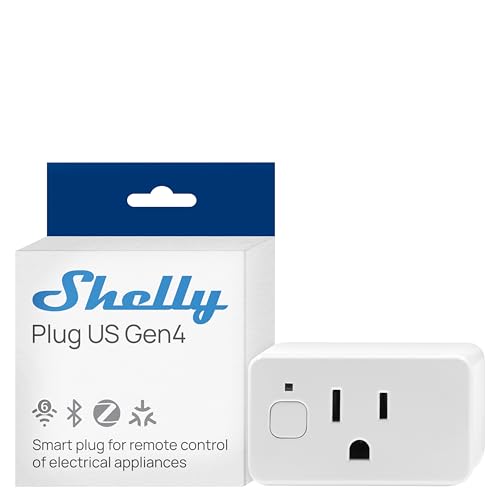
Pros
- Real-time power monitoring
- Wi-Fi, Matter, Bluetooth, and Zigbee
- UL Certified
- Built-in schedules and timer
- Three-year warranty and support
Cons
- Best suited to small appliances
- App-based control requires setup

Pros
- Four smart outlets in a compact 2-in-1 design
- Independent control for each socket
- WiFi and Bluetooth app control
- Works with Alexa and Google Assistant
Cons
- Does not support 5G WiFi
- Requires a Govee Home App account

Pros
- 800 Series chip with S2 security
- Built-in repeater extends Z-Wave coverage
- 15A grounded outlet for small appliances
- Scheduling and scene automation support
Cons
- Requires a compatible Z-Wave hub
- Cannot connect directly with Echo Plus

Pros
- Real-time energy monitoring
- 15A outlet rating
- Zigbee repeater functionality
- ETL certified
- Space-saving design preserves adjacent socket
Cons
- Zigbee hub required
- Energy monitoring needs supported hub

Pros
- Matter support across major platforms
- Power monitoring for connected appliances
- Local control without Eve cloud or tracking
- UL-certified with Thread network technology
Cons
- Requires a compatible platform hub
- Requires iOS 16.4 or Android 8.1

Pros
- WiFi and Bluetooth connectivity
- Alexa and Google Assistant support
- Group control and multiple timers
- ETL and FCC certified
Cons
- Does not support 5G WiFi
- Govee Home App account required
Choose the Network Your Home Already Uses
Z-Wave models need a compatible hub, while Zigbee models need a Zigbee hub or a supported Echo device. Matter and Thread products also depend on a compatible platform and, in Eve’s case, a Thread border router. Check that requirement before buying, because a plug cannot replace the hub it needs.
The Z-Wave device guidance is useful if your home already uses that protocol. Z-Wave can be a sensible fit for a hub-based setup, while Zigbee may suit households with compatible Echo, SmartThings, Home Assistant, or other listed hubs.
| Network type | Hub requirement | Best fit |
|---|---|---|
| Z-Wave | Certified Z-Wave hub | Existing Z-Wave homes |
| Zigbee | Zigbee hub or Echo | Hub-based automation |
| Matter or Thread | Platform hub and router | Multi-platform homes |
Separate Local Control From Wi-Fi Convenience
Non-Wi-Fi does not mean every model works without supporting hardware. Minoston requires a Z-Wave hub, THIRDREALITY requires a Zigbee hub, and Eve Energy requires a hub from the chosen platform plus a Thread border router. Shelly combines Wi-Fi, Bluetooth, Zigbee, and Matter, so it offers the widest connectivity mix in this group.
For a home centered on Home Assistant, SmartThings, or compatible Echo equipment, protocol matching matters more than voice-assistant branding. The Zigbee home automation information can help clarify whether your existing hub supports the devices you plan to add.
Pro Tip: Check the hub model and supported protocol before opening the package. A compatible voice assistant alone may not provide the required Z-Wave, Zigbee, Matter, or Thread connection.
Match Energy Features to the Appliance
Energy monitoring is valuable when you want to see consumption from a plugged-in device. Shelly provides precise, real-time power monitoring, THIRDREALITY supports real-time monitoring through specified hubs, and Eve includes a power meter. Other models focus on schedules, timers, remote control, or group operation.
Schedules can automate lamps, coffee makers, fans, and other small appliances, but the safest choice depends on the appliance and your routine. Shelly includes timers, local schedules, and app control, while Minoston and both Govee models support scheduled operation.
Before You Automate: Do not use a smart plug as a substitute for supervision around heat-producing appliances. Confirm the appliance is suitable for automated power switching and keep the plug within its stated electrical limits.
Expert Examined
From Ray Okafor

I keep seeing people choose a protocol first and inspect hub compatibility later. The better order is to identify the hub already running the home, then select a plug that it explicitly supports and place schedules only on appliances appropriate for unattended control.
Read more about Ray OkaforCheck Outlet Space and Household Safety
Physical design matters in crowded wall outlets. Govee’s Dual Smart Plug uses two horizontally positioned sockets while occupying one normal outlet fixture, and its four smart outlets can be controlled independently. The standard Govee four-pack is compact and leaves the other outlet free, while THIRDREALITY also uses a space-saving design.
Certifications provide an important safety signal, but they do not remove the need to follow installation and appliance instructions. Shelly is UL certified, Eve is UL certified, and Govee and THIRDREALITY are ETL certified. UL Solutions explains how safety certification fits into product evaluation, while the US Consumer Product Safety Commission offers broader household product safety information.
Which Plug Fits Your Existing Setup
I would point you to Minoston Smart Plug, Mini Plug-in Z-Wave 800 if your household already runs a compatible Z-Wave hub. Its built-in repeater and range-extender function, scheduling, SmartStart pairing, and 800-series chip make it a practical choice for extending a Z-Wave setup, but it is not a direct-to-phone purchase.
I would choose THIRDREALITY ZigBee Smart Plug 4 Pack for a home with a supported Zigbee hub or compatible Echo device. It adds real-time energy monitoring through specified platforms, works as a Zigbee repeater, and provides space-saving placement. It is especially appropriate when several outlets need coordinated control.
For cross-platform households, I would put Eve Energy (Matter) 2-Pack on the shortlist. It supports major smartphone and voice-assistant platforms through Matter, uses Thread, includes power metering, and keeps communication local without Eve cloud registration or tracking. Confirm the required hub and Thread border router before ordering.
The Bottom Line
The mistake most buyers make is treating “non-Wi-Fi” as a complete feature description. Z-Wave, Zigbee, Matter, and Thread each create different setup requirements, so the plug must match the hub already serving your home.
If you only do one thing first, identify your hub and protocol support. Then compare energy monitoring, outlet shape, scheduling, and certification so the device fits both the automation system and the appliance you intend to control.
FAQs
There is no single choice for every home. Select Z-Wave, Zigbee, Matter, or Thread according to the hub and platform you already use, then confirm that the specific plug is supported before buying. Most products in this selection require supporting equipment. Minoston needs a Z-Wave hub, THIRDREALITY needs a Zigbee hub or compatible Echo device, and Eve requires a platform hub plus a Thread border router. The listed products support small appliances, but suitability depends on the appliance and its electrical requirements. Use schedules and remote control only when the appliance is appropriate for automated switching and follow its instructions. UL and ETL certification indicate that the product has been evaluated under the applicable safety certification program. Certification does not replace checking load limits, outlet condition, or the appliance manufacturer’s instructions.Which protocol is best for a non-Wi-Fi smart plug?
Do non-Wi-Fi smart plugs need a hub?
Can a smart plug control a heater or coffee maker?
What does UL or ETL certification mean on a smart plug?
Sources
- UL Solutions and product safety certification. www.ul.com
- US Consumer Product Safety Commission and household safety information. www.cpsc.gov