
Shopping for the best smart plugs for home gets easier once you decide between a simple 2.4GHz Wi-Fi plug, a Matter device, or a Zigbee model that needs a hub. Renters, busy households, and anyone automating lamps or appliances should match that choice to the outlet space and smart-home system already in use.
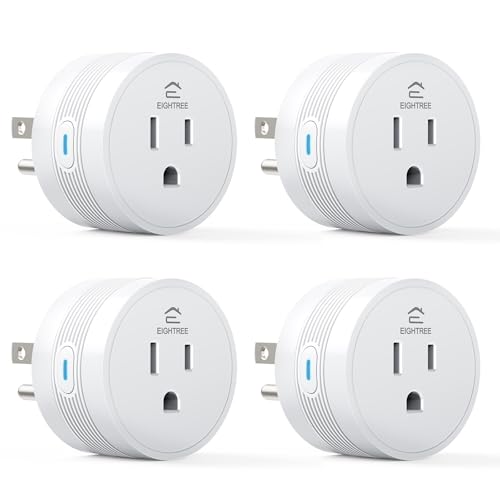
Pros
- 15A/1800W capacity for high-power appliances
- Compact 1.2-inch thickness fits crowded outlets
- Alexa and Google Home voice control
- FCC and ETL certified
- Four-pack supports grouped device control
Cons
- Requires 2.4GHz WiFi only
- Smart Life app required for setup

Pros
- USB-A and USB-C charging built in
- 15A, 110V maximum load
- Tamper-resistant shutters for child safety
- No hub required, Alexa and Google support
Cons
- 2.4GHz Wi-Fi only
- Requires wall-outlet replacement and wiring

Pros
- Four smart outlets in a compact 2-in-1 design
- Independent control for each socket
- WiFi and Bluetooth app control
- Works with Alexa and Google Assistant
Cons
- Does not support 5G WiFi
- Requires a Govee Home App account

Pros
- Real-time energy monitoring
- 15A outlet rating
- Zigbee repeater functionality
- ETL certified
- Space-saving design preserves adjacent socket
Cons
- Zigbee hub required
- Energy monitoring needs supported hub

Pros
- Matter support across major smart-home platforms
- 15A/1800W capacity for household electronics
- Remote control, timers, and scheduling
- FCC certified with overload protection
Cons
- Hub required for most listed platforms
- 2.4GHz Wi-Fi and IPv6 network only

Pros
- Matter support for major smart home platforms
- 15A/1800W capacity
- Remote app control from anywhere
- Voice control with Siri and Alexa
- Timers and schedules for automation
Cons
- Requires 2.4GHz Wi-Fi and IPv6
- Hub required for most Matter platforms
Start With Your Network and Platform
A Wi-Fi plug is usually the simplest route when you want remote control without adding a dedicated hub. EIGHTREE, Govee, and the Lumary wall outlet use 2.4GHz Wi-Fi, while Govee also adds Bluetooth during setup. A 5GHz-only network will not work with these products, so confirm your router can provide the required band.
Matter changes the setup decision. Linkind can work with Apple Home, Alexa, Google Home, or SmartThings, but those platforms require a Matter-certified controller such as a HomePod, Echo Dot, Nest, or SmartThings Hub. The AiDot app is the stated no-hub alternative. For a broader look at platform compatibility, see our coverage of Apple Home-compatible security devices.
THIRDREALITY is the specialist choice for a Zigbee household. It requires a compatible Zigbee hub or an Echo device with a built-in Zigbee hub, and it can integrate with systems such as Home Assistant and SmartThings. That extra requirement makes it less suitable for a first plug, but useful when your automation system already depends on Zigbee.
Pro Tip: Check your router and smart-home controller before buying several plugs. A 2.4GHz-only product needs a compatible Wi-Fi band, while Matter and Zigbee products depend on the controller listed by the manufacturer.
Match the Plug to the Outlet
Standard single plugs are practical for lamps, fans, coffee makers, and other appliances that need one controlled connection. EIGHTREE offers a compact round design that is 1.2 inches thick, and THIRDREALITY is designed not to occupy the adjacent socket. Those details matter behind furniture or in a crowded power strip area.
Govee takes a different approach with two horizontally positioned sockets in one compact unit. Each socket can be controlled independently, turning one normal vertical outlet into four smart outlets when used as a four-pack. Lumary is a replacement wall outlet rather than a plug-in adapter, with traditional AC, USB-A, and USB-C connections that can be managed separately.
| Device style | Key distinction | Suitable location |
|---|---|---|
| Single plug | Compact remote control | Lamps and appliances |
| Dual smart plug | Four controlled sockets | Crowded outlet areas |
| Wall outlet | AC plus USB-A/C | Kitchen, bedroom, office |
Wall replacement requires more commitment than plugging in an adapter. Lumary supports side or back wiring and is designed for quick DIY installation, but you should only replace an outlet if the wiring and installation conditions are appropriate. Its tamper-resistant shutters and overheating and short-circuit protection are useful household features, not substitutes for careful electrical work.
Before You Connect a High-Power Appliance: Do not assume every smart plug suits every load. The listed models include 15A capacity, but you still need to check the appliance requirements and the outlet condition before connecting heaters, air fryers, or other high-power devices.
Prioritize Control, Monitoring, and Safety
All six choices support some form of scheduling, timer, remote control, or voice operation, but their strengths differ. EIGHTREE combines Smart Life app control, Alexa and Google Home support, group control, and FCC and ETL certification. Govee adds Wi-Fi and Bluetooth control, independent sockets, and ETL certification.
THIRDREALITY adds real-time energy monitoring when used with supported systems including Home Assistant, SmartThings, Hubitat, or its own hub. Linkind supports local Matter communication after setup, allowing devices on the same LAN to communicate if the internet connection goes offline. That distinction matters if local control is more important to you than using a manufacturer app.
Certification can help identify products built to recognized safety requirements, but it does not remove the need to follow load limits or installation instructions. UL Solutions explains how certification marks relate to product safety evaluation, and its consumer safety information is a useful reference when comparing electrical products.
Expert Examined
From Jenna Castellano

I keep smart plugs away from damp locations and avoid stacking adapters around a crowded outlet. The mistake I see most often is choosing a compact device for its shape, then ignoring the appliance load or the network requirement. Match both before automating anything.
Read more about Jenna CastellanoWhich Plug Fits Your Home
I would point you to smart plugs and outlets for home automation when you want to compare a basic plug with a wall-replacement design. For a straightforward multi-room setup, I would choose EIGHTREE 15A Smart Plug Works with Alexa & Google for its 15A rating, compact 1.2-inch profile, Smart Life scheduling, Alexa and Google Home support, and FCC and ETL certification. It is a sensible fit for lamps, coffee makers, or other appliances that need remote switching without a hub.
I would put Govee Dual Smart Plug 4 Pack in a room where outlet capacity is the main problem. Its two independently controlled sockets can expand a normal outlet into four smart outlets, while Wi-Fi and Bluetooth simplify setup. For a home already organized around Zigbee, I would point you to THIRDREALITY ZigBee Smart Plug 4 Pack. Its energy monitoring support and repeater function are more relevant than no-hub setup in an established Zigbee system.
Choose Lumary if integrated USB-A and USB-C charging belongs at the wall, not on an adapter. Choose Linkind if Apple Home or local Matter control is central, remembering that a compatible Matter controller is required for the major platforms.
The Bottom Line
The biggest mistake buyers make with smart plugs is treating every model as interchangeable. Network band, hub requirements, outlet shape, USB access, and appliance load can change whether a plug fits your home.
If you only do one thing first, identify the platform and network you already use. Then select the plug style that matches the room, confirm the appliance load, and set schedules only after the device connects reliably.
FAQs
No. Wi-Fi models connect directly to a compatible 2.4GHz network, Matter models need a certified controller for major platforms, and THIRDREALITY Zigbee plugs require a compatible Zigbee hub or Echo device with Zigbee built in. Choose the standard that matches your existing setup. Compact plugs work well behind furniture, in narrow spaces, or around crowded outlets. EIGHTREE is 1.2 inches thick, while THIRDREALITY is designed not to occupy the adjacent socket. Keep the plug and appliance connection dry and unobstructed. The listed products include 15A models, but you must compare the appliance requirements with the plug rating before connecting anything. Coffee makers, air fryers, heaters, and similar appliances deserve particular attention because their loads can be substantial. They indicate that the product carries stated certification marks associated with safety and compliance evaluation. Certification does not override load limits, wiring instructions, or safe outlet practices, so use the device within its listed specifications.Are Wi-Fi, Matter, and Zigbee smart plugs interchangeable?
Where should I use a compact smart plug?
Can smart plugs control high-power appliances?
What do FCC and ETL certifications tell me?
Sources
- UL Solutions consumer product safety information www.ul.com
- US Consumer Product Safety Commission home electrical safety information www.cpsc.gov