
Shopping for the best z-wave smart locks means matching the lock to your existing hub before choosing a finish or keypad style. The key split is whether you want simple keypad access or deeper control through a compatible Z-Wave system, especially for family entry, rentals, or remote access.

Pros
- Keypad, app, and Apple Watch entry
- Optional Bluetooth Auto-Unlock
- Auto-Lock helps secure the door
- Custom codes for guests and service people
Cons
- Wi-Fi or Z-Wave modules sold separately
- Bluetooth configuration requires the Yale Access app

Pros
- Fingerprint entry with backlit keypad
- Unlimited scheduled and revocable access codes
- Z-Wave integration with compatible hubs
- BHMA Grade 2 certified
- DoorSense and Auto-Lock features
Cons
- Requires a compatible Z-Wave hub and app
- Z-Wave integration limited to US and Canada

Pros
- Z-Wave Long Range for larger homes
- BHMA Grade 1 security certification
- IP65 weather resistance
- DIY installation in about 10 minutes
Cons
- Requires a compatible Z-Wave hub
- Runs on four AA batteries
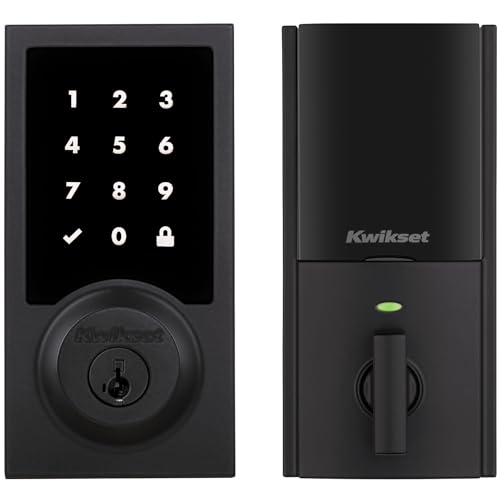
Pros
- Touchscreen keyless entry
- Up to 250 customizable user codes
- Auto-lock schedules from 30 seconds to 10 minutes
- Grade 2 BHMA certified security
- 12-month battery life with included AA batteries
Cons
- Compatible Z-Wave hub required
- Ring Alarm use requires Ring Alarm smart hub

Pros
- Up to 250 customizable user codes
- Z-Wave 700 Long Range coverage
- Grade 2 BHMA certified security
- Auto-lock scheduling from 30 seconds to 10 minutes
Cons
- Compatible Z-Wave hub required separately
- Uses four AA alkaline batteries

Pros
- Unlimited access codes for guests
- Keypad, app, and Apple Watch access
- DoorSense-triggered Auto-Lock
- Backup key included
Cons
- Remote control requires compatible hub and app
- Only compatible in the US and Canada
Start With Your Hub
Z-Wave locks do not work as standalone remote systems in the same way a lock with built-in Wi-Fi can. You need a compatible hub and app for features such as remote locking, status alerts, scheduled access, and automations. The Yale Z-Wave models support systems such as Samsung SmartThings, while the Kwikset models require a compatible hub and specifically support Ring Alarm.
Compatibility also varies by location. The Yale Z-Wave Smart Lock Deadbolt and Yale Assure Lock 2 Keypad Deadbolt with Z-Wave are limited to the US and Canada. The ULTRALOQ Bolt Z-Wave Deadbolt with 800 works with Alarm.com, Home Assistant, and SmartThings, giving buyers more flexibility when those systems already run the home.
Pro Tip: Confirm your hub and app support the exact lock model before removing your existing deadbolt.
Choose the Entry Method You Will Actually Use
Keypads suit households that share access with relatives, service providers, or guests. The Yale Bluetooth Smart Lock Deadbolt with Keypad adds keypad entry, Yale Access app control, optional Bluetooth Auto-Unlock, custom codes, and Auto-Lock without requiring a Z-Wave module in the listed configuration.
Fingerprint access is the standout feature of the Yale Z-Wave Smart Lock Deadbolt. It also includes a backlit keypad, smartphone control, Auto-Unlock, scheduled codes, and a backup key, so it can serve households that want quick entry without remembering another code.
For a high number of users, both Kwikset HomeConnect models support up to 250 user codes and one programming code. Their scheduled Auto-Lock settings can be set for intervals from 30 seconds to 10 minutes.
| Entry method | Main advantage | Best fit |
|---|---|---|
| Fingerprint | Fast personal entry | Busy households |
| Keypad | Shared access codes | Families and rentals |
| App and hub | Remote control | Connected homes |
Check Range, Power, and Door Fit
Z-Wave Long Range matters most in larger homes, detached garages, guest houses, or layouts where a direct connection to the hub is useful. The ULTRALOQ model uses Z-Wave 800 Series Long Range, while the Kwikset HomeConnect 918 and 620 use Z-Wave 700 Long Range. All still require a compatible hub.
Battery details can affect maintenance. The Kwikset models use four AA alkaline batteries and specify at least 12 months of battery life. ULTRALOQ also uses four AA batteries and states that lithium batteries can extend longevity. Before buying, verify that the deadbolt fits your door and that the interior hardware has enough clearance.
Before You Mount It: Do not assume a smart lock will correct a misaligned door. A bolt that drags or fails to reach the strike can prevent reliable locking, regardless of the wireless connection.
For background on the hardware behind the lock, see why the strike plate matters. It is also worth reviewing how a smart lock compares with a physical key solution in key lock boxes versus smart locks.
Expert Examined
From Ray Okafor

I keep an eye on the door alignment first because wireless features cannot compensate for mechanical resistance. The mistake I see is choosing a feature-rich lock while ignoring whether the existing deadbolt closes cleanly, so check the door before planning automations.
Read more about Ray OkaforSecurity Features Need the Right Expectations
Auto-Lock is useful when people leave in a hurry, but DoorSense adds an important distinction on supported Yale models by detecting whether the door is fully closed. Kwikset provides scheduled Auto-Lock, while ULTRALOQ adds app control, activity alerts, remote access, and automations through a compatible Z-Wave hub.
Certification is another useful signal, but it is not a substitute for correct installation. The Yale Z-Wave Smart Lock Deadbolt is BHMA Grade 2 certified, while the ULTRALOQ model states BHMA Grade 1 certification and IP65 weather resistance. BHMA explains lock grading and performance standards through its industry resources at Builders Hardware Manufacturers Association.
If you are concerned about digital risks, review practical information about whether smart locks can be hacked. Use unique account credentials, keep access codes limited to people who need them, and remove temporary codes after they expire.
Which Lock Fits Your Home
I would point you to the Yale Z-Wave Smart Lock Deadbolt if fingerprint entry is the deciding feature. It combines that access method with scheduled codes, a backup key, DoorSense, Auto-Lock, and integration with SmartThings, Hubitat, and other Z-Wave systems.
I would choose the ULTRALOQ Bolt Z-Wave Deadbolt with 800 for a larger home, detached garage, guest house, or property managed through Alarm.com, Home Assistant, or SmartThings. Its long-range Z-Wave connection, remote access, activity alerts, automations, Grade 1 certification, and IP65 rating fit a broader range of demanding placements.
For a more straightforward keypad setup with long-range Z-Wave, I would consider the Kwikset HomeConnect 620 Z-Wave Long Range Keypad. It supports Ring Alarm, up to 250 user codes, scheduled Auto-Lock, and a stated 12-month battery life.
The Bottom Line
The biggest mistake buyers make is treating Z-Wave compatibility as universal. A lock may support Z-Wave yet still require a particular hub, app, region, or alarm platform for the features you expect.
Start by identifying your existing hub and confirming the lock is supported. Then check door fit, choose keypad or fingerprint entry, and plan a battery reminder before relying on remote access or Auto-Lock.
FAQs
Fingerprint access is convenient when you want entry without remembering a code or carrying a phone. Keypads are usually more flexible for shared access because you can create, schedule, or revoke codes for family, guests, and service providers. The listed Z-Wave models require a compatible hub and app for remote control, alerts, scheduled access, or automations. Basic local entry may still be available through the keypad, fingerprint reader, app, or backup key, depending on the model. Battery life depends on the model, usage, and battery type. The Kwikset models specify at least 12 months with four AA alkaline batteries, while ULTRALOQ states that lithium batteries can provide greater longevity. Check battery status through the supported app when available. BHMA grades indicate performance levels established for door hardware under industry standards. Grade 1 is a higher listed grade than Grade 2, but installation, door alignment, and the surrounding strike hardware still affect how reliably the lock operates.Are fingerprint smart locks better than keypad locks?
Do Z-Wave smart locks work without a hub?
How often do smart lock batteries need attention?
What does BHMA Grade 1 or Grade 2 mean?
Sources
- Builders Hardware Manufacturers Association buildershardware.com
- UL Solutions www.ul.com