
The best z-wave smart door locks depend less on appearance than on the hub already running your home and how people need to enter. Choose between keypad, fingerprint, phone, and backup-key access, then confirm the lock fits your door and works in your region.

Pros
- Keypad, app, and Apple Watch entry
- Optional Bluetooth Auto-Unlock
- Auto-Lock helps secure the door
- Custom codes for guests and service people
Cons
- Wi-Fi or Z-Wave modules sold separately
- Bluetooth configuration requires the Yale Access app

Pros
- Fingerprint entry with backlit keypad
- Unlimited scheduled and revocable access codes
- Z-Wave integration with compatible hubs
- BHMA Grade 2 certified
- DoorSense and Auto-Lock features
Cons
- Requires a compatible Z-Wave hub and app
- Z-Wave integration limited to US and Canada

Pros
- Z-Wave Long Range for larger homes
- BHMA Grade 1 security certification
- IP65 weather resistance
- DIY installation in about 10 minutes
Cons
- Requires a compatible Z-Wave hub
- Runs on four AA batteries
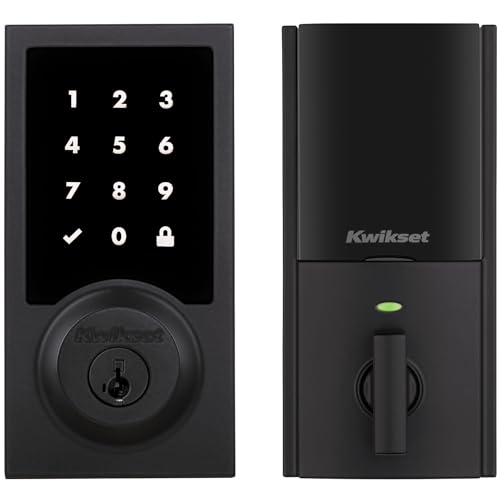
Pros
- Touchscreen keyless entry
- Up to 250 customizable user codes
- Auto-lock schedules from 30 seconds to 10 minutes
- Grade 2 BHMA certified security
- 12-month battery life with included AA batteries
Cons
- Compatible Z-Wave hub required
- Ring Alarm use requires Ring Alarm smart hub

Pros
- Up to 250 customizable user codes
- Z-Wave 700 Long Range coverage
- Grade 2 BHMA certified security
- Auto-lock scheduling from 30 seconds to 10 minutes
Cons
- Compatible Z-Wave hub required separately
- Uses four AA alkaline batteries

Pros
- Unlimited access codes for guests
- Keypad, app, and Apple Watch access
- DoorSense-triggered Auto-Lock
- Backup key included
Cons
- Remote control requires compatible hub and app
- Only compatible in the US and Canada
Start With Your Z-Wave Hub
A Z-Wave lock needs a compatible hub and app for remote control, alerts, schedules, and automations. The Yale Z-Wave models support systems such as Samsung SmartThings, while the Kwikset models require a compatible hub and work with Ring Alarm. ULTRALOQ lists Alarm.com, Home Assistant, and SmartThings support.
Compatibility is not only about the radio standard. Check whether your hub supports the lock’s Z-Wave generation, inclusion process, and access features before buying. For broader background on hub connections, see this explanation of what a smart lock bridge does.
Pro Tip: Confirm your hub and app support before removing the existing deadbolt.
Match Entry Methods to Your Household
A keypad is the simplest shared-access option because family members, guests, and service workers can use individual codes. Yale adds app and Apple Watch access on several models, while the Yale Z-Wave Smart Lock Deadbolt adds fingerprint entry for people who do not want to remember a code.
Temporary and scheduled codes matter for rentals, caregivers, and dog walkers. The Yale Z-Wave Smart Lock Deadbolt supports scheduled sharing, and the Yale Assure Lock 2 Keypad Deadbolt with Z-Wave supports unlimited codes through its app. Kwikset’s HomeConnect models support up to 250 user codes and one programming code.
| Access method | Main advantage | Useful placement |
|---|---|---|
| Keypad | Shared codes | Family entry doors |
| Fingerprint | No code needed | Frequent daily entry |
| App and hub | Remote control | Rentals and service access |
Do not assume every lock offers the same phone features. Some models provide app control directly, while Z-Wave versions depend on the selected hub and app for remote functions.
Check Door Fit, Coverage, and Power
Measure the door thickness and deadbolt backset before ordering. The Kwikset HomeConnect 918 and 620 fit doors from 1-3/8 to 2 inches thick and support an adjustable backset from 2-3/8 to 2-3/4 inches. The ULTRALOQ model is designed for screwdriver installation without wiring or drilling.
Long Range can matter in a large home, detached garage, or guest house, but the compatible hub still determines the connection. Battery planning matters too: the Kwikset models use four AA alkaline batteries and state at least twelve months of battery life, while ULTRALOQ uses four AA batteries and lists a one-year battery claim.
Before You Mount It: Do not rely on a smart lock as a substitute for a properly aligned deadbolt, secure strike plate, and sound door frame.
A lock that rubs or fails to seat fully can undermine automatic locking. Learn why the strike plate matters in this explanation of door strike plate security.
Expert Examined
From Ray Okafor

I keep an eye on alignment first because a motorized deadbolt can expose a door problem that a manual key hides. The mistake I see is choosing features before confirming that the bolt moves freely with the door closed.
Read more about Ray OkaforUnderstand Security Features and Limits
DoorSense on the Yale models can identify whether the door is fully closed before automatic locking. Kwikset lists S2 encryption and SmartStart, while ULTRALOQ lists BHMA Grade 1 certification and IP65 weather resistance. These specifications describe different parts of the system, so do not treat them as interchangeable.
Region restrictions also matter. The Yale Z-Wave Smart Lock Deadbolt is listed for the US and Canada, and the Yale Assure Lock 2 Keypad Deadbolt with Z-Wave is not intended for use outside those countries. For general advice about digital lock risks, read whether a smart lock can be hacked.
The UL Solutions standards organization explains how safety certifications relate to products and systems. A certification can be useful evidence, but it does not guarantee that a lock suits every door, hub, or installation.
Which Lock Fits Your Home
I would point you to the Yale Z-Wave Smart Lock Deadbolt only when fingerprint access is a priority and your hub is compatible. Its fingerprint reader, scheduled code sharing, DoorSense, backup key, and Z-Wave alerts make it a strong fit for a busy household that wants several entry choices.
For a larger property with a detached garage or guest house, I would consider the ULTRALOQ Bolt Z-Wave Deadbolt Smart Lock with 800. Its Z-Wave Long Range support, remote access, activity alerts, automations, BHMA Grade 1 certification, and weather resistance match a home where coverage and exterior durability matter.
If you want a lower-complexity keypad setup tied to Ring Alarm, I would choose the Kwikset HomeConnect 620 Z-Wave Long Range Keypad. It offers up to 250 user codes, scheduled auto-lock choices, S2 encryption, SmartStart, and a stated twelve-month battery life.
The Bottom Line
The biggest mistake buyers make is treating every Z-Wave lock as universally compatible. The radio standard is shared, but hubs, apps, regions, entry methods, and installation requirements still vary.
If you do one thing first, identify your hub and measure the existing deadbolt. That single check removes the most common compatibility and fit problems before you choose keypad, fingerprint, or remote-access features.
FAQs
A keypad suits households that share access with family, guests, or service workers. Fingerprint access is more convenient if the same residents enter frequently and prefer not to remember codes or carry a phone. The Z-Wave models listed here require a compatible hub and app for their connected functions. Check the hub’s compatibility before installation, especially if you want remote access, alerts, schedules, or automations. Keep batteries fresh, check that the deadbolt moves freely, and confirm the door closes fully before relying on auto-lock. Review user codes periodically and remove access that is no longer needed. BHMA certification refers to performance requirements for door hardware. It is one useful specification, but it does not replace checking door alignment, installation fit, hub compatibility, or the lock’s regional limits.Is a keypad or fingerprint smart lock better for a front door?
Does a Z-Wave smart lock need a hub?
How should I maintain a Z-Wave smart lock?
What does BHMA certification mean on a smart lock?
Sources
- UL Solutions and product safety standards. www.ul.com
- US Consumer Product Safety Commission and home safety information. www.cpsc.gov