
Choosing among the best Wi-Fi smart door locks is mainly a question of access style: do you need fast fingerprint entry, flexible guest codes, a complete handle set, or a stronger security rating? That distinction matters most for busy families, rental hosts, and anyone replacing a front-door deadbolt.

Pros
- Fingerprint access in under one second
- Built-in Wi-Fi, no bridge required
- Up to eight months with eight AA batteries
- BHMA Grade 3 certification
Cons
- Requires eight AA batteries
- IP53 protection, not fully waterproof

Pros
- Eight entry methods, including fingerprint and voice
- 0.2-second fingerprint recognition
- Built-in 2.4GHz Wi-Fi, no hub needed
- IP65 weatherproof matte black finish
Cons
- Requires eight AA batteries, not included
- Supports 2.4GHz Wi-Fi only
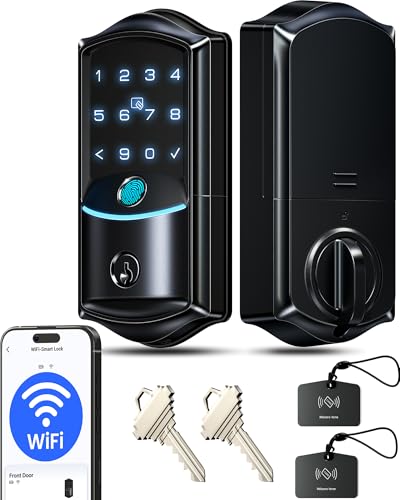
Pros
- Built-in Wi-Fi, no hub required
- 0.2-second fingerprint entry
- IP65 weatherproof, ANSI Grade 3
- Remote codes, logs, and security alerts
Cons
- Eight batteries required, not included
- Two-year warranty requires product registration

Pros
- Fingerprint, passcode, app, key, and voice entry
- Built-in Wi-Fi, no extra hub needed
- Up to 100 custom passcodes
- Auto-lock adjustable from 10 to 180 seconds
Cons
- Batteries not included
- Supports 2.4GHz Wi-Fi only

Pros
- Built-in WiFi, no hub required
- Fingerprint entry in 0.3 seconds
- One-time and recurring PIN codes
- Matching handle set included
Cons
- Requires 2.4GHz WiFi within 33 feet
- Batteries not included, alkaline only
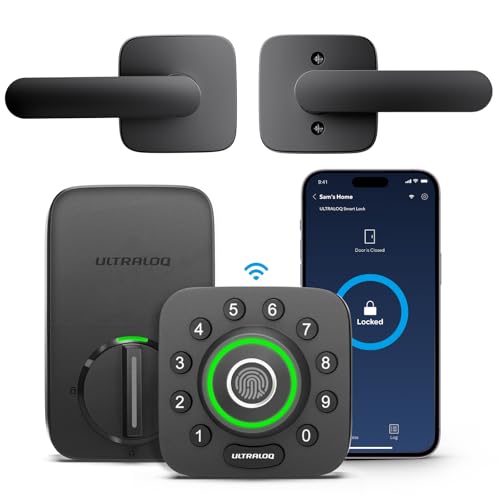
Pros
- AI-powered fingerprint entry
- Built-in Wi-Fi, no extra hub
- ANSI Grade 1 security rating
- Works with Alexa and Google Assistant
Cons
- 2.4GHz Wi-Fi only
- Smartphone app required for remote access
Match Entry Methods to Your Household
Fingerprint entry is convenient when several people use the door every day, while passcodes are easier to share with guests, cleaners, or renters. The eufy Security Smart Lock C220 offers six entry methods, including an app, keypad, physical key, Apple Watch, and voice control. Veise models add options such as cards, fobs, authorized users, and temporary codes.
Remote access also varies in practical detail. Every model listed uses built-in Wi-Fi, so you do not need to buy a separate bridge, but the network limits matter. Philips models support 2.4GHz Wi-Fi, and the Philips WiFi Keypad Deadbolt with Handle recommends keeping the lock within 33 feet of the router.
Pro Tip: Choose the entry method your household will use most often, then keep a physical key or backup power option available for emergencies.
Check Door Fit, Hardware, and Weather Exposure
Most of these products are deadbolt replacements for standard US doors, but the hardware package is not identical. The Philips WiFi Keypad Deadbolt with Handle includes a matching lever, while the other choices focus primarily on the deadbolt assembly. Confirm whether your existing handle and deadbolt arrangement suits the model before ordering.
Weather ratings help when the exterior lock faces rain, dust, or temperature swings. The eufy model is rated IP53, while the Veise and ULTRALOQ options carry IP65 ratings. The ULTRALOQ U-Bolt Pro WiFi Fingerprint Smart Lock also includes a door sensor, which can report an open door rather than only the lock status.
For related hardware guidance, see what a strike plate does. A properly aligned deadbolt still matters because a smart motor cannot compensate for a door that drags or a strike opening that is poorly positioned.
Before You Mount It: A loose strike plate, misaligned deadbolt, or unsuitable door thickness can cause repeated motor strain and failed locking. Fix the door fit first, and do not rely on auto-lock until you have confirmed the door closes completely.
Battery Life and Security Ratings
Battery claims depend on use, but the listed designs give you useful planning points. The eufy C220 runs on eight AA batteries for around eight months, the Veise VE027-K is rated for up to 240 days, and the Philips WiFi Keypad Deadbolt with Handle lists up to six months. Several models require batteries that are not included.
Grade ratings are not interchangeable. The ULTRALOQ model carries ANSI Grade 1, while the eufy and Veise products list Grade 3. For broader advice about digital risks, read how smart locks can be hacked. UL Solutions explains certification information at its official standards site, but you should still follow the manufacturer’s installation and battery instructions.
| Entry priority | Useful feature | Best placement |
|---|---|---|
| Fast daily entry | Fingerprint reader | Family front door |
| Guest access | Scheduled codes | Rental or guest door |
| Physical security | ANSI Grade 1 | High-use entrance |
Expert Examined
From Ray Okafor

I keep seeing door owners focus on app features while ignoring alignment. The mistake I see is installing a smart deadbolt on a door that already needs a shoulder shove to close; adjust the hinges or strike first, then configure auto-lock.
Read more about Ray OkaforWhich Lock Fits Your Door Routine
I would put the eufy Security Smart Lock C220 on a family front door when fingerprint access and a long stated battery interval matter. Its built-in Wi-Fi needs no bridge, and its eufy ecosystem support is useful if you already use an eufy doorbell.
I would point rental owners and households with frequent visitors to the Veise VE027-K WiFi Smart Deadbolt Locks with 2. It supports permanent, scheduled, one-time, and expiring digital keys, plus up to 100 custom passcodes. Its included two-knob set also suits a door where matching interior hardware is desirable.
For a higher security rating and door-status awareness, I would choose the ULTRALOQ U-Bolt Pro WiFi Fingerprint Smart Lock. ANSI Grade 1, IP65 protection, a sensor, auto-unlock, and broad smart-home support make it the strongest fit for a busy primary entrance, provided your door is compatible and the 2.4GHz network reaches it.
The Bottom Line
The mistake most buyers make is treating every Wi-Fi lock as the same kind of replacement. A keypad-only routine, fingerprint-heavy household, handle upgrade, and high-security entrance each favor different hardware and access controls.
If you do only one thing first, inspect your existing deadbolt, door thickness, strike alignment, and router location. Then choose the model whose entry methods and battery format match your daily routine rather than selecting by app features alone.
FAQs
Fingerprint locks are quick for household members who enter frequently, while keypad locks make guest and rental access easier to share. Models with both options give you more flexibility, especially when visitors do not need permanent access. The six listed models have built-in Wi-Fi, so they do not require a separate bridge. Most use 2.4GHz networks, and the lock must remain close enough to the router for reliable remote control. Monitor battery alerts, use the battery type specified by the manufacturer, and keep the bolt aligned with the strike. Test auto-lock settings after installation so the door does not lock before it is fully closed. The ratings indicate different levels within a hardware performance standard, with Grade 1 positioned above Grade 3 in the listed products. The rating is useful for comparison, but correct installation and a sound door frame remain essential.Are fingerprint or keypad smart locks better for a front door?
Do Wi-Fi smart locks need a bridge?
How should I maintain a Wi-Fi smart lock?
What does an ANSI Grade 1 or Grade 3 rating mean?
Sources
- UL Solutions and product safety standards. www.ul.com
- National Fire Protection Association and home safety guidance. www.nfpa.org