
Shopping for the best smart locks that work with Ring gets easier once you separate direct Ring Alarm integration from built-in WiFi control. This selection suits households deciding between hub-based access, app control, keypad entry, and fingerprint access.

Pros
- Built-in WiFi, remote control from anywhere
- Stores up to 100 access codes
- Works with Alexa and Google Home
- Forced-entry alarm and encrypted connection
Cons
- Requires Schlage Home app for smart features
- Four AA batteries last up to six months

Pros
- Built-in WiFi with remote lock control
- Manages up to 250 access codes
- Backlit, fingerprint-resistant push-button keypad
- Alexa, Google Home, and Ring compatible
Cons
- App features require secure WiFi connection
- Fits only 1-3/8 to 1-3/4-inch doors

Pros
- Fingerprint entry with backlit keypad
- Unlimited scheduled and revocable access codes
- Z-Wave integration with compatible hubs
- BHMA Grade 2 certified
- DoorSense and Auto-Lock features
Cons
- Requires a compatible Z-Wave hub and app
- Z-Wave integration limited to US and Canada
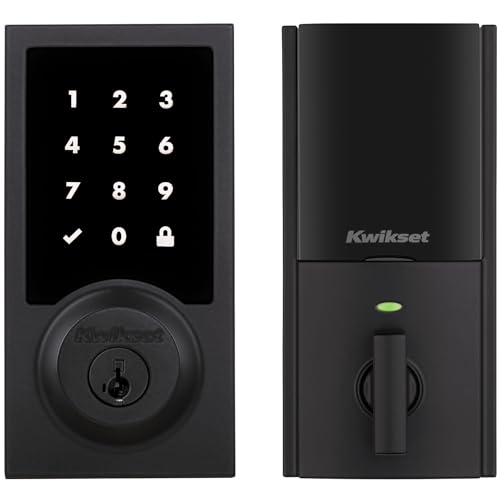
Pros
- Touchscreen keyless entry
- Up to 250 customizable user codes
- Auto-lock schedules from 30 seconds to 10 minutes
- Grade 2 BHMA certified security
- 12-month battery life with included AA batteries
Cons
- Compatible Z-Wave hub required
- Ring Alarm use requires Ring Alarm smart hub

Pros
- Up to 250 customizable user codes
- Z-Wave 700 Long Range coverage
- Grade 2 BHMA certified security
- Auto-lock scheduling from 30 seconds to 10 minutes
Cons
- Compatible Z-Wave hub required separately
- Uses four AA alkaline batteries

Pros
- Unlimited access codes for guests
- Keypad, app, and Apple Watch access
- DoorSense-triggered Auto-Lock
- Backup key included
Cons
- Remote control requires compatible hub and app
- Only compatible in the US and Canada
Ring integration is the first split
Some models connect to Ring Alarm through Z-Wave and require a compatible Ring Alarm smart hub. The Kwikset HomeConnect 918 Contemporary Z-Wave Long and Kwikset HomeConnect 620 Z-Wave Long Range Keypad both use that setup, giving you lock status and control through the Ring Alarm system and app.
The Schlage Encode Smart WiFi Deadbolt Lock and Schlage Arrive Smart WiFi Deadbolt Lock use built-in WiFi with the Schlage Home app. Both are also identified as Ring compatible, but their listed control features center on remote app management rather than a required Z-Wave hub.
Yale options take the hub route. The Yale Assure Lock 2 Keypad Deadbolt with Z-Wave specifically lists Ring Alarm among compatible systems, while the Yale Z-Wave Smart Lock Deadbolt requires a compatible Z-Wave hub and app and is limited to the US and Canada.
Pro Tip: If your Ring system already has a smart hub, confirm that the lock’s listed connection method matches it before choosing a keypad style.
Match the entry method to your household
Keypads are practical when several people need access without carrying keys. Schlage Arrive uses backlit push buttons and supports up to 250 access codes, while both Kwikset models also support up to 250 user codes plus a programming code.
The Schlage Encode uses a fingerprint-resistant touchscreen and can manage up to 100 access codes. It also adds one-touch exterior locking, customizable notifications, lock history, and a built-in alarm for door movement and forced-entry attempts.
Fingerprint access changes the routine further. Yale Z-Wave Smart Lock Deadbolt lets you use a touch to enter, alongside a backlit keypad, smartphone control, Auto-Unlock, and a backup key. For families who want scheduled or revocable access, Yale also describes unlimited code sharing.
| Entry method | Connection type | Best fit |
|---|---|---|
| Touchscreen keypad | WiFi or Z-Wave | Keypad households |
| Push-button keypad | Built-in WiFi | Low-light entry |
| Fingerprint reader | Z-Wave hub | Fast personal access |
Power, fit, and automatic locking
Battery format and maintenance matter because every model here is powered at the door. Schlage Encode uses four included AA batteries with up to six months of typical use, while both Kwikset models use four included AA alkaline batteries and list at least 12 months of battery life.
Auto-lock is available across several choices, but the controls differ. Kwikset lets you select intervals from 30 seconds through 10 minutes, while Yale uses DoorSense to detect that the door has closed before Auto-Lock secures it. Schlage Encode offers selectable time delays or lets you turn Auto-Lock off.
Check the door dimensions before ordering. Schlage models fit standard doors from 1-3/8 to 1-3/4 inches thick, Kwikset models fit 1-3/8 to 2 inches, and the listed backsets are generally 2-3/8 or 2-3/4 inches. For broader door hardware context, see what a strike plate does.
Before You Mount It: A lock that fits the door thickness may still fail to operate correctly if the deadbolt, strike, or backset does not align. Check the stated measurements and make sure the door closes fully before relying on Auto-Lock.
Expert Examined
From Ray Okafor

I keep seeing the same avoidable mistake with smart locks: buyers focus on app features and overlook the existing deadbolt alignment. I would inspect the door’s closing movement first, then select the connection type and entry method.
Read more about Ray OkaforSecurity claims also need careful reading. Schlage lists encrypted connections and the highest residential Security, Durability, and Finish rating certified by BHMA industry experts, while Yale lists Grade 2 certification by BHMA for its Z-Wave model. The UL Solutions site is another useful place to understand how safety organizations describe product standards, but its presence does not replace checking the lock’s own certification details.
For battery and access planning, keep the backup key where household members can reach it without leaving it beside the door. You can also review practical alternatives in key lock box versus smart lock safety guidance.
Which lock fits your Ring setup
I would point Ring Alarm households toward the Kwikset HomeConnect 918 Contemporary Z-Wave Long when direct Ring control is the priority and a touchscreen is preferred. It requires a Ring Alarm smart hub, supports up to 250 user codes, offers adjustable Auto-Lock intervals, and lists a 12-month battery life.
I would choose the Yale Assure Lock 2 Keypad Deadbolt with Z-Wave for a household that wants several access methods and unlimited code sharing. Its Ring Alarm connection requires a compatible hub and app, while keypad access, optional Auto-Unlock, the Yale Access app, and DoorSense cover different routines.
For someone who wants built-in WiFi rather than a separate hub, I would select the Schlage Encode Smart WiFi Deadbolt Lock. Its Schlage Home app supports remote control, history, notifications, and up to 100 codes, with Alexa and Google Home support as additional options.
The Bottom Line
The mistake most buyers make is treating every Ring-compatible lock as if it connects in the same way. Some use Ring Alarm through Z-Wave and require a hub, while Schlage’s listed approach centers on built-in WiFi and the Schlage Home app.
If you do one thing first, identify whether your household wants a Ring Alarm hub connection or independent WiFi control. Then verify the door thickness, backset, battery plan, and preferred entry method before choosing the model.
FAQs
Keypad entry works well when several people need separate access codes. Fingerprint entry suits a household that wants quick personal access, while app control is useful when remote locking and unlocking matter more than touch-free entry. The Kwikset HomeConnect models require a Ring Alarm smart hub. The Yale Z-Wave models require a compatible Z-Wave hub and app, while the Schlage Encode and Arrive models list built-in WiFi control through the Schlage Home app. Check the lock’s battery indicator and app notifications where provided, and keep the listed battery format available. Schlage Encode uses four AA batteries, while the Kwikset models use four AA alkaline batteries. A backup key is also useful for the models that include one. BHMA certification refers to residential security, durability, or finish ratings assigned by industry experts. The exact claim differs by product, so read whether the listing identifies a highest residential rating or Grade 2 certification rather than assuming every lock has the same certification.Which entry type is best for a Ring-compatible smart lock?
Do Ring-compatible smart locks need a hub?
How should I plan for smart-lock battery maintenance?
What does BHMA certification mean on these locks?
Sources
- UL Solutions www.ul.com