
Shoppers comparing the best smart locks that can be rekeyed need to separate true keyway control from keyless convenience, especially when replacing a front-door deadbolt or securing an interior room.

Pros
- Up to 30 programmable user codes
- Illuminated keypad for keyless entry
- 30-second automatic locking option
- DIY installation with a screwdriver
Cons
- ZigBee connection required for smart-home features
- Uses four AA batteries
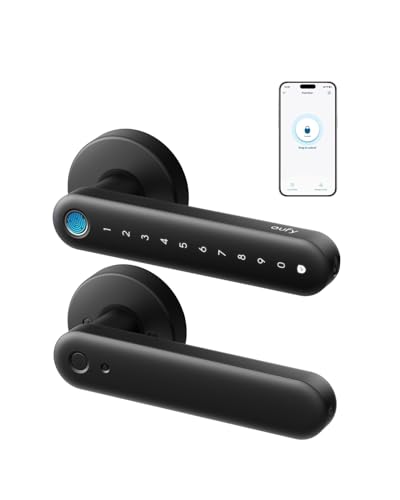
Pros
- 0.3-second fingerprint entry
- Built-in 2.4 GHz Wi-Fi
- Four AA batteries last over five months
- Alexa and Google Assistant integration
Cons
- Not recommended for front doors
- Rekeying is not supported

Pros
- Up to 30 customizable user access codes
- Three entry modes for flexible locking
- SmartKey re-keying in seconds
- BHMA certified AAA security rating
Cons
- Requires checking door measurements before purchase
- Uses a 9V battery for power
Rekeying matters most at exterior doors
A rekeyable lock lets you change the mechanical key combination without replacing the entire lock. That is useful after a tenant moves out, a contractor finishes work, or a spare key has circulated beyond the people you trust.
The Kwikset models use SmartKey Security, while the eufy Security Smart Lock FamiLock C32 explicitly does not support rekeying. That makes the eufy better suited to an interior door where fingerprint, PIN, Wi-Fi, and voice control matter more than matching an existing key.
Before ordering, measure the door thickness, backset, and cross bore where applicable. The 914 fits doors between 1-3/8 and 1-3/4 inches thick, while the 917 also requires careful fit checks despite its reversible lever.
Pro Tip: Keep the current key available until the new lock is installed and its mechanical override has been checked.
Match the entry method to the household
Keypad deadbolts suit households that need separate codes for family, guests, or a dog walker. Both Kwikset options support up to 30 programmable user codes, and the 917 adds optional one-time codes for temporary access.
Fingerprint entry can be quicker for regular occupants, particularly children and seniors, but it is not the same as rekeying. The C32 has built-in 2.4 GHz Wi-Fi for remote management and works with Alexa and Google Assistant, yet its interior-door recommendation makes placement especially important.
| Entry type | Key control | Best placement |
|---|---|---|
| Keypad deadbolt | SmartKey rekeying | Exterior entry |
| Fingerprint lock | Rekey not supported | Interior door |
| Keypad lever | SmartKey rekeying | Residential door |
If remote access is essential, the 914 requires a Zigbee connection through a compatible panel or hub. The C32 includes Wi-Fi, while the 917 is centered on local keypad and key operation rather than a listed smart-home connection.
Learn how smart lock bridges work before choosing a hub-dependent setup.
Battery planning and installation details
Battery format and expected runtime affect where each lock makes sense. The 914 uses four AA batteries that last 12 months or longer according to its specifications, the 917 uses a 9V battery with up to three years of battery life, and the C32 uses four AA batteries for over five months.
The C32 adds USB-C emergency backup, allowing a power bank and cable to provide emergency access. The 914 offers auto-lock after 30 seconds, while the 917 provides Auto Lock, Passage, and Disable Passage modes, so you can choose whether the door locks after every entry.
Before You Mount It: Do not install the C32 on a front door when you need a rekeyable exterior lock; its specifications say it is not recommended for front doors.
I also recommend reading about how to reset a smart lock before installation. Keep battery access clear, and confirm that the deadbolt extends and retracts freely before relying on auto-lock.
Expert Examined
From Jenna Castellano

I keep seeing the same household mistake: people focus on app features and forget that a deadbolt must align with the strike plate. I would check the door fit and manual key operation first, then set codes and automation.
Read more about Jenna CastellanoWhich lock fits your door
I would put the Kwikset 914 Contemporary Keypad SmartCode on an exterior door for a household that wants keypad entry, SmartKey rekeying, auto-lock, and possible Zigbee integration. Its illuminated keypad, 30 user codes, and stated fit range make it the more adaptable deadbolt choice when a compatible hub is already part of the security system.
I would point you to the Kwikset SmartCode 917 Contemporary Electronic when rekeying and long battery life matter more than remote control. Its Halifax lever is reversible, its SmartKey system supports self-rekeying, and its three entry modes give a household more control over everyday access.
For a bedroom, office, storeroom, or garage entry, I would choose the eufy Security Smart Lock FamiLock C32 when fingerprint access, built-in Wi-Fi, and Alexa or Google Assistant integration are the priorities. I would not select it for a front door or any situation requiring rekeying.
The Bottom Line
The mistake most buyers make is treating every keyless lock as rekeyable. A fingerprint reader, PIN pad, or app can simplify entry, but only the Kwikset models in this group provide the listed SmartKey rekeying feature.
If you only do one thing first, identify whether the lock will protect an exterior entry or an interior room. Then verify the door measurements and choose the Kwikset deadbolt for rekeying needs, or the eufy interior lock for fingerprint and built-in Wi-Fi access.
FAQs
A keypad deadbolt with SmartKey Security is the clearest fit when you want to change the mechanical key combination yourself. In this selection, both Kwikset models list SmartKey Security, while the eufy Security Smart Lock FamiLock C32 says rekeying is not supported. It depends on the product and door, but fingerprint access alone does not confirm exterior-door suitability. The C32 is recommended for interior doors and is not recommended for front doors, so use it for bedrooms, offices, storerooms, or garage entries instead. Keep the battery area accessible and replace batteries according to the lock’s stated format and runtime. The C32 also provides USB-C emergency backup, while the Kwikset models use AA or 9V batteries as specified for each model. BHMA certification refers to a residential grading system covering areas such as security, durability, and finish. The Kwikset SmartCode 917 is listed as BHMA certified AAA, the highest residential rating stated in its product information.Which type of smart lock is easiest to rekey?
Can a fingerprint smart lock replace a front-door deadbolt?
How should I manage batteries in a smart lock?
What does BHMA certified AAA mean on a smart lock?
Sources
- Builders Hardware Manufacturers Association and residential hardware standards. www.buildershardware.com
- UL Solutions and security product safety information. www.ul.com