
Shopping for the best smart locks for Vivint means checking the connection first, because a keypad lock is not automatically part of your alarm system. The key split is whether you need Z-Wave control through a compatible hub or standalone entry at the door, especially if you manage codes for family, guests, or service workers.

Pros
- Keypad, app, and Apple Watch entry
- Optional Bluetooth Auto-Unlock
- Auto-Lock helps secure the door
- Custom codes for guests and service people
Cons
- Wi-Fi or Z-Wave modules sold separately
- Bluetooth configuration requires the Yale Access app

Pros
- Fingerprint entry with backlit keypad
- Unlimited scheduled and revocable access codes
- Z-Wave integration with compatible hubs
- BHMA Grade 2 certified
- DoorSense and Auto-Lock features
Cons
- Requires a compatible Z-Wave hub and app
- Z-Wave integration limited to US and Canada

Pros
- Z-Wave Long Range for larger homes
- BHMA Grade 1 security certification
- IP65 weather resistance
- DIY installation in about 10 minutes
Cons
- Requires a compatible Z-Wave hub
- Runs on four AA batteries
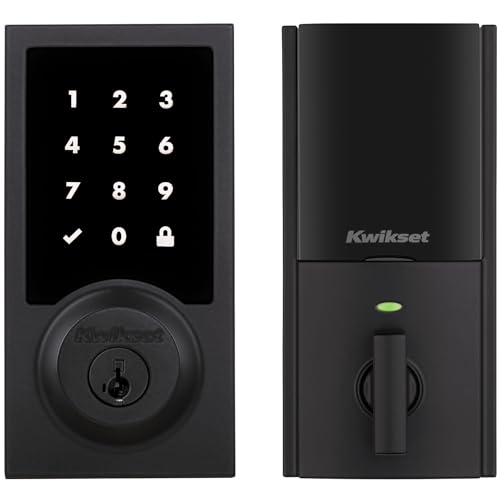
Pros
- Touchscreen keyless entry
- Up to 250 customizable user codes
- Auto-lock schedules from 30 seconds to 10 minutes
- Grade 2 BHMA certified security
- 12-month battery life with included AA batteries
Cons
- Compatible Z-Wave hub required
- Ring Alarm use requires Ring Alarm smart hub

Pros
- Up to 250 customizable user codes
- Z-Wave 700 Long Range coverage
- Grade 2 BHMA certified security
- Auto-lock scheduling from 30 seconds to 10 minutes
Cons
- Compatible Z-Wave hub required separately
- Uses four AA alkaline batteries

Pros
- Unlimited access codes for guests
- Keypad, app, and Apple Watch access
- DoorSense-triggered Auto-Lock
- Backup key included
Cons
- Remote control requires compatible hub and app
- Only compatible in the US and Canada
Start With the Vivint Connection
For system-level control, focus on the Z-Wave models in this group. The Yale Z-Wave Smart Lock Deadbolt, Yale Assure Lock 2 Keypad Deadbolt with Z-Wave, Kwikset HomeConnect 918 Contemporary Z-Wave Long, Kwikset HomeConnect 620 Z-Wave Long Range Keypad, and ULTRALOQ Bolt Z-Wave Deadbolt with 800 all require a compatible Z-Wave hub or system for their connected features.
That requirement matters before installation. Confirm that your Vivint setup can enroll the lock and provide the functions you want, such as remote locking, alerts, or access management. If you prefer a lock that can operate independently at the door, the Yale Bluetooth Smart Lock Deadbolt with Keypad offers keypad access, Yale Access app control, Apple Watch access, optional Bluetooth Auto-Unlock, and a backup key.
A Z-Wave module is not the same as Wi-Fi. Z-Wave models need compatible hub support, while the Yale Bluetooth model can be upgraded with Wi-Fi or Z-Wave modules sold separately. For a refresher on network equipment, see this explanation of what a smart lock bridge does.
Pro Tip: Confirm the hub, region, and supported lock profile before removing your existing deadbolt.
Keypad, Fingerprint, or App Entry
Keypads are useful when several people need access without carrying keys. Yale models support custom or unlimited access codes depending on the model, while both Kwikset models allow up to 250 user codes and one programming code. The ULTRALOQ model adds app control, remote access, activity alerts, and automations through a compatible Z-Wave hub.
The Yale Z-Wave Smart Lock Deadbolt is the unusual choice here because it adds fingerprint access. That can suit a household that wants entry without remembering a code or reaching for a phone, while scheduled codes can handle dog walkers, relatives, or guests.
Before You Pair It: A lock can provide keypad entry without giving Vivint remote control. Treat hub compatibility as a required feature, not an optional extra.
| Connection type | Main access | Best fit |
|---|---|---|
| Z-Wave | Codes or app | Vivint hub integration |
| Bluetooth | Keypad or app | Standalone entry |
| Z-Wave Long Range | Codes or app | Larger properties |
Auto-Lock, Door Status, and Coverage
Auto-lock is present across the comparison, but the details differ. Yale Assure Lock 2 Keypad Deadbolt with Z-Wave uses DoorSense to detect that the door has closed, while the Yale Z-Wave Smart Lock Deadbolt also combines DoorSense with auto-lock. Kwikset lets you set an auto-lock schedule from 30 seconds to 10 minutes.
Coverage is another practical distinction. Kwikset HomeConnect 918 Contemporary Z-Wave Long and Kwikset HomeConnect 620 Z-Wave Long Range use Z-Wave 700 Long Range, while the ULTRALOQ model uses Z-Wave Long Range for larger homes, detached garages, guest houses, and other areas where distance matters.
Do not assume a stronger wireless range fixes a poor door fit. The Kwikset models specify door thickness between 1-3/8 and 2 inches and adjustable deadbolt backsets from 2-3/8 to 2-3/4 inches. Review why the strike plate matters if the bolt does not enter smoothly.
Expert Examined
From Ray Okafor

I keep seeing smart locks treated as a software problem when the real trouble is a misaligned door. I would first check that the deadbolt moves freely with the door closed, then connect the lock to the hub and set auto-lock.
Read more about Ray OkaforBattery Planning and Door Safety
Battery-powered locks remain dependent on maintenance even when the hub is reliable. The Kwikset HomeConnect models use four AA alkaline batteries and specify at least 12 months of battery life. ULTRALOQ also uses four AA batteries and describes longer performance with lithium batteries, while the Yale models include backup keys for manual entry.
Keep the backup key available to an authorized household member rather than hiding it in an obvious outdoor location. If you are weighing physical keys against electronic access, this discussion of key lock boxes versus smart locks covers the access trade-off.
For general consumer safety information about residential security products, the U.S. Consumer Product Safety Commission is a useful authority. Follow the lock maker’s installation instructions, and do not force the bolt if the door or strike plate needs adjustment.
Which Lock Fits Your Vivint Setup
I would point you to the Yale Z-Wave Smart Lock Deadbolt if fingerprint entry is the deciding feature. It also provides a backlit keypad, Auto-Unlock, smartphone control, scheduled code sharing, DoorSense, and a backup key, making it a strong fit for a busy household that wants several entry methods. Its Z-Wave integration is limited to the US and Canada and requires a compatible hub and app.
I would put the ULTRALOQ Bolt Z-Wave Deadbolt with 800 on a larger property or detached garage door where long-range coverage is important. It works with Alarm.com, Home Assistant, and SmartThings, supports remote access and automations, and adds BHMA Grade 1 certification and IP65 weather resistance.
For a simpler keypad-centered setup, I would choose the Yale Assure Lock 2 Keypad Deadbolt with Z-Wave. It supports unlimited codes, Auto-Unlock, Yale Access app control, DoorSense auto-lock, and compatibility with several alarm and smart-home systems in the US and Canada. Verify Vivint support before pairing it.
The Bottom Line
The biggest mistake is assuming every keypad lock will become a Vivint-controlled lock. Models with Z-Wave still need compatible hub support, while the Bluetooth Yale model provides useful local and app-based access without making that same connection promise.
If you do one thing first, confirm your Vivint hub can enroll the exact lock model and deliver the controls you want. Then check door fit, choose your preferred entry method, and keep a backup key available.
FAQs
Z-Wave models are the logical starting point because they are designed to connect through a compatible Z-Wave hub. Confirm that your specific Vivint setup supports the exact lock before purchasing, since the lock and hub must work together for remote control and alerts. Fingerprint entry can be convenient when you do not want to remember a code or use a phone. A keypad is more flexible for guests, relatives, and service workers because you can create, schedule, or revoke codes on supported models. Check the door thickness, deadbolt backset, and strike plate alignment before installation. The bolt should move freely with the door closed, because forcing it can create unreliable locking and unnecessary battery drain. Battery schedules vary by model and use. The Kwikset models specify at least 12 months with four AA alkaline batteries, while other models provide different battery guidance, so monitor alerts and keep the backup key accessible. BHMA grades describe performance requirements for door hardware under an industry standard. The ULTRALOQ model is listed as BHMA Grade 1, and the Yale Z-Wave Smart Lock Deadbolt is listed as Grade 2, but the grade does not replace correct installation or hub compatibility.Which smart lock type works best with Vivint?
Is fingerprint entry better than a keypad?
Where should I check before installing a smart lock?
How often do smart lock batteries need attention?
What does BHMA Grade 1 or Grade 2 mean?
Sources
- Builders Hardware Manufacturers Association standards information. www.buildershardware.com
- U.S. Consumer Product Safety Commission consumer guidance. www.cpsc.gov