
Choosing the best smart locks for SmartThings requires more than checking compatibility on the box. The real split is between locks that need a compatible hub and models that use Matter, Thread, or built-in Wi-Fi, making this useful for households replacing a deadbolt without rebuilding their smart home.

Pros
- Apple Home, Alexa, Google Home, SmartThings support
- Keypad, app, physical key, voice access
- Built-in Wi-Fi, no additional hub required
- Up to 8 months from 8 AA batteries
Cons
- Requires eight AA batteries
- Remote features rely on apps or compatible hubs

Pros
- Touchscreen keyless entry
- Z-Wave Long Range whole-home coverage
- Up to 250 user codes
- Customizable auto-lock timing
Cons
- Compatible Z-Wave hub required
- Uses four AA alkaline batteries

Pros
- Z-Wave Long Range for larger homes
- BHMA Grade 1 security certification
- IP65 weather resistance
- DIY installation in about 10 minutes
Cons
- Requires a compatible Z-Wave hub
- Runs on four AA batteries
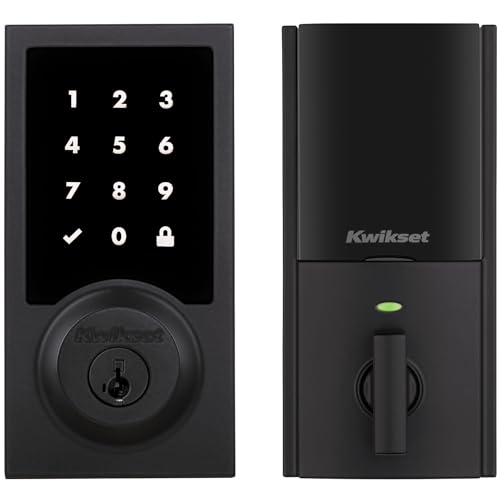
Pros
- Touchscreen keyless entry
- Up to 250 customizable user codes
- Auto-lock schedules from 30 seconds to 10 minutes
- Grade 2 BHMA certified security
- 12-month battery life with included AA batteries
Cons
- Compatible Z-Wave hub required
- Ring Alarm use requires Ring Alarm smart hub

Pros
- 62% smaller, hidden interior and exterior hardware
- BHMA AAA and ANSI grade 1 certified
- Apple Home Key and Matter compatibility
- Door status detection without stick-on magnets
Cons
- Remote access requires a separate hub or bridge
- Keypad access requires a separately sold accessory

Pros
- UWB auto-entry when you truly arrive
- NFC, app, PIN, and physical key access
- Matter works with major smart-home platforms
- BHMA certified, IP65 weather resistant
Cons
- Remote control requires a Matter hub
- Battery-powered, so periodic replacement remains necessary
Match the connection to your SmartThings setup
Z-Wave models are a natural fit if your home already uses a compatible Z-Wave hub. The Kwikset HomeConnect 918 versions and ULTRALOQ Bolt Z-Wave Deadbolt with 800 require compatible hubs, while the Kwikset also specifically requires a Samsung SmartThings hub sold separately. That extra hardware should be part of your installation plan.
Matter models offer a different route. Level Lock Pro – World’s Smallest and ULTRALOQ Bolt Mission UWB Smart Lock,Matter Over work with SmartThings through a supported Matter hub and Thread border router. The eufy Security Smart Lock C34 supports SmartThings without an additional hub and also includes built-in Wi-Fi, Apple Home, Alexa, and Google Home support.
Pro Tip: Choose the lock protocol before removing your existing deadbolt. A compatible hub, Matter hub, or Thread border router may be essential for the functions you want.
Separate entry methods from remote control
Every household has different access habits. Keypads help family members and guests enter without a phone, while physical keys provide a fallback. The eufy Security Smart Lock C34 adds app, keypad, key, and voice control, and the Kwikset models support touchscreen entry with up to 250 user codes.
Level Lock Pro – World’s Smallest focuses on a traditional appearance, with Apple Home Key, NFC key fobs, touch-to-unlock, voice control, and a physical key. Its optional keypad mounts separately, which can preserve the look of the door. ULTRALOQ Bolt Mission UWB Smart Lock,Matter Over adds UWB approach-to-unlock, Android NFC, app access, PIN entry, and a physical key.
Before You Mount It: Do not assume remote control works directly from every phone app. Check whether your selected setup needs a hub, bridge, or Thread border router before relying on remote entry.
| Connection type | Key access feature | Best fit |
|---|---|---|
| Wi-Fi and Matter | Keypad and voice | Mixed smart homes |
| Z-Wave Long Range | User codes | Existing Z-Wave hubs |
| Matter over Thread | UWB or Apple Key | Advanced mobile access |
Battery life and installation details matter
Battery replacement is easy to overlook when comparing app features. The eufy Security Smart Lock C34 uses eight AA batteries and lists up to eight months under typical use. Both Kwikset HomeConnect 918 models use four AA alkaline batteries and list at least 12 months, while ULTRALOQ Bolt Mission UWB Smart Lock,Matter Over lists battery life of up to 18 months through Thread.
Installation is another practical divider. The eufy model is designed for standard US and Canadian doors and lists a 15-minute installation without drilling. The Kwikset models fit doors from 1-3/8 to 2 inches thick, and the ULTRALOQ Bolt Z-Wave Deadbolt with 800 lists a 10-minute screwdriver installation. Confirm your door dimensions and deadbolt fit before ordering.
For broader security context, learn why the strike plate matters, since the lock is only one part of the door assembly. UL Solutions explains how recognized safety and security standards help describe product performance, but certification does not replace correct installation.
Expert Examined
From Ray Okafor

I keep seeing the same household mistake: people prioritize app features and forget that the door must close and align cleanly first. I would inspect the deadbolt throw, strike plate, and door thickness before choosing a protocol or keypad.
Read more about Ray OkaforWhich lock fits your household
I would point renters and mixed-platform households toward eufy Security Smart Lock C34. Its built-in Wi-Fi, SmartThings support without an additional hub, multiple entry methods, and stated easy installation make it the most straightforward fit when you want broad platform coverage and a keypad.
I would put Kwikset HomeConnect 918 Traditional Z-Wave Long in a home already centered on SmartThings or Ring Alarm with a compatible hub. Its Z-Wave Long Range connection, touchscreen, up to 250 user codes, auto-lock choices, and stated 12-month battery life suit a busy household that wants structured access management.
For a door where appearance matters, I would choose Level Lock Pro – World’s Smallest. It keeps the smart hardware hidden, adds door-status detection, and supports SmartThings through Matter with the required hub and Thread equipment. Its separate keypad option also gives you flexibility without placing a large keypad on the exterior.
The Bottom Line
The mistake most SmartThings buyers make is treating compatibility as proof that every feature works without extra equipment. Z-Wave, Matter, Thread, Wi-Fi, hubs, and bridges affect remote access and automation in different ways.
If you do only one thing first, identify the hub or border-router equipment already in your home. Then confirm door thickness, deadbolt fit, preferred entry method, and battery format before choosing among these locks.
FAQs
SmartThings-compatible choices in this group include Z-Wave locks, Matter-compatible locks, and a built-in Wi-Fi model. Z-Wave options require a compatible Z-Wave hub, while Matter models require a supported Matter hub and Thread border router for the relevant smart-home connection. Not always. The eufy Security Smart Lock C34 supports SmartThings without an additional hub, while the Kwikset and ULTRALOQ Z-Wave models require compatible hubs. Level Lock Pro and ULTRALOQ Bolt Mission require Matter and Thread equipment for remote smart-home control. Battery life varies by model, battery type, connection, and use. The listed products range from up to eight months for the eufy model to up to 18 months for ULTRALOQ Bolt Mission, while both Kwikset versions list at least 12 months. BHMA certification describes performance against recognized door-hardware requirements. It is useful when comparing durability and security claims, but it does not confirm that a lock fits your door or that SmartThings features work without the required hub equipment.Which type of smart lock works with SmartThings?
Do SmartThings locks need a separate hub?
How often do smart lock batteries need replacement?
What does BHMA certification mean on a smart lock?
Sources
- UL Solutions www.ul.com
- National Fire Protection Association www.nfpa.org