
Shopping for the best smart locks for google home gets easier once you separate platform support from the way you actually enter. The key decision is whether your home suits Matter and Thread, built-in Wi-Fi, or a lock with richer biometric access.

Pros
- Multiple entry methods, including fingerprint and passcode
- Matter over Thread supports multiple ecosystems
- Rechargeable battery lasts up to six months
- BHMA-certified with IP65 outdoor protection
Cons
- UWB requires specific Apple devices and a Thread hub
- NFC cards sold separately
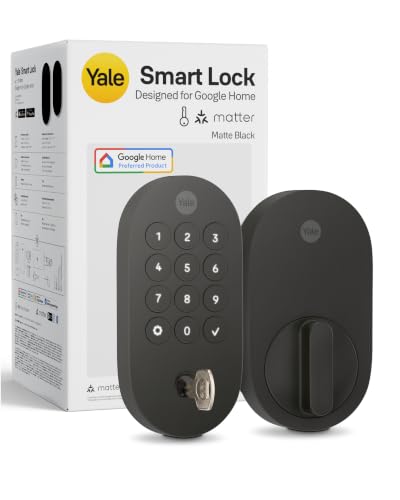
Pros
- Matter over Thread, energy-efficient mesh network
- Google Home and Google Assistant control
- Keypad, phone, voice, and backup key entry
- BHMA Grade 2 certified
- Designed for -22 to 140°F
Cons
- Matter hub required for remote access
- Google Home features limited to US and Canada

Pros
- Fingerprint, PIN, app, FOB, voice, and key access
- Built-in WiFi, no extra gateway required
- Supports 50 fingerprints and 50 passcodes
- ANSI Grade 3 and IP54 rated
Cons
- Requires 8 AA batteries
- Fingerprint and passcode capacity capped at 50 each

Pros
- ANSI Grade 3 mechanical certification
- IP54 rating for rain and dust
- Supports 50 fingerprints and passcodes
- Voice, fingerprint, app, and key entry
Cons
- Requires eight AA batteries
- Remote management needs home WiFi

Pros
- 3D face recognition with liveness detection
- Local storage for facial and fingerprint data
- Built-in WiFi, no hub required
- Face, fingerprint, app, voice, and key access
Cons
- Solar charging depends on available light
- Fits only specified door sizes and backsets

Pros
- UWB auto-entry when you truly arrive
- NFC, app, PIN, and physical key access
- Matter works with major smart-home platforms
- BHMA certified, IP65 weather resistant
Cons
- Remote control requires a Matter hub
- Battery-powered, so periodic replacement remains necessary
Match the connection to your Google Home setup
Matter over Thread models need a compatible Matter hub, but they can fit more than one smart-home platform. The Yale Smart Lock Deadbolt with Google Matter is built around Google Home and supports control through devices such as Google TV and Nest Hub, while the Aqara and ULTRALOQ models also support broader ecosystems.
Built-in Wi-Fi takes a different approach. The Smart Lock Keypad Door Lock with Handle and WiFi Smart Door Locks for Front Door Lock Set connect directly to your home network, so remote app control does not require an extra gateway. The DESLOC V150 Plus Solar Smart Lock also has built-in Wi-Fi and adds remote activity notifications.
Pro Tip: Check whether your preferred Google Home features require a Matter hub before choosing a Thread lock.
| Connection type | Main requirement | Best fit |
|---|---|---|
| Matter over Thread | Compatible Matter hub | Multi-platform homes |
| Built-in Wi-Fi | Reliable home network | Remote app access |
Choose the entry method you will use
Keypads are practical for family members and guests because you can create separate codes without handing out keys. The LINGDU locks also support fingerprints, app control, voice commands, and mechanical keys, with capacity for up to 50 fingerprints and 50 passcodes.
Biometric options become more varied at the higher end. Aqara combines a fingerprint reader with Apple Home Key, NFC card support, passcodes, voice control, and a physical key. DESLOC adds 3D face recognition with liveness detection and stores facial and fingerprint data locally on the lock.
UWB approach access is a specialized convenience rather than a universal requirement. Aqara requires specific Apple devices and a Thread-enabled Apple Home hub for its UWB feature, while ULTRALOQ supports UWB approach access and Android NFC alongside codes, app control, and a physical key.
Before You Mount It: Do not assume a voice command is the right daily entry method for every household. Keep a physical key or another supported access method available, and confirm the door hardware fits the lock before installation.
Account for batteries, weather, and certification
Power maintenance varies widely across these models. Aqara uses a removable rechargeable battery rated for up to six months per charge, DESLOC combines solar charging with a 10000mAh battery, and ULTRALOQ states that its Thread connection can extend battery life up to 18 months.
The two LINGDU models use eight AA batteries and state up to eight months of battery life. Their IP54 ratings suit ordinary outdoor exposure, while Aqara and ULTRALOQ carry IP65 weather resistance. These figures describe the product design, not a promise that every door or climate will produce identical results.
Certification is another useful filter. Yale is BHMA Grade 2 certified, the LINGDU models are ANSI Grade 3 certified, and Aqara and ULTRALOQ are BHMA certified. For background on door hardware, see why the strike plate matters. BHMA publishes information about lock performance and grading at Builders Hardware Manufacturers Association.
Expert Examined
From Ray Okafor

I keep the access plan simple in homes with several users. The mistake I see is choosing a lock for one impressive entry feature, then leaving guests without a dependable code or backup key. Write down the fallback method and battery routine before installation.
Read more about Ray OkaforBefore buying, measure the existing bore hole, backset, and door thickness where the product requires it. For more context on digital access risks, read how a smart lock can be hacked.
Which lock fits your household
I would point Google-focused households toward the Yale Smart Lock Deadbolt with Google Matter when Google Home integration is the priority and you already have, or plan to add, a Matter hub. Its keypad, phone access, Google Assistant control, and backup key cover the everyday situations most families encounter.
I would choose the DESLOC V150 Plus Solar Smart Lock for a front door where built-in Wi-Fi, local biometric storage, face recognition, and reduced charging attention matter most. Its support for up to 50 facial profiles and 50 fingerprints also suits a larger household.
For someone who wants approach-based access and several ecosystems, I would consider the ULTRALOQ Bolt Mission UWB Smart Lock,Matter Over. It combines UWB, Android NFC, codes, app access, and a physical key, but you should confirm that your Matter hub and phone setup support the features you intend to use.
The Bottom Line
The mistake most Google Home buyers make is treating platform compatibility as the whole decision. A lock may work with Google Home yet still require a hub, depend on Wi-Fi quality, or offer an entry method that does not suit your household.
Start by checking your hub requirements, door measurements, and preferred backup method. Then choose between keypad simplicity, Wi-Fi convenience, biometric access, or Matter and Thread flexibility.
FAQs
Matter over Thread locks suit homes that already have a compatible Matter hub and want broader platform support. Built-in Wi-Fi models suit shoppers who prefer direct network access and remote app management without an additional gateway. Some do and some do not. Yale, Aqara, and ULTRALOQ use Matter features that can require a compatible hub, while the LINGDU and DESLOC models include built-in Wi-Fi for direct network connection. Battery intervals depend on the model and its connection method. The products listed use rechargeable batteries, solar-assisted power, or AA batteries, so check the stated battery design and keep the backup entry method available. These certifications indicate that the lock has been rated under a hardware performance standard. The grade is one useful durability and security reference, but it does not replace checking door fit, installation, and access settings. Privacy depends on how biometric information is stored. DESLOC states that facial and fingerprint data remain locally on the lock, while other models may emphasize different entry methods such as fingerprints, passcodes, NFC, or keys.Which smart lock type works best with Google Home?
Do Google Home smart locks need a hub?
How often do smart lock batteries need maintenance?
What does BHMA or ANSI certification mean for a smart lock?
Are fingerprint and face recognition locks private?
Sources
- Builders Hardware Manufacturers Association buildershardware.com
- UL Solutions www.ul.com
- US Consumer Product Safety Commission www.cpsc.gov